9
Connections
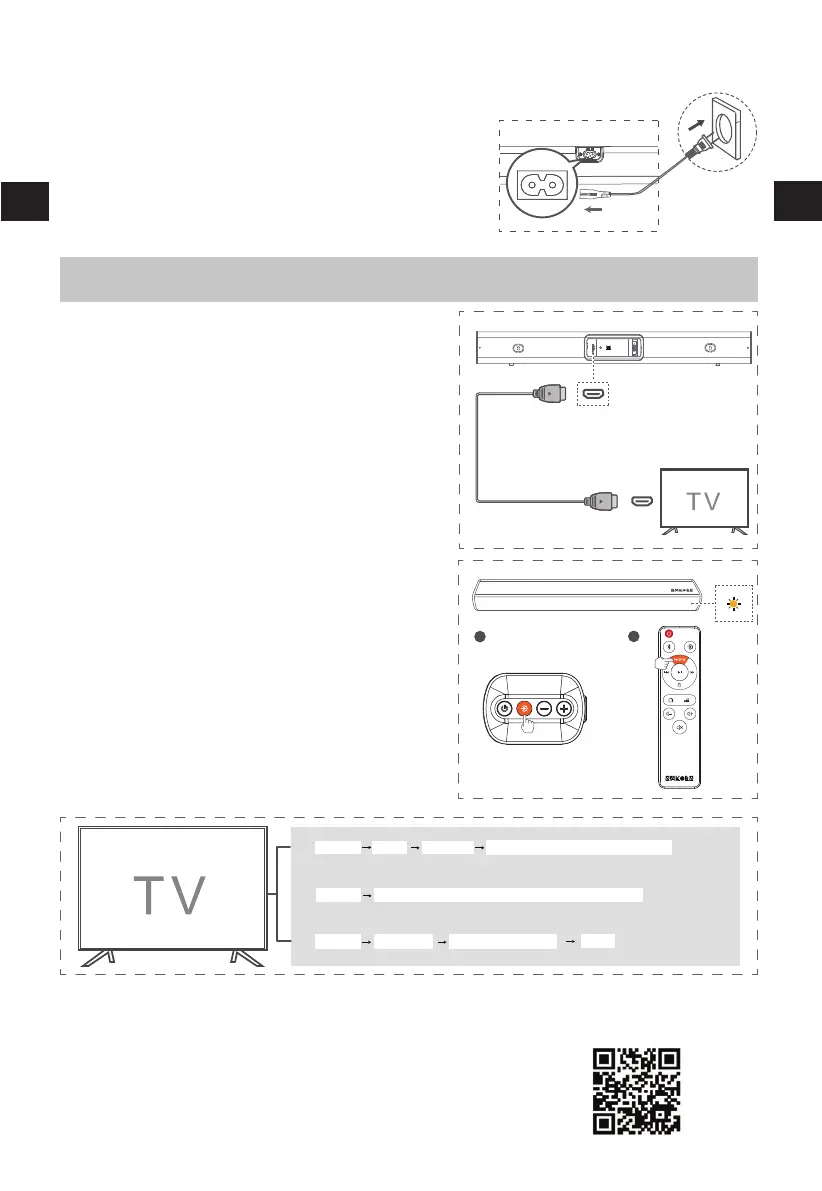
Connect to HDMI ARC Socket
1
-
2
Tips:
EN
Connect Power
Risk of product damage!
-
-
•
Your Soundbar supports HDMI with Audio Return
Channel (ARC). If your TV is HDMI ARC compliant,
you can hear the TV audio through your Soundbar
by using a single HDMI cable.
Use a High Speed HDMI cable to connect
the HDMI ARC connector on your Soundbar
and the HDMI IN (ARC) connector on the TV
(No HDMI OUT connector).
The HDMI ARC connector on the TV might
be labelled differently. For details, see the
TV user manual.
•
Your TV must support the HDMI-CEC and ARC function. HDMI-CEC and ARC must beset to On.
•
The setting method of HDMI-CEC and ARC may differ depending on the TV. For details about ARC
function, please refer to your TV user manual.
Or visit our website https://www.sakobs.com/how-enable-hdmi-cec-on-your-tv
•
Only HDMI 1.4 compatible cables can support the ARC function.
• PC don‘t need to be set up.
Ensure that the power supply voltage corresponds to the
voltage printed on the back or the underside of the unit.
Before connecting the AC power cord,ensure you have
completed all other connections.
Connect the mains cable to the AC Socket of main unit
and then into a mains socket.
HDMI
A
B
AUX IN
OPTISCH
HDMI ARC
HDMI ARC
Menu
Sound
Sakobs SB2122/External Device/Auto/HDMI
①
Audio output
Menu
General -----HDMI-CEC/CEC-control/HDMI Control/Simplink/---- ON
②
Menu
Expert setting Digital audio output format
PCM
Press the Source button on sound bar repeatly or
HDMI button on the remote control to select the
HDMImode, the indicator light up yellow.
3
Some TVs need to select the Audio Source,enable
the HDMI-CEC or set the Audio format rst,
otherwise there will be no sound.Below are some
general settings, if it is different from your TV,please
refer to your TV manual to enable HDMI Operation.
③
EN


 To Next Page