24
INGREDIENTS – IMPORTANT
IT IS EXTREMELY IMPORTANT THAT YOU PAY HIGH ATTENTION TO THE AMOUNT OF
WATER AND SLUSH ICE MIX. IT IS ONLY ALLOWED TO USE REAL SLUSH ICE MIXTURE AND
FOLLOW THE INSTRUCTIONS FOR MIX RATIO DESCRIBED ON THE LABEL. IF MAKING
YOUR OWN SLISH ICE MIX PLEASE PAY HIGH ATTENTION TO THE SUGAR CONTENT IN
THE MIXTURE. WRONG SUGAR CONTENT MIXTURE CAN DAMAGE THE MACHINE AND IS
NOT COVERED BY THE WARRANTY.
STEP 2.
Close the lid of the loading barrel.
STEP 3.
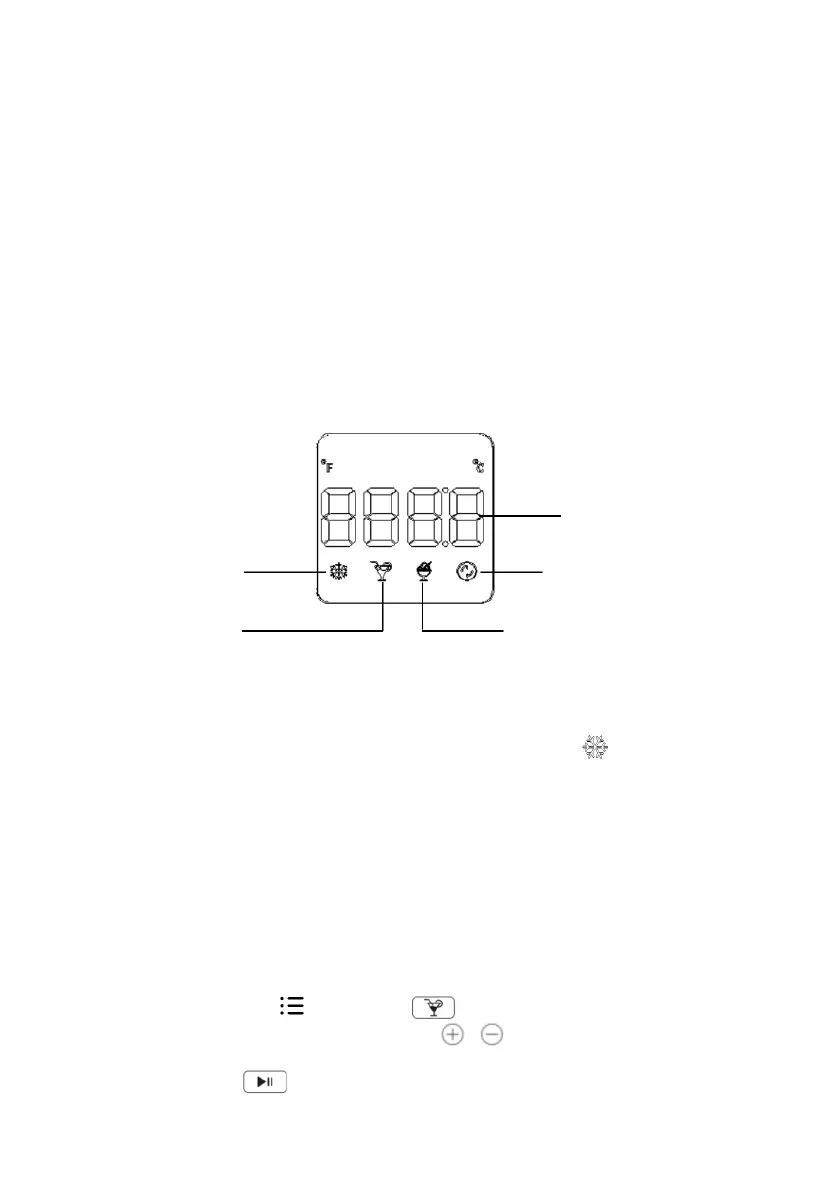
Plug in the power, select cold drink or Slush ice mode (as shown in Figure 3), set the
temperature, and nally press the Start/Pause button to start the machine.
Slush ice mode.
Mixing without cooling/
cleaning
Temperature display
Keep Cold Function
Cold drink mode
STEP 4.
After the cold drink or slush ice reaches the set temperature, there will be 6 short beeps, and
the machine will enter the keep cold state. The keep cold mode icon will ash and keep
working in a cycle at the set temperature.
OPERATION
1. Standby state
Power on → The buzzer beeps and displays ”---” → Wait for the user to press the
power button.
2. BUTTONS OPERATION INSTRUCTIONS
Press the button, the screen is fully lit, and you can enter the menu interface to select
the function mode.
a. Cold drink mode
Touch the settings button , select menu on the display screen, enter cold
drink mode, press the temperature adjustment / button to adjust the desired
temperature, adjust the temperature range in cold drink mode from 2 °C to 6 °C, then
press the start/pause button, and the whole machine will start working.


 To Next Page