8
REMOTE CONTROL
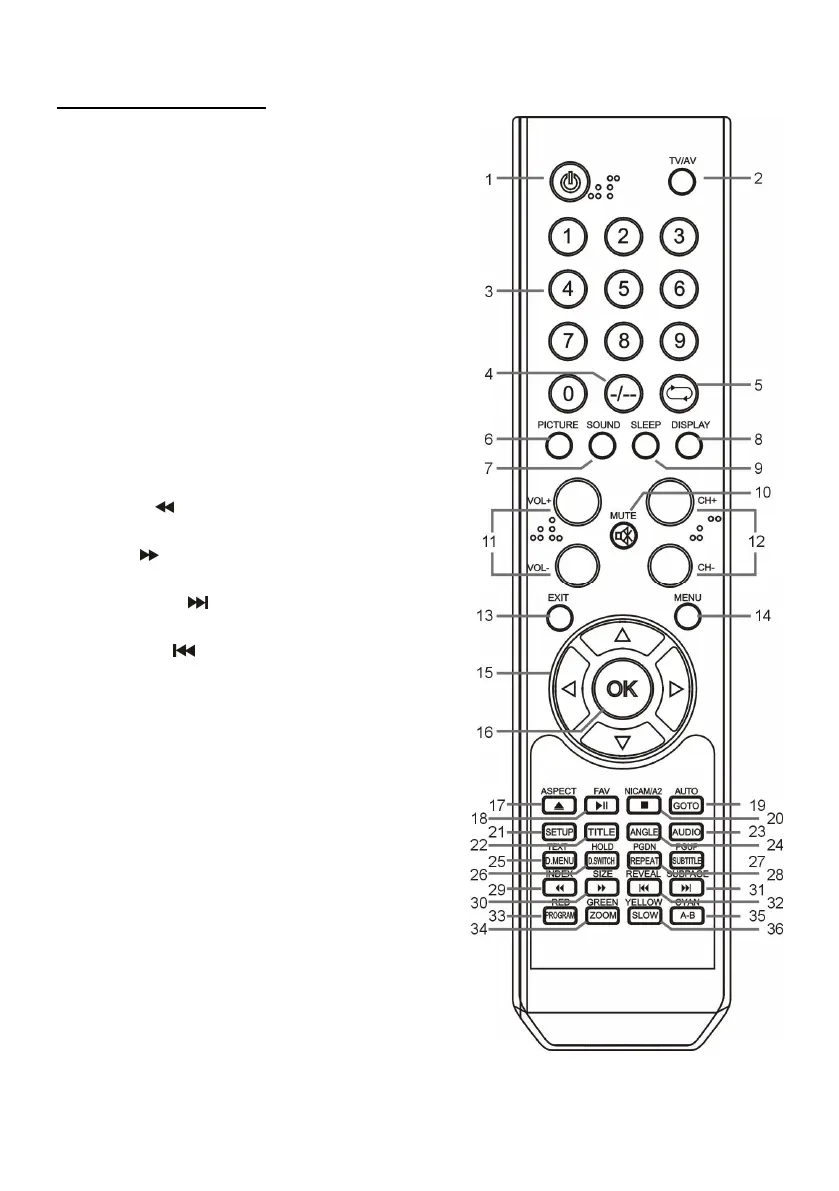
23. AUDIO: To switch the audio output mode
when playing a disc.
24. ANGLE: To select the available angle when
playing a multi-angle disc.
25. TEXT/D.MENU: To display the available
teletext information in TV mode; to display the
DVD menu when playing a disc.
26. HOLD/D.SWITCH: To hold teletext in TV
mode; to switch between video and audio in DVD
mode.
27. PGUP/SUBTITLE: Page up of available
teletext; to open/close subtitle in DVD mode.
28. PGDN/REPEAT: Page down of available
teletext; to change the repeat mode in DVD
mode.
29. INDEX/
: To display the index of teletext in
TV mode; to play fast backward in DVD mode.
30. SIZE/
: To switch teletext size in TV mode;
to play fast forward in DVD mode.
31. SUBPAGE/ : To display the sub-page of
teletext; to play next chapter in DVD mode.
32. REVEAL/
: To hide teletext or display
hidden characters; to play previous chapter in
DVD mode.
33. RED/PROGRAM: To enter programming
page in DVD mode.
34. GREEN/ZOOM: To zoom in/out in DVD mode.
35. CYAN/A-B: To repeat playing between two
specific points in DVD mode (A-B).
36. YELLOW/SLOW: In DVD mode, playback at
lower speed.




 To Next Page