26
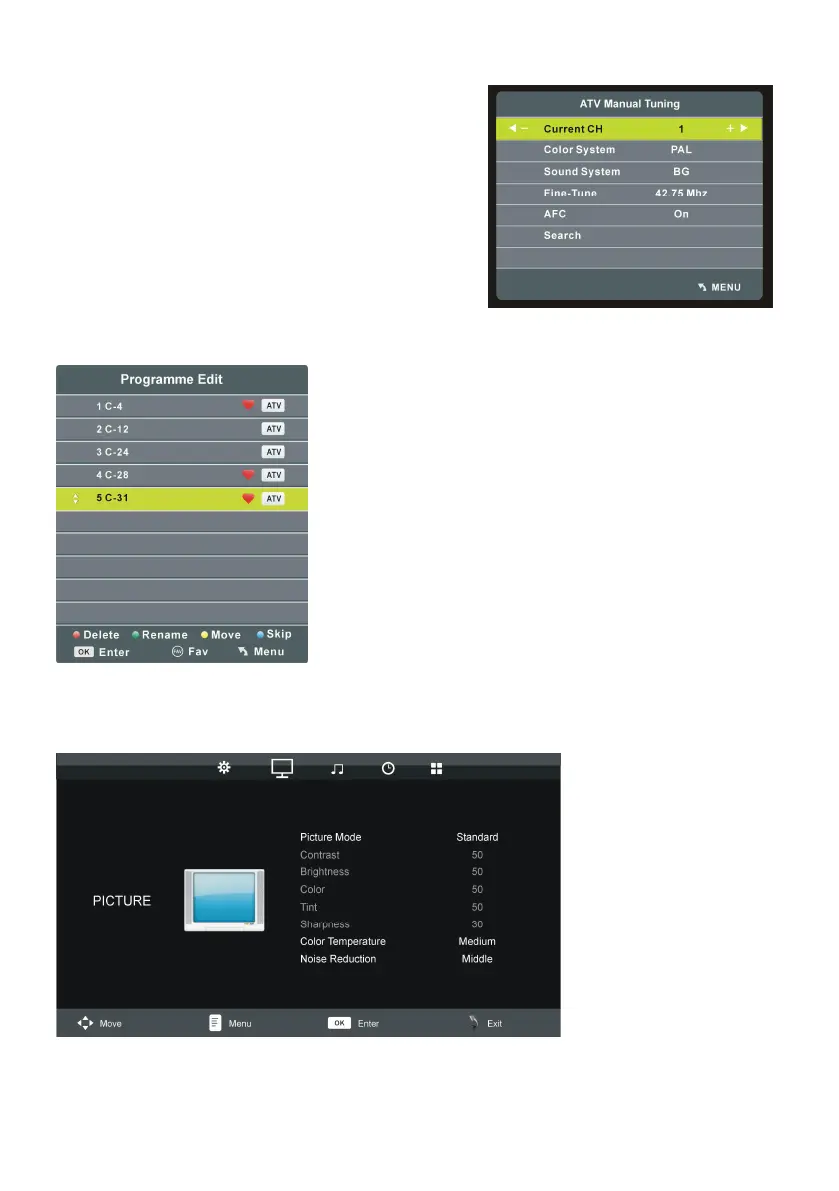
1.2 ATV Manual Tuning
- Press UP or DOWN navigation button to select this
item, and press OK button to enter it.
- Press UP or DOWN navigation button to select the
second option.
- Press LEFT or RIGHT navigation button to adjust
it.
1.3 Programme Edit
- Press UP or DOWN navigation button to select this
item, and press OK button to enter it.
- Press RED button to delete highlighted channel.
- Press GREEN button to enter Rename mode. Then
press UP/DOWN navigation button to adjust the value;
press LEFT/RIGHT navigation button to move the cursor.
- Press YELLOW button to enter Move mode. Then press
UP/DOWN navigation button to select desired position
and press YELLOW button again to move it.
- Press BLUE button to skip current channel.
- Press FAV button to set current channel as a favorite
channel, and press FAV button again to set it as a normal
channel.
2. PICTURE











 To Next Page