7
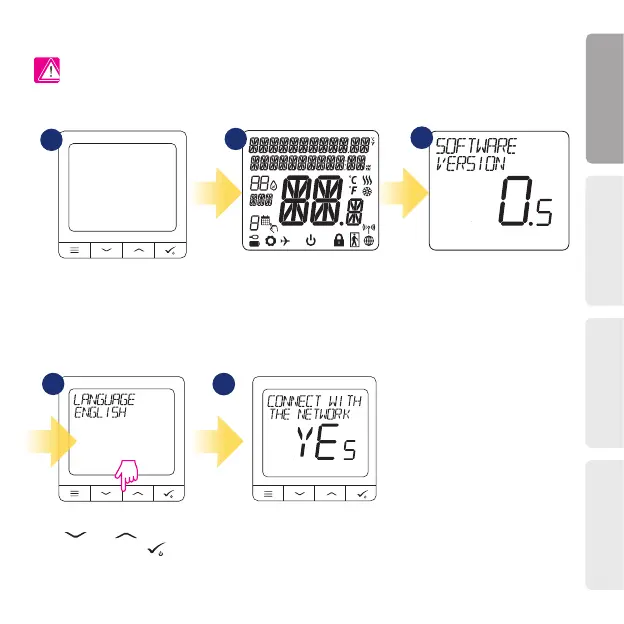
First power up sequence
To power on the Thermostat you
have to connect it to the 230V power
then...
For easier installation, please make sure you have already added other devices to your ZigBee network, such as
Underoor Heating Control Box (KL08RF) or Radiator heads (TRV’s) etc.
Please note:
Now, choose your language by
„ ” or „ ” buttons. Conrm
your language by button.
...display will show all icons...
...then thermostat will display
the software version.
2
1
4
3
5
Thermostat work as a standalone device
for pump, boiler, receivers etc. That is, you
can directly connect thermostat to selected
device without any network system. You
can add it later anytime.
You can congure your thermostat
with universal gateway or CO10RF
coordinator. That is, add it to the Salus
Smart Home system.
YES - ONLINE, OFFLINE MODE.
Español Deutsch
Português
English



 To Next Page