37 VS20WRF and VS20BRF Installer Manual
Installation - Testing the pairing with the RF WC
NL
NL
SUPPLIED CABLES
230V TO UFH PUMP
UNDERFLOOR HEATING MANIFOLD
1.5MMCABLE
(INSTALLER SUPPLIED)
External power supply
Optional boiler connection
Heat / cool changeover
(open = heat, closed = cool)
Dew point sensor
NL
NL
SUPPLIED CABLES
230V TO UFH PUMP
UNDERFLOOR HEATING MANIFOLD
1.5MMCABLE
(INSTALLER SUPPLIED)
External power supply
Optional boiler connection
Heat / cool changeover
(open = heat, closed = cool)
Dew point sensor
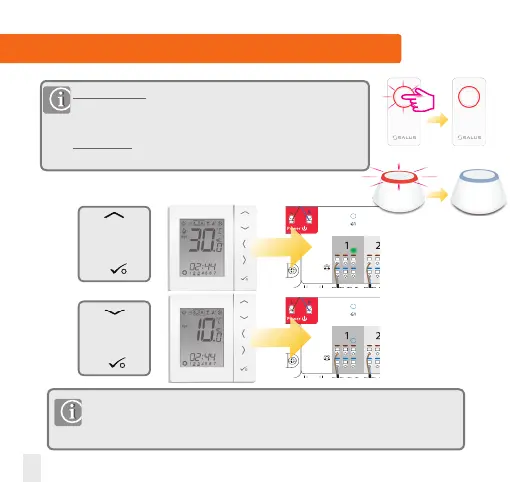
Use to
increase
temperature to
30ºC and then
press
If you are using the optional system receiver configured to RX1 please check that the
green light goes on when the temperature is raised and off when reduced. The boiler
and the pump have the ON/OFF Delay function. For more details please see the KL08RF
manual.
Without internet: If pairing for your system is complete, please take
the Coordinator or the Universal Gateway out of pair mode. Press for
5 seconds and light will stop flashing,goes to solid red.
With internet: Once the pairing process is complete, the Universal
Gateway will automatically turn solid blue.
Use to
decrease
temperature to
10ºC and then
press
5 sec


 To Next Page