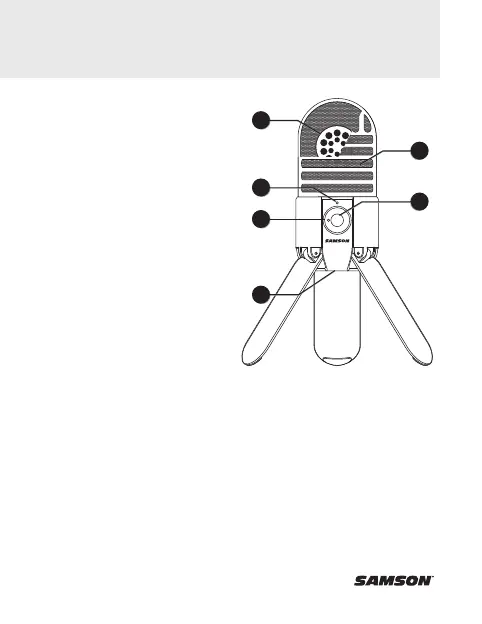
1. Capsule - Large, 1” (25mm)
diaphragm with a cardioid
(unidirectional) polar pattern.
2. Windscreen - Dual stage grille
protects the capsule and
helps reduce wind noise and
p-popping.
3. LED - Three-color LED
illuminates blue to indicate
power, amber to indicate that
the microphone is muted, and
flashes red when the input
signal is clipping.
4. Headphone Volume - Controls the
overall level of the Meteor Mic’s
headphone output.
5. Microphone Mute Button - Mutes
the output of the microphone to
the computer and headphone
output. The LED will illuminate
amber when the microphone
is muted.
6. Stand Mount - Standard 5/8”
thread mount to attach the
Meteor Mic to a microphone
stand.
1
3
6
4
2
5
Meteor Mic Layout



 To Next Page