Quick
Setup
Guide
ec:rva--.m
..
-d,...,_SimarglY.
-till
....,~.,gol-lVICJn:ti\IYtlg-
.
-~-11141
so-ro--hc.
lli<hlqlr-~PIIk.PU07lBJ.2112
so-ro-Qralohc.
5&-Qut~O.OOL!R<B2
CIICOrO!rtaAd--9:00NA-12NAEBT.
...
.....,.
...
__
_.........
Getting
-
Started
~----~--
Step
l:
Install the Batteries into the
Remote
To
install batteries into your
remote
control, follow these
steps:
1.
2.
3.
Uft
the
cover
on
the
back
of
the
remote
upward
as
shown
in
the
figure
to
the
right.
Install
two
AAA
batteries.
~
Make
sure
to
match
the
+
and
-
ends
of
the
batteries
to
the
diagram
in
the
battery
compartment.
Replace
the
cover.
~
Step
.2:
Connect
Power
and
Antenna or
Cable
~
r
Power
Input
•WsJ.cable
jad<or
•
VHFi\JHF
"""""'"
• CableorSateita
box
Ant
or
Cable
Use
a
75
ohm
(round)
cable.
"'
T
Make
sure
the
AC
power
cord
is
plugged
in
securely
to
the
wall
outlet
and
the
1V.
lllllllllllllllllllllllllllllllllllllllllll
BN68-03704A-OO
Step
3: Connect
External
Devices
9.«>.1111~119
.
~11
.
""Y
.
~
.
E!\fi~E!
.
(~IIJ.~~Y
.
PI~yE!'1
.
~~1
.
E!f.~E!II~E!
.
~~)(;,
E!~C::·l
..
. ..
.....................
.
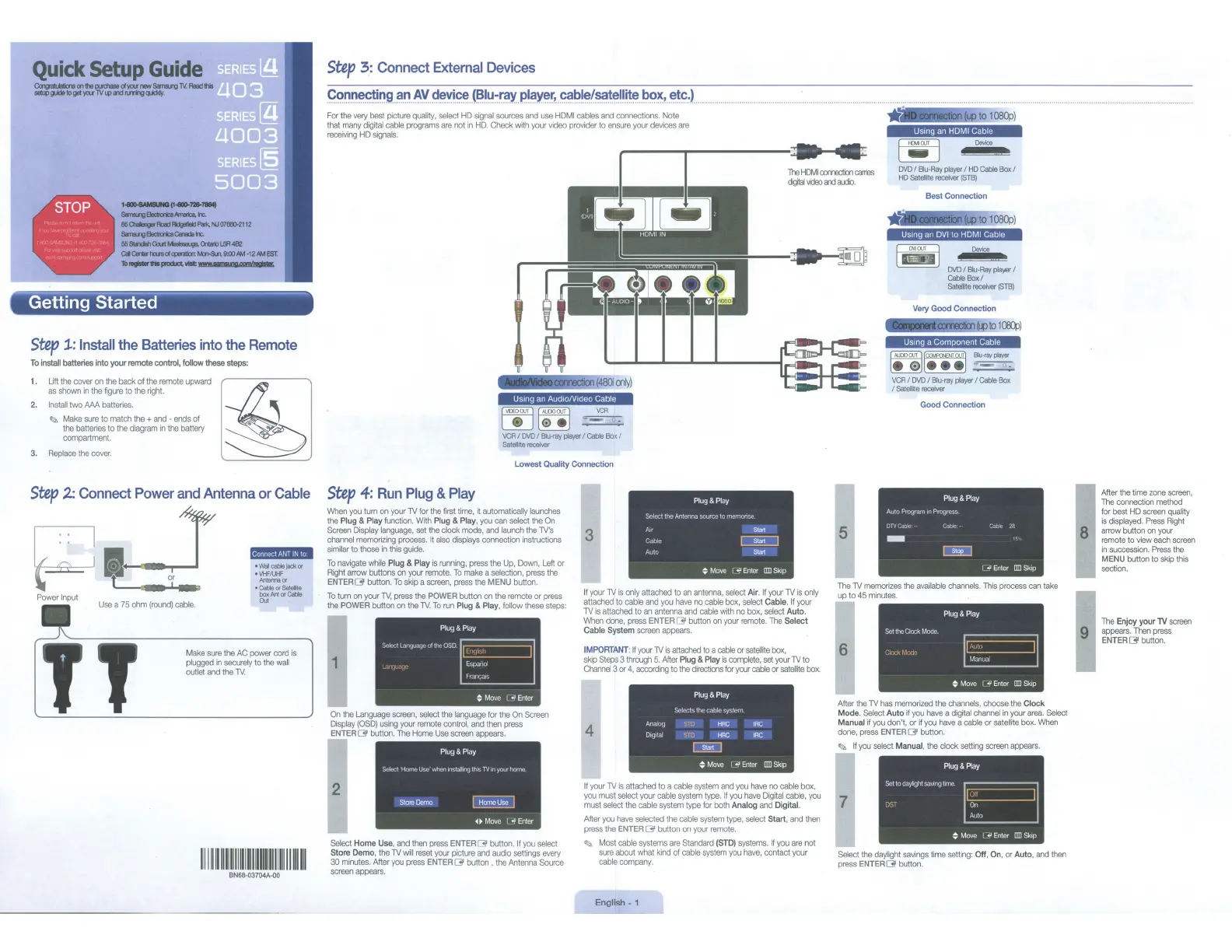
For
the
very
best
picture
quality,
select
HO
signal
sources
and
use
HOM
I
cables
and
connections.
Note
that
many
digital
cable
programs
are
not
in
HD.
Check
with
your
video
provider
to
ensure
your
devices
are
receiving
HD
signals.
~
·
£iii91080p)
I
Mi@II!.Fi,p:!.JM!p
,_
,
D<Moo
TI-e
HilMI
comection
cares
cljtal
;ideo""'
ado.
DVD
I
Blu-Ray
player
I
HD
Cable
Box
I
HD
Satellite
receiver
{STB)
Usmg
an
Aud1oN1deo Cable
~~
~~
VCR
.:.=,;..!;..
VCR
I
DVD
I
Blu-ray
player
I Cable
Box
I
Satell~ereceiver
Lowest Quality Connection
Step
4:
Run
Plug
&
Play
When
you
tum
on
your
TV
for
the
first
time,
it
automatically
launches
the
Plug &
Play
function.
With
Plug & Play,
you
can
select
the
On
Screen
Display
language,
set
the
clock
mode,
and
launch
the
TV's
channel
memorizing
process.
It
also
displays
connection
instructions
similar
to
those
in
this
guide.
To
navigate
while
Plug &
Play
is
running,
press
the
Up,
Down,
Left
or
Right
arrow
buttons
on
your
remote.
To
make
a
selection,
press
the
ENTERC3'
button.
To
skip
a
screen,
press
the
MENU
button.
To
turn
on
your
TV,
press
the
POWER
button
on
the
remote
or
press
the
POWER
button
on
the
1Y.
To
nun
Plug
& Play,
follow
these
steps:
1
Plug
&
Play
Sdr:r;tL11WJL~<Iqr•olttl<)QSD
r.::::====::::;'!
Espanol
Fr;tllf,;Jo';
~
Move
1
..P
Enter
On
the
Language
screen,
select
the
language
for
the
On
Screen
Display
(OSD)
using
your
remote
control,
and
then
press
ENTER
[31
button.
The
Home
Use
screen
appears.
Plug
&
Play
Select Horll<)Use'vihen•nstallulglh•sTV•nyourtx>mc
Store
Demo
Home
Use
~~Move
l .jl
Enter
Select
Home
Use
,
and
then
press
ENTERC3'
button.
If
you
select
Store Demo,
the
TV
will
reset
your
picture
and
audio
settings
every
30
minutes.
After
you
press
ENTER~
button ,
the
Antenna
Source
screen
appears.
3
Plug
&
Play
SelecttheAntennas.ourcetomemonse
A1r
Stat
Cable
~
Auto
Start
~
Move
L
-JI
Enter
liD
Skip
If
your
lV
is
only
attached
to
an
antenna,
select
Air.
If
your
TV
is
only
attached
to
cable
and
you
have
no
cable
box,
select
Cable.
If
your
TV
is
attached
to
an
antenna
and
cable
with
no
box,
select
Auto.
When
dme,
press
ENTER
C3'
button
on
your
remote.
The
Select
Cable
System
screen
appears.
IMPORTANT
:
~your
lV
~
attached
to
a
cable
or
satelliTe
box,
skip
Steps 3
through
5.
After
Plug
&
Play
is
complete, set
your
lV
to
Channel
3
or
4,
according
to the
directions
for
your
cable
or
satelloe
box.
4
Plug& P
lay
Seleclslhecabtesystem
Analog
STD
HRC
tRC
DICJIIal
STD
HRC
tRC
0!!!0
~
Move
1
<0!1
Enter
ITD
Skip
If
your
TV
is
attached
to
a
cable
system
and
you
have
no
cable
box,
you
must
select
your
cable
system
type.
If
you
have
Digital
cable,
you
must
select
the
cable
system
type
for
both
Analog
and
Digital.
After
you
have
selected
the
cable
system
type,
select
Start,
and
then
press
the
ENTER
[31 button
on
your
remote.
~
Most
cable
systems
are
Standard
(STD)
systems.
If
you
are
not
sure
about
what
kind
of
cable
system
you
have,
contact
your
cable
company.
English
-1
Best Connection
Usmg
an
DVI
to
HOM
I
Cable
LiffjJ
'
.
""""
DVO
/Biu-Ray
playa<
I
Cable
Box/
Satellrte
receiver
(STBI
Very
Good Connection
wJo1~)
Usmg
a Component
Cab
le
le0IIH'el
Blu-rayplayer
~
VCR
I
DVD
I
Blu-ray
player
I
Cable
Box
/Satellite
receiver
Good Connection
Plug
& P
lay
Auto Program m Progress
DTVC•'l'- n
-
s. 18
O!iJ
I .j!Enter
liD
Skip
The
lV
memorizes
the
available
channels.
This
process
can
take
up
to
45
minutes.
6
Plug& P
lay
Set
the
Clock
MOOe
~
Move
I
..JI
Enter
liD
Skip
After
the
TV
has
memorized
the
channels,
choose
the
Clock
Mode.
Select
Auto
~
you
have
a
digital
channel
in
your
area.
Select
Manual
if
you
don't, or
if
you
have
a
cable
or
satellite
box.
VVhen
done,
press
ENTER
[31
button.
~
If
you
select
Manual,
the
clock
setting
screen
appears.
7
Plug
&
Play
SettoeiayhghtsavmgtlnlC
~
Move
1
..JI
Enter
I1Il
Skip
Select
the
daylight
savings
time
setting:
Off
,
On
,
or
Auto,
and
then
press
ENTER
[31
button.
After
the
time
zone
screen,
The
connection
method
for
best
HD
screen
quality
is
displayed.
Press
Right
arrow
button
on
your
remote
to
view
each
screen
in
succession.
Press
the
MENU
button
to
skip
this
sec
t
ion.
The
Enjoy your
TV
screen
appears.
Then
press
ENTER
[31
button.



 To Next Page