8
English
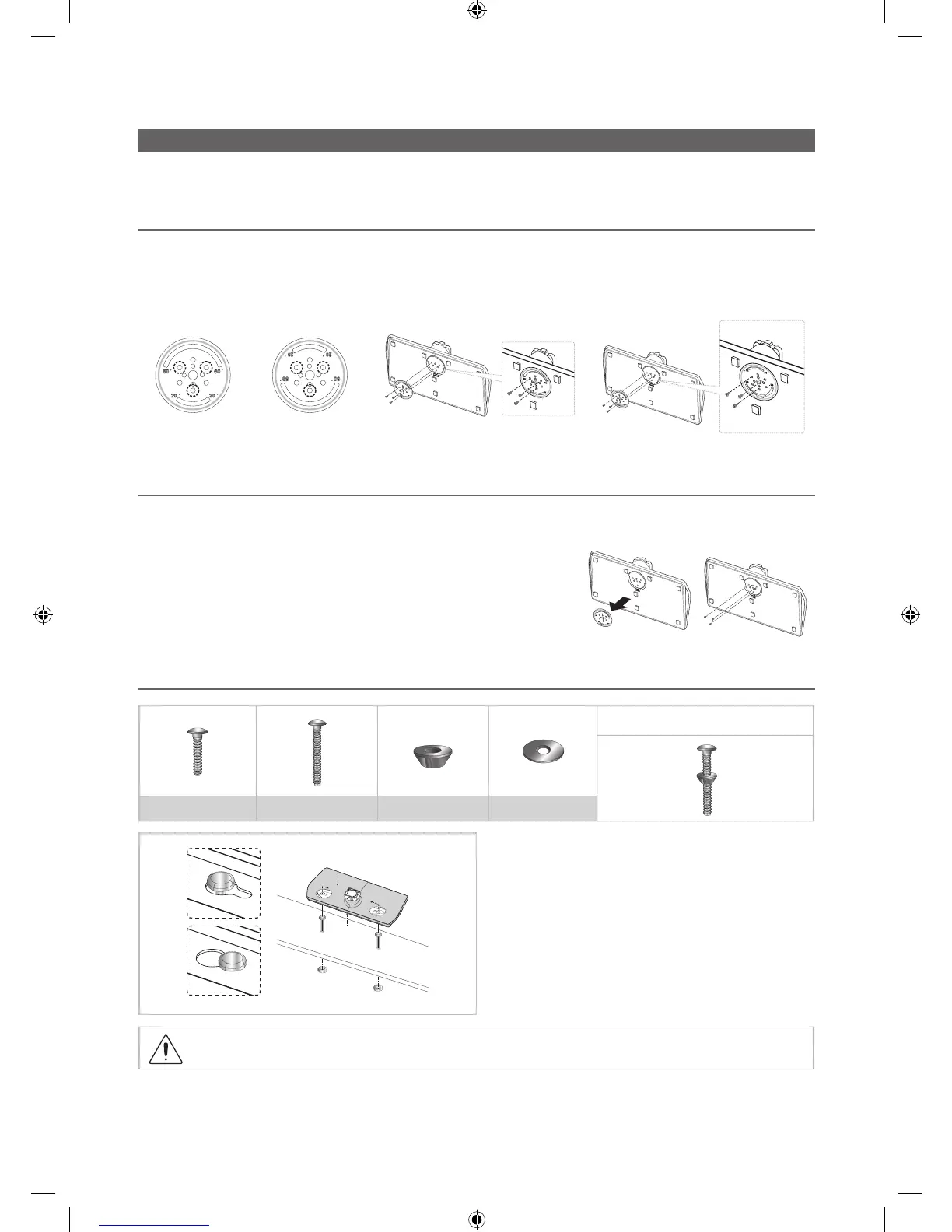
Assembling the swivel (32 inch TVs or larger)
The TV stand more than 32inch supports the swivel function. The swivel angle support all of 20°, 60° and 90° and you
can change the swivel angle by using BRACKET HOLDER SWIVEL. (Except HG***C470/HG32EC673/HG22EC673)
¦ 20° ~ 60° swivel
If you assemble the wedge on the bottom of the stand to the hole of BRACKET HOLDER SWIVEL where 20° or 60° is
marked, the swivel angle becomes each 20° ~ 60° in the left and right side.
(The shape of stand depend on the model.)
¦ 90° swivel
If you assemble only screws after you remove BRACKET HOLDER SWIVEL, the swivel angle becomes each 90° in the
left and right side.
¦ Hotel Mount Kit (only HC670 have)
Bolt + Nut
Short Bolt (2EA) Long Bolt (2EA) Nut (2EA) Washer (2EA)
Top
Bottom
Affix the stand to a flat surface such as a dresser top, desk
top, or entertainment center as shown.
WARNING: To prevent injury, this apparatus must be securely attached to the floor/ table in accordance with
the installation instructions.
EU_Install Guide_ENG.indd 8 2014-04-14 10:22:36








 To Next Page