MJ15AS*/MJ17AS*/MJ19AS*/
MJ15BS*/MJ17BS*/MJ19BS*
3-1
3 Disassembly and Reassembly
This section of the service manual describes the disassembly and reassembly procedures for the
MJ15AS*/MJ17AS*/MJ19AS*/MJ15BS*/MJ17BS*/MJ19BS* TFT-LCD monitors.
WARNING: This monitor contains electrostatically sensitive devices. Use caution when handling
these components.
3-1 Disassembly
Cautions:1. Disconnect the monitor from the power source before disassembly.
2. Follow these directions carefully; never use any metal instrument except provided jig to
separate the cabinet.
3. R/Cover opening jig : BH81-00001A
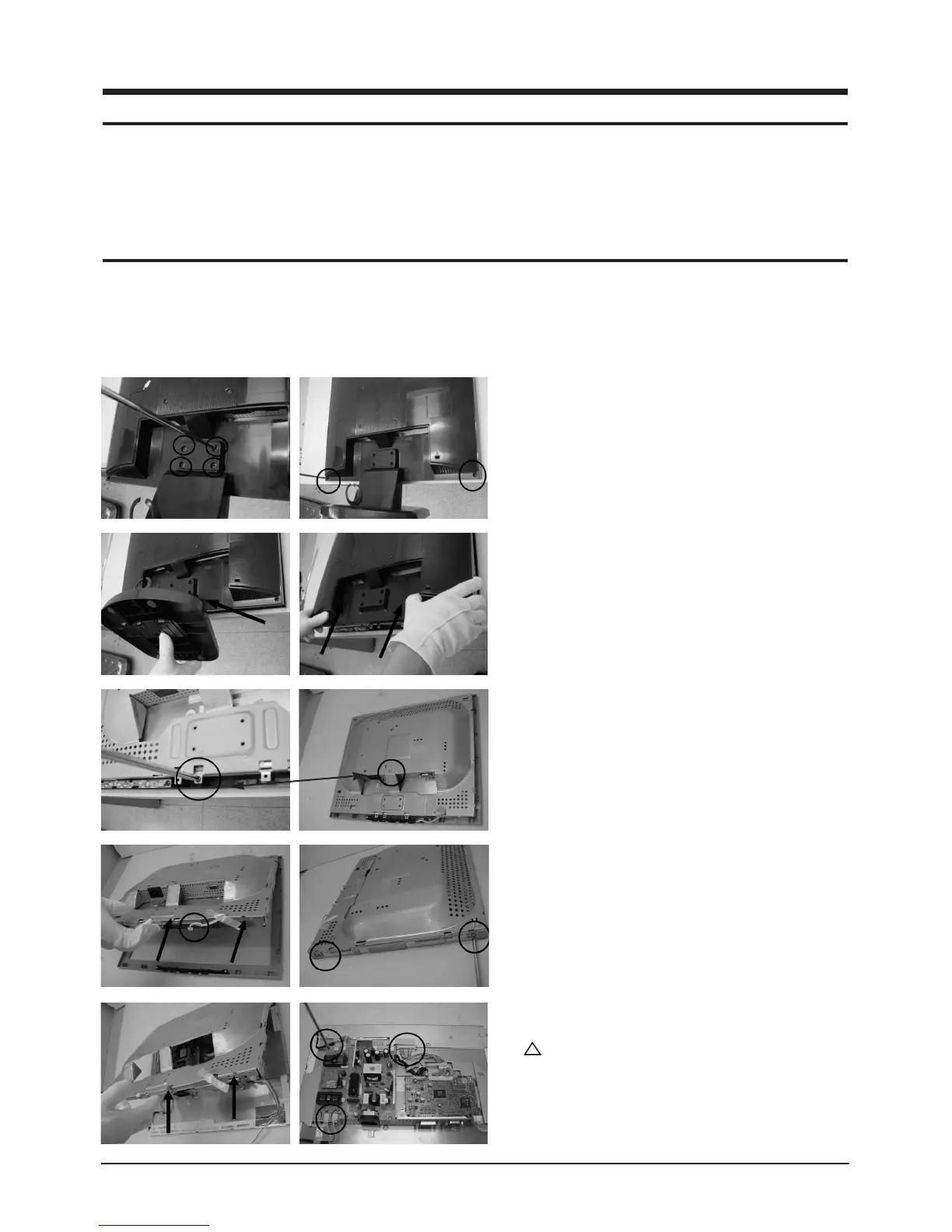
1. Place monitor face down on cushioned table.
Remove 4 screws from grip on the stand and
remove the stand. Remove 2 screws from the
rear cover.
2. Insert the opening stand into the grooves at a
hole and press until it clicks and lift the rear
cover.
3. Remove 2 screws from the shield.
4. Disconnect function cable from the cover front
and lift up the panel. Remove 4 screws from
the panel shield. (Right / Left)
5. Lift up the panel shield and carefully remove
the silicon glue on the cables with a nipper.
Caution : Lamp wire may be easily
damaged. Please use caution when removing
the silicon.





 To Next Page