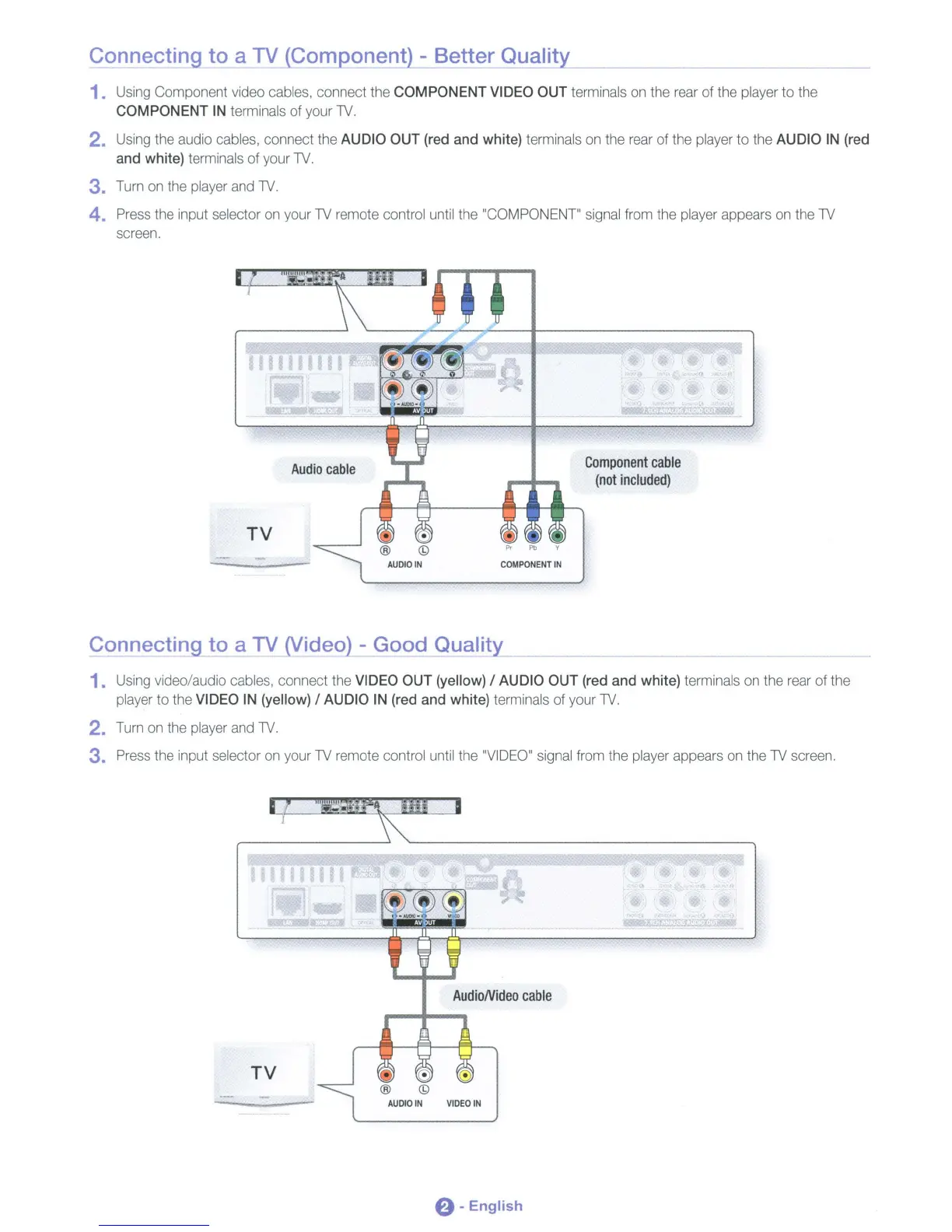
Connecting to a TV (Component) - Better Quality
1. Using Component video cables, connect the
COMPONENT
VIDEO OUT terminals on the rear of the player to the
COMPONENT
IN
terminals of your
TV.
2. Using the audio cables, connect the AUDIO OUT (red and white) terminals on the rear of the player
to
the AUDIO
IN
(red
and white) terminals of your
TV.
3. Turn on the player and
TV.
4. Press the input selector on your TV remote control until the "COMPONENT" signal from the player appears on the TV
screen.
Component
cable
(not
included)
Connecting to a TV (Video) - Good Quality
1.
Using video/audio cables, connect the VIDEO OUT (yellow) / AUDIO OUT (red and white) terminals on the rear of the
player to the VIDEO
IN
(yellow) / AUDIO
IN
(red and white) terminals of your
TV.
2. Turn on the player and
TV.
3. Press the input selector on your TV remote control until the "VIDEO" signal from the player appears on the TV screen.
e -English












 To Next Page