Connecting to the Network
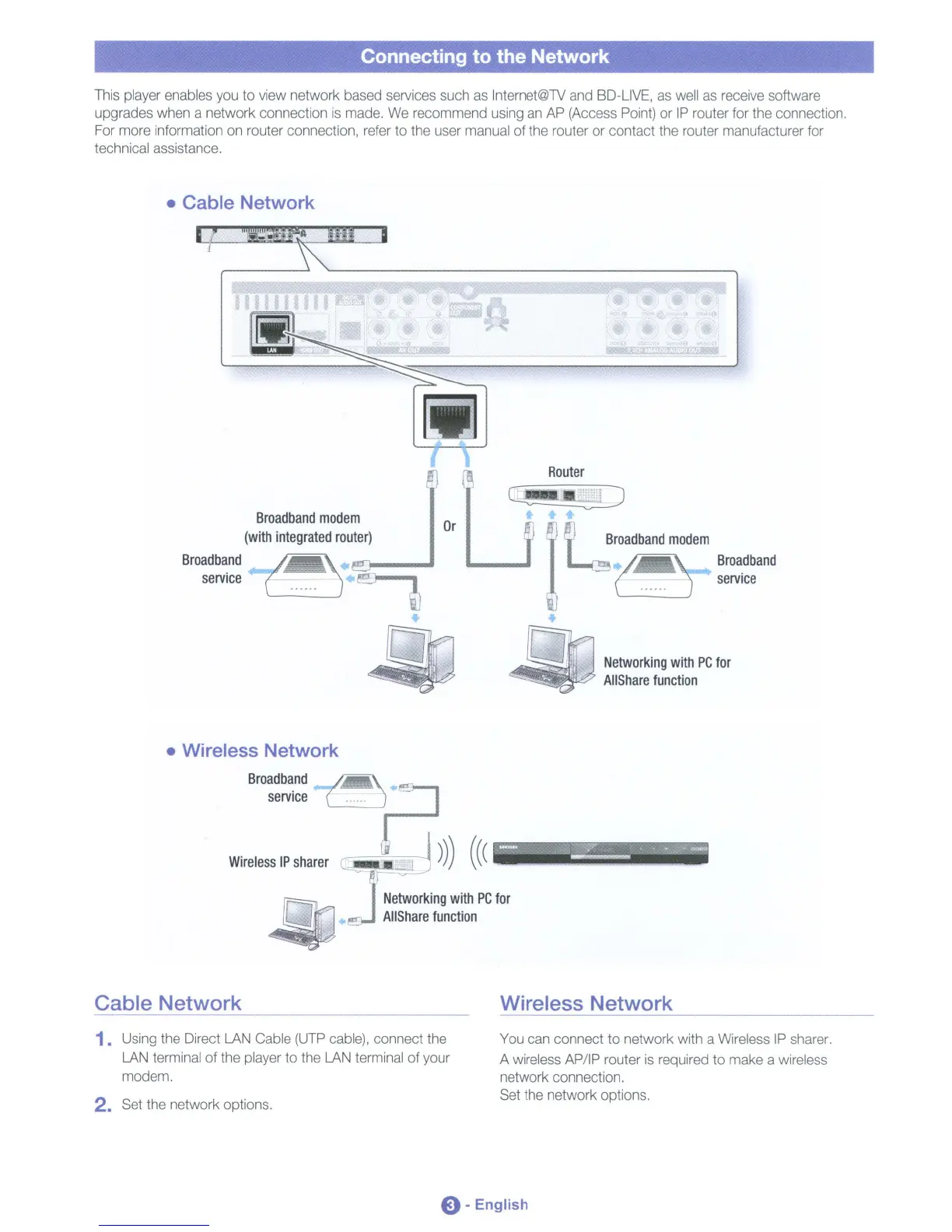
This player enables you to view network based services such as Internet@TV and
BD-L1VE,
as well as receive software
upgrades when a network connection
is
made. We recommend using an AP (Access Point) or
IP
router for the connection.
For more information on router connection, refer to the user manual of the router or contact the router manufacturer for
technical assistance.
• Cable Network
Router
Cj!-'
w
I
~
Broadband
modem
L...c"
('"
"J
Bro~dband
service
1IGJ.~.·
ltd
Networking
with
PC
for
~
AIiShare
function
Or
Broadband
modem
(with
integrated
router)
Broadband
( 3
service
~
~
[J
• Wireless Network
Broadband
service
~A
Wireless
IP
sharer
....:::J)))
((
(
=~;;~!E:5;;;;;;ii
Networking
with
PC
for
AIiShare
function
Cable Network Wireless Network
1. Using the Direct LAN Cable (UTP cable), connect the
LAN terminal of the player to the LAN terminal of your
modem.
2. Set the network options.
You can connect to network with a Wireless
IP
sharer.
A wireless AP/IP router
is
required
to
make a wireless
network connection.
Set the network options.
e-English












 To Next Page