EasyManua.ls Logo

Samsung BD-C6500 - AllShare Function Setup; PC Share Manager Setup

Samsung BD-C6500
86 pages
Print Icon
To Next Page IconTo Next Page
To Previous Page IconTo Previous Page
Loading...
Using
the
AIiShare Function
-.r..
III
settm
i
5efYer
:
PC
Share
Manaoer
..
.sAM$OOG
Blu·ray
DISC
Player
Deny
ii
SAMSUNG
PC
Share
Manager
FKe
Share
server
Help
Q!QlI
,',
1
Set
Device
Polley
Myc.:
~
~,:,
..
.,..........
"'"'":=
..................
=~=":"~;;;
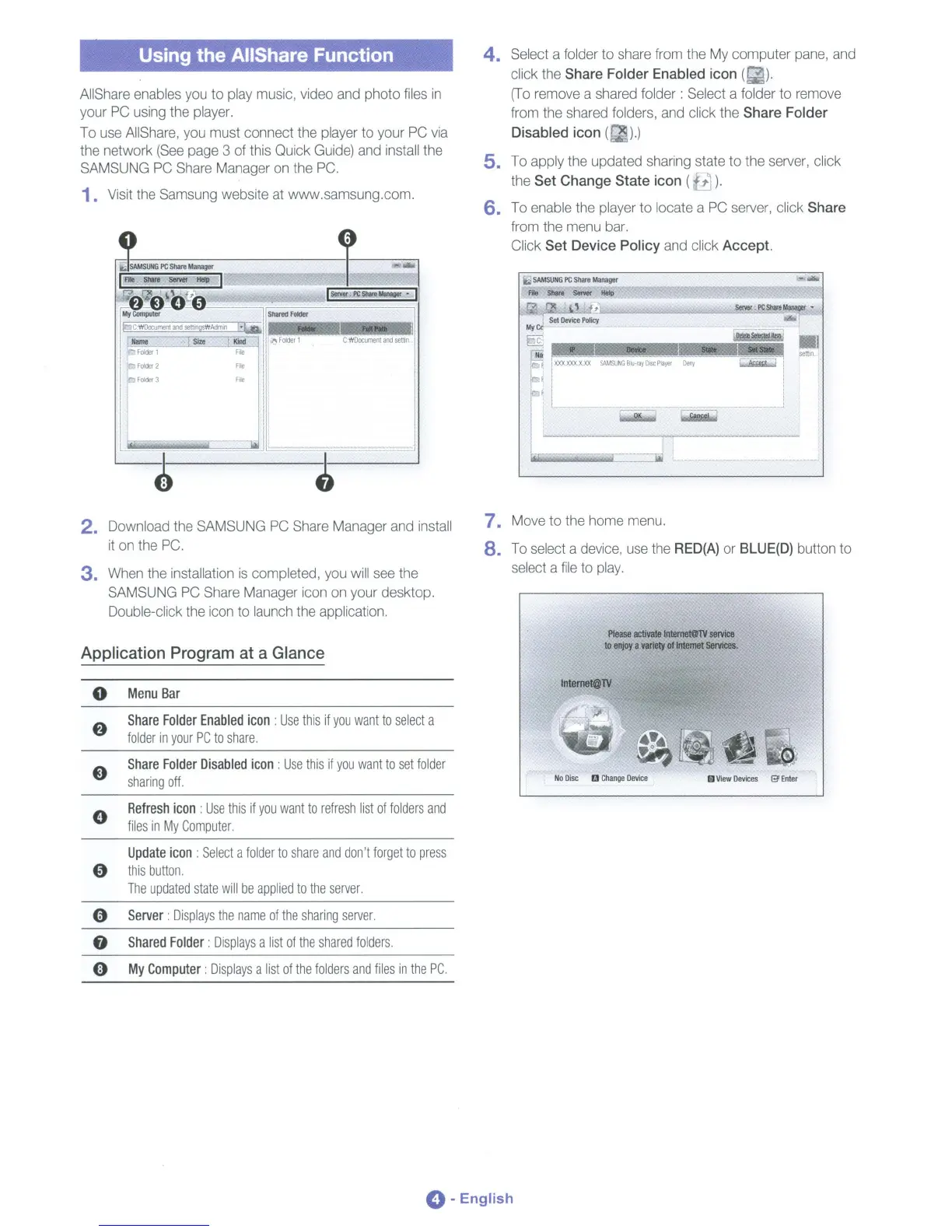
4.
Select a folder to
share
from
the
My
computer
pane,
and
click
the
Share Folder Enabled icon
(~).
(To
remove
a
shared
folder: Select a folder to
remove
from
the
shared
folders,
and
click the Share Folder
Disabled icon (
).)
5.
To
apply the updated sharing state to the
server,
click
the Set Change State icon (
7).
6.
To
enable
the
player
to locate a
PC
server,
click Share
from
the
menu
bar.
Click Set Device Policy
and
click Accept.
C'WOocument
and
senin
Shared
Folder
--'-----::0
-1-
-
..
l@erYaciPCShale~
I
C
WDocument
and
setu
sWAdmln
f.o"rtl,=,Ml::,,'
__
,-,'Sit",,'
'e--..::;Ki<1d"'-l
!
o.
Folder
1
I
Folder
1
File
1
Folder
2
File
:ttJ
FOlder
3
File
AIiShare
enables
you
to
play
music,
video
and
photo
files
in
your
PC
using
the
player.
To
use
AIiShare,
you
must connect the
player
to your
PC
via
the
network
(See
page
3
of
this
Quick
Guide)
and
install
the
SAMSUNG
PC
Share
Manager
on
the
PC.
1.
Visit
the
Samsung
website
at
www.samsung.com.
2. Download
the
SAMSUNG
PC
Share
Manager
and
install
it
on
the
PC.
3.
When
the
installation
is
completed,
you
will
see
the
SAMSUNG
PC
Share
Manager
icon
on
your desktop.
Double-click
the
icon
to
launch
the
application.
7.
Move
to
the
home
menu.
8.
To
select
a
device,
use
the
RED(A)
or
BLUE(D)
button to
select
a
file
to
play.
Application Program at a Glance
Please
activate
Intemet@lV
servica
to
enjoy
a
variety
of
Internet
seMces.
o
Menu
Bar
Intemet@TV
Share
Folder
Enabled
icon:
Use
this
if
you
want
to
select
a
folder
in
your
PC
to
share.
Share
Folder
Disabled
icon:
Use
this
if
you
want
to
set
folder
sharing
off.
No
Disc
B
Change
DevIce
iii
View
Devices
e
Enter
Refresh
icon:
Use
this
if
you
want
to
refresh
list
of
folders
and
files
in
My
Computer.
Update
icon:
Select
a
folder
to
share
and
don't
forget
to
press
"
this
button.
The
updated
state
will
be
applied
to
the
server.
9
Server:
Displays
the
name
of
the
sharing
server.
f)
Shared
Folder:
Displays
a
list
of
the
shared
folders.
o
My
Computer:
Displays
a
list
of
the
folders
and
files
in
the
PC.
0-
English

Table of Contents

Related product manuals