EasyManua.ls Logo

Samsung BD-UP5000 - Step 3: Connection to a TV

Samsung BD-UP5000
76 pages
Print Icon
To Next Page IconTo Next Page
To Previous Page IconTo Previous Page
Loading...
Connection
AudioNideo
T
LINE
IN
AUDIO
VIDEO
TV
AudioNideo
Cable
HOMI Cable
DIGITAL
AUDIO
OUT
COMPONENT
OUT
~--(=.=t----i-~--
-4f.
1----------_
L..-;--!
7.1CH
ANALOG
AUDIO
OUT
AVOL
T
SlJRR.B.ACK-O
ISurrOUnd-O
I
CENTER
IFRONT-D
AUD~
-4)
@
The
Rear
Panel
of
Duo
HD
player
SlJRR.B.ACK-(l)
jSurround-(l)
I
SUBWOOFER
I
FRONT
-t)
AUDIO-@
T I
LAN
S-Video Cable
Component Cable
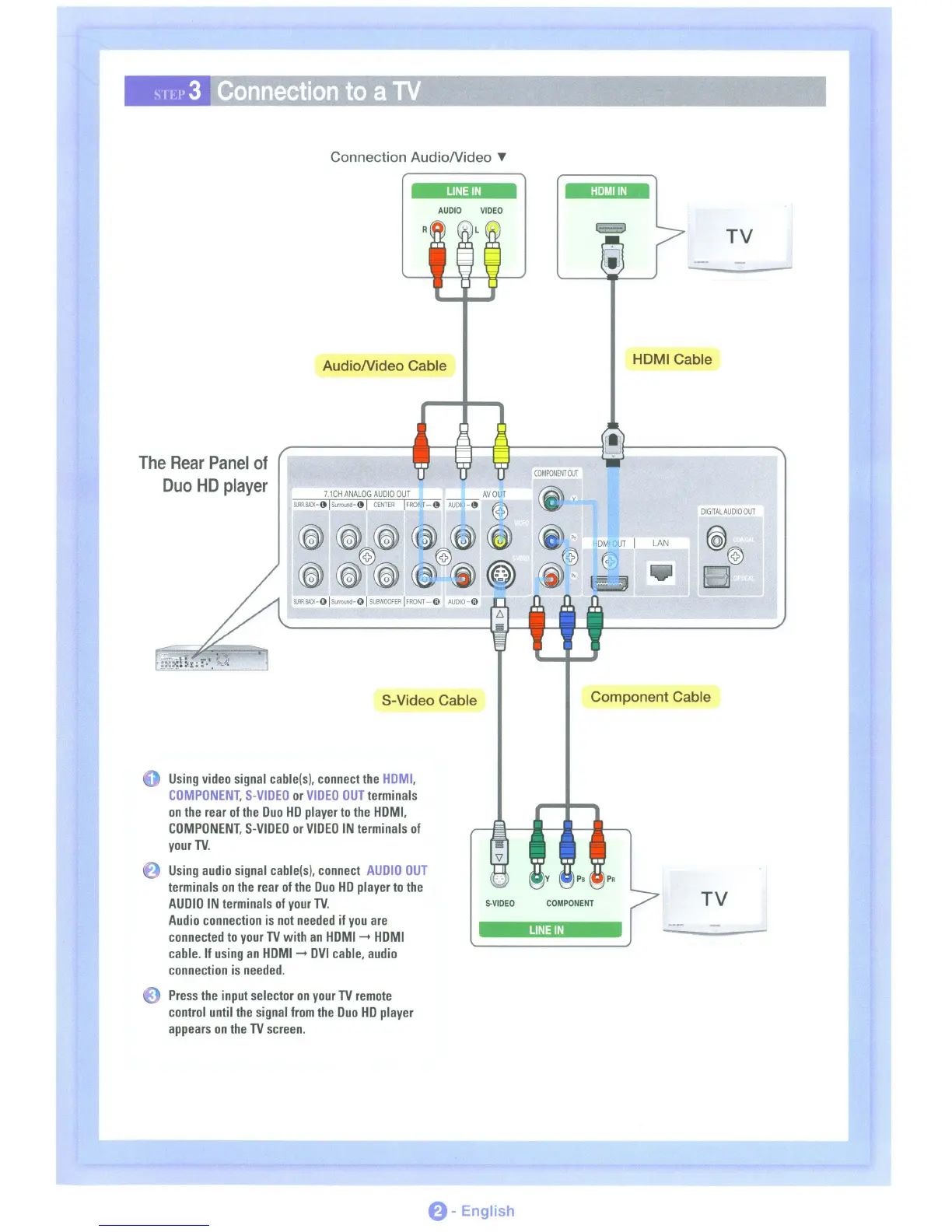
Using
video
signal
cable(sl,
connect
the
HDMI,
COMPONENT,
S-VIDEO
or
VIDEO
OUT
terminals
on
the
rear
of
the
Duo
HD
player
to
the
HDMI,
COMPONENT,
S-VIDEO
or
VIDEO
IN
terminals
of
your
TV.
Using
audio
signal
cable(sl,
connect
AUDIO
OUT
terminals
on
the
rear
of
the
Duo
HD
player
to
the
AUDIO
IN
terminals
of
your
TV.
Audio
connection
is
not
needed
if
you
are
connected
to
your
TV
with
an
HDMI
~
HDMI
cable.
If
using
an
HDMI
~
DVI
cable,
audio
connection
is
needed.
S.VIDEO
COMPONENT
LINE
IN
TV
Press
the
input
selector
on
your
TV
remote
control
until
the
signal
from
the
Duo
HD
player
appears
on
the
TV
screen.
0-
English

Table of Contents