EasyManua.ls Logo

Samsung BD-UP5000 - Step 4: Connection to an Audio System

Samsung BD-UP5000
76 pages
Print Icon
To Next Page IconTo Next Page
To Previous Page IconTo Previous Page
Loading...
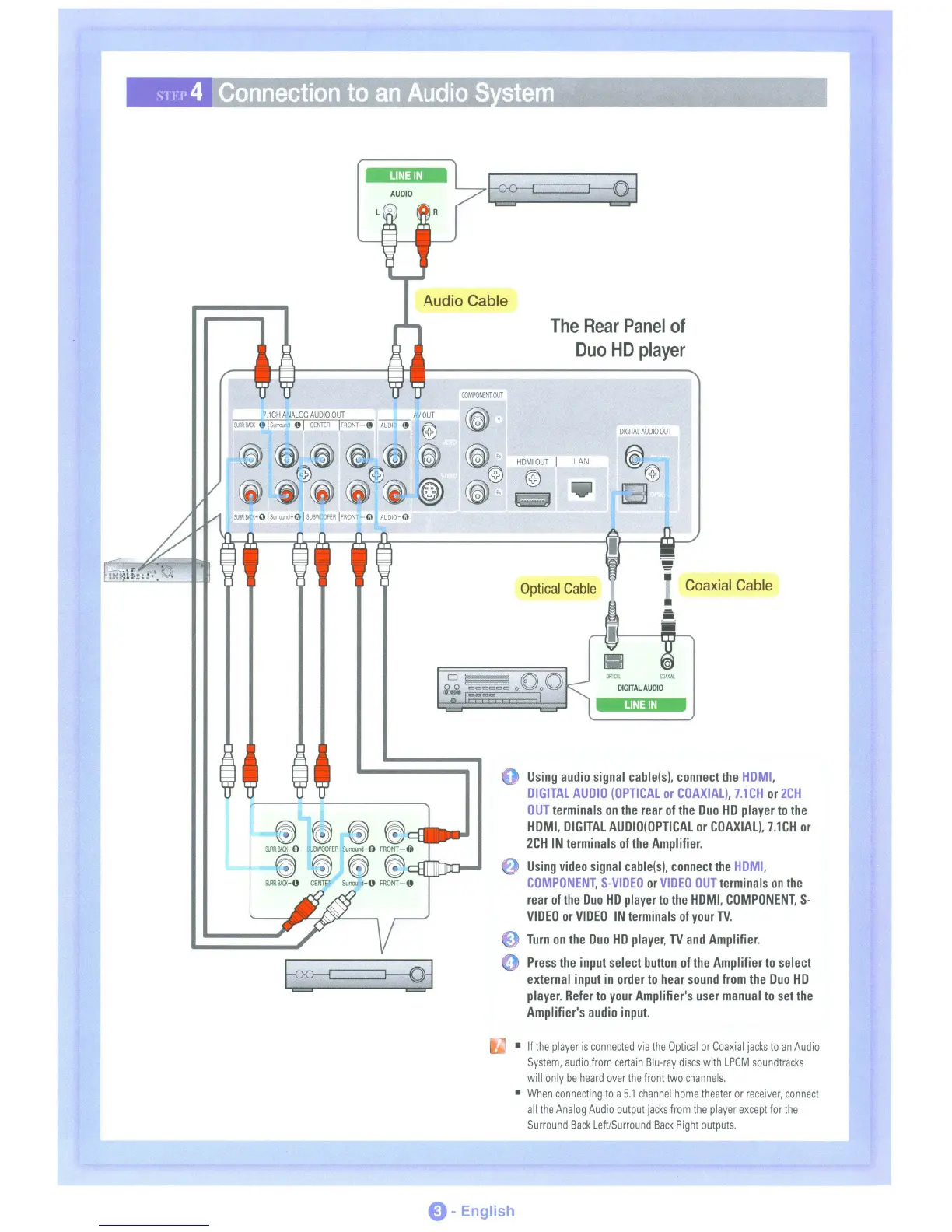
The
Rear
Panel
of
Duo
HD
player
AUDIO
7.1CH
A.JALOG
AUDIO
OUT
AV
OUT
$1JRR1lIll<-e!Surrouod-el
CENTER
IFRONT-O
AVDI
-0
@
o
DIGITAL
AUDIO
OUT
I 0
HDMIOUT
I
LAN
@ @
o
Optical
Cable
Coaxial
Cable
M(,I(
COAXIAl.
DIGITAL
AUDIO
LINE
IN
@ ~ @
@~
...
9JR1lIll<-O
BWQOFER
Surround-O
FRONT-G)
@@~@
9JRS\O(-4)
CENTEI'
SurrQU!'<1-4)
FRONT-4)
Using
audio
signal
cable(s),
connect
the
HDMI,
DIGITAL
AUDIO
(OPTICAL
or
COAXIAL),
7.1CH
or
2CH
OUT
terminals
on
the
rear
of
the
Duo
HD
player
to
the
HDMI,
DIGITAL
AUDIO(OPTICAL
or
COAXIAL),
7.1CH
or
2CH
IN
terminals
of
the
Amplifier.
Using
video
signal
cable(s),
connect
the
HDMI,
COMPONENT,
S-VIDEO
or
VIDEO
OUT
terminals
on
the
rear
of
the
Duo
HD
player
to
the
HDMI,
COMPONENT,
S-
VIDEO
or
VIDEO
IN
terminals
of
your
TV.
Turn
on
the
Duo
HD
player,
TV
and
Amplifier.
Press
the
input
select
button
of
the
Amplifier
to
select
external
input
in
order
to
hear
sound
from
the
Duo
HD
player.
Refer
to
your
Amplifier's
user
manual
to
set
the
Amplifier's
audio
input.
•
If
the
player
is
connected
via
the
Optical
or
Coaxial
jacks
to
an
Audio
System,
audio
from
certain
Blu-ray
discs
with
LPCM
soundtracks
will
only
be
heard
over
the
front
two
channels.
•
When
connecting
to
a
5.1
channel
home
theater
or
receiver,
connect
all
the
Analog
Audio
output
jacks
from
the
player
except
for
the
Surround
Back
Left/Surround
Back
Right
outputs.
E) -English

Table of Contents