FRANÇAISENGLISH
8484
2
3
4
5
Using File Browser Navigateur de fichiers
Viewing File Information
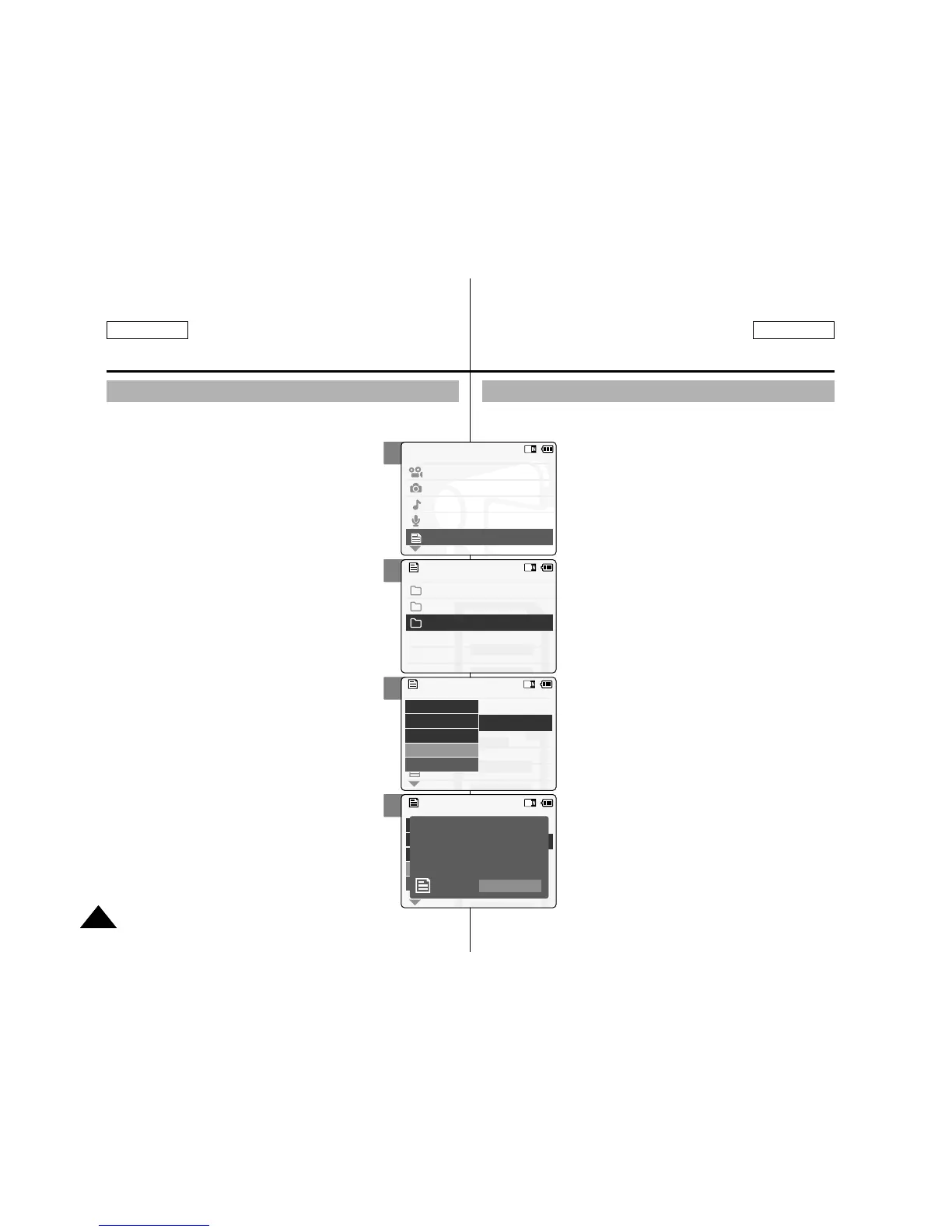
You can see the file name, format, size and date.
1. Slide the [Mode Selector] down to turn
on the CAM and press it again.
◆ The Mode Selection screen appears.
2. Slide the [ ▲ / ▼ ] switch to select File
Browser and press the [OK] button.
3. Slide the [ ▲ / ▼ ] switch to select the
file you want to see its file information.
Press the [OK] button.
◆ Perform these steps repeatedly until the file
you want to see its file information appears.
4. Press the [Menu] button and slide the
[ ▲ /▼ ] switch.
Press the [OK] button after selecting
<File Info>.
◆ The screen with file name, format, size and
date appears.
5. Press the [OK] button to finish viewing
file information.
◆ If you select <Close> in the screen, the
screen disappears.
Affichage d’informations sur les fichiers
Vous pouvez afficher le nom d’un fichier, son format, sa taille
et sa date de création.
1. Déplacez l'interrupteur
[Mode Selector]
(Sélecteur de mode)
vers le bas pour
allumer le CAM puis actionnez-le à
nouveau.
◆ L’écran Mode Selection (Sélection de mode)
s’affiche.
2.
Déplacez l’interrupteur [ ▲ / ▼ ] pour
sélectionner File Browser <Navigateur de
fichier> puis appuyez sur le bouton [OK].
3. Déplacez l’interrupteur [ ▲ / ▼ ] pour
sélectionner le fichier dont vous
souhaitez afficher les informations.
Appuyez sur le bouton [OK].
◆ Répétez ces étapes jusqu’à ce que le fichier
dont vous souhaitez consulter les
informations s’affiche.
4. Appuyez sur le bouton [Menu] et
déplacez l’interrupteur [ ▲ / ▼ ].
Appuyez sur le bouton [OK] après
avoir sélectionné <File Info> (Info
fichiers).
◆ Le nom, le format, la taille et la date de
création du fichier apparaissent à l’écran.
5. Appuyez sur le bouton [OK] pour faire
disparaître l’affichage des informations
relatives au fichier.
◆ Si vous sélectionnez <Close> (Fermer) à
l’écran, celui-ci disparaît.


 To Next Page