2
3
4
5
ENGLISH FRANÇAIS
Setting the CAM : Setting the System
Réglages du CAM –
Réglages du système
9696
Setting the Beep Sound
You can set the beep sound on/off. When on, a beep will
sound every time a button is pressed.
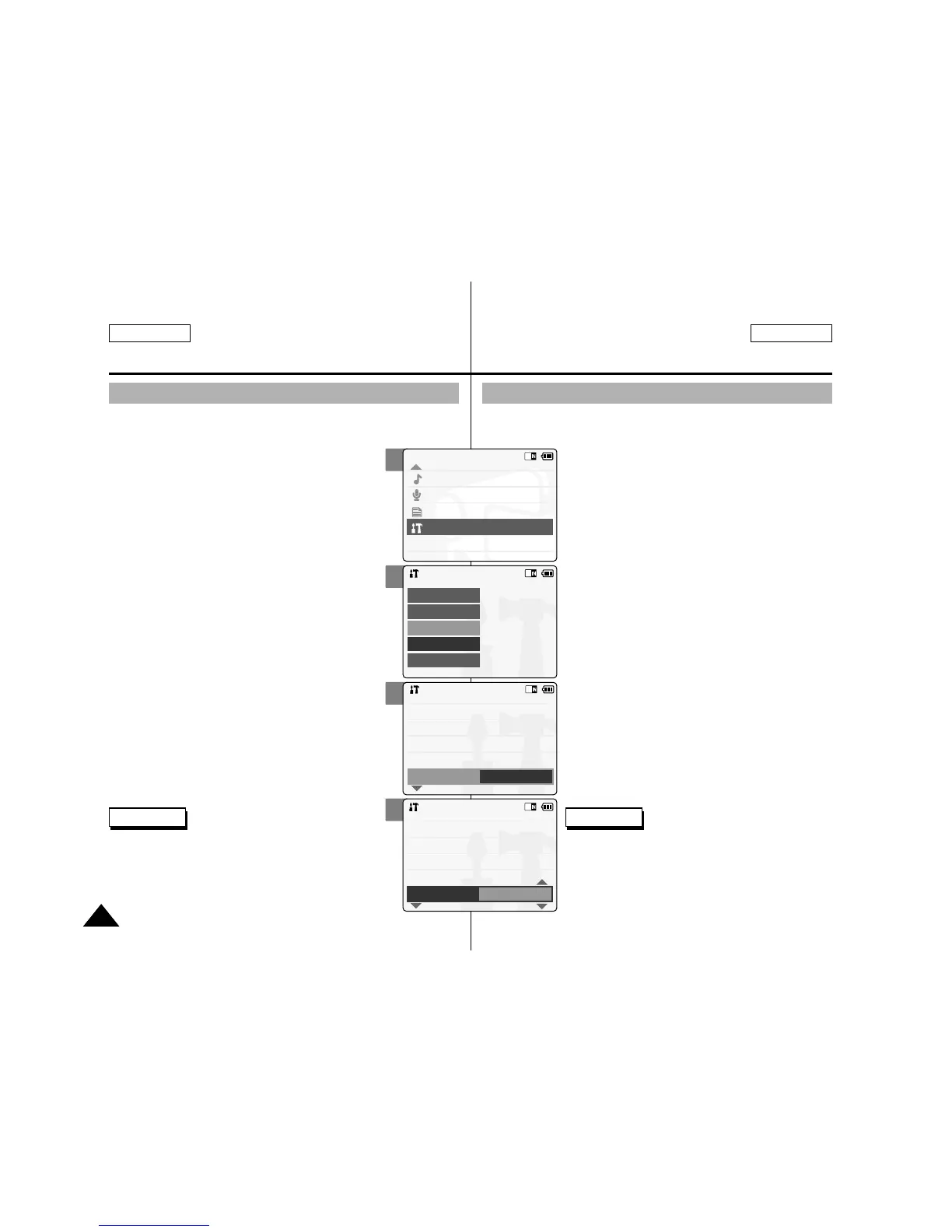
1. Slide [Mode Selector] down to turn on
the CAM and slide it down again.
◆ The Mode Selection screen appears.
2. Slide the [ ▲ /▼ ] switch to select
System Settings and press the [OK]
button.
3. Slide the [ ▲ /▼ ] switch to select
<System> and press the [OK] button.
4. Slide the [ ▲ /▼ ] switch to select
<Beep Sound> and press the [OK]
button.
5. Slide the [ ▲ /▼ ] switch to select
desired sound and press the [OK]
button.
◆ On: Turns the beep sound on.
◆ Off: Turns the beep sound off.
6. Press the [Back] button to finish
setting.
Signal sonore (bip)
Vous pouvez activer ou désactiver le signal sonore (bip). S’il est activé,
un bip se fait entendre à chaque fois que l’on presse sur un bouton.
1. Glissez l'interrupteur [Mode Selector]
(Sélecteur de mode) vers le bas pour
mettre le CAM en marche puis
actionnez-le à nouveau.
◆ L’écran de sélection du mode s’affiche.
2.
Glissez l’interrupteur [ ▲ /▼ ] afin de
sélectionner System Settings <Réglage du
système> et appuyez sur le bouton [OK].
3. Glissez l’interrupteur [ ▲ /▼ ] afin de
sélectionner <System> (Système) et
appuyez sur le bouton [OK].
4.
Déplacez l’interrupteur [ ▲ /▼ ] pour
sélectionner <Beep Sound> (Bip sonore)
puis appuyez sur le bouton [OK].
5. Déplacez l’interrupteur [ ▲ /▼ ] pour
sélectionner le son souhaité puis
appuyez sur le bouton [OK].
◆ On (Activé) : Active le bip.
◆ Off (Désactivée) : Désactive le bip.
6. Appuyez sur le bouton [Back] pour
terminer le réglage.
Note
✤
If you select <Back> in the menu, the previous menu
appears.
✤
When the earphones or Video/Audio cable is
connected to the CAM, the beep sound function
does not operate.
Remarques
✤
Si vous sélectionnez <Back> (Retour) dans le
menu, le menu précédent s’affiche.
✤
Lorsque le câble vidéo/audio ou les écouteurs
sont raccordés au CAM, le bip sonore ne
fonctionne pas.



 To Next Page