OPERATION
35
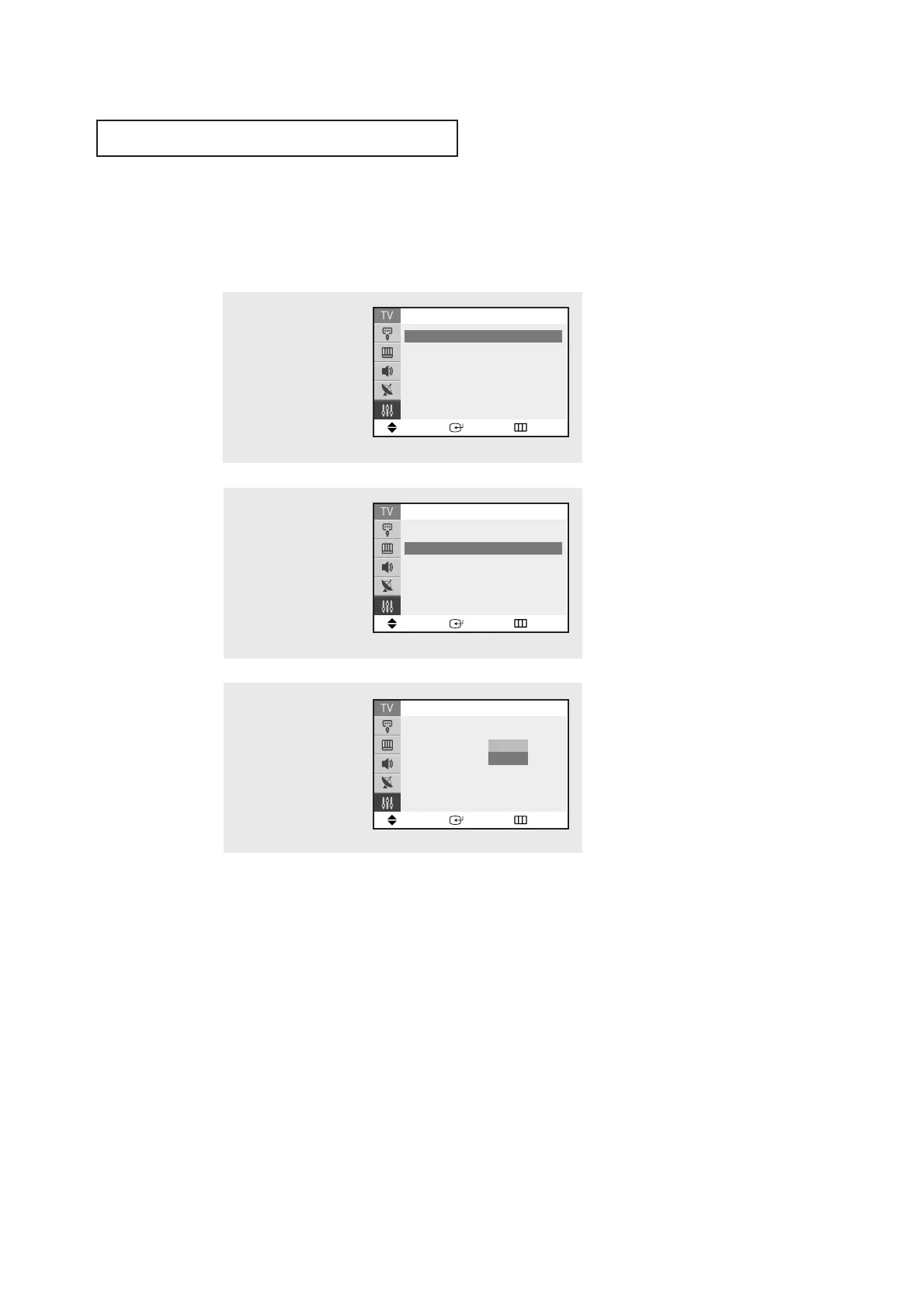
1
Press the MENU button to
display the menu.
Press the ▲ or ▼ button
to select the “Setup”, then
press the
ENTER button.
2
Press the ▲ or ▼ button
to select "Blue Screen",
then press the ENTER
button.
3
Press the ▲ or ▼ button
to select Blue Screen “On”,
then press the ENTER but-
ton.
Press the EXIT button to
exit.
▼
Pressing the ▲ or ▼ button will
alternate between “On” and “Off”.
Setting the Blue Screen Mode
If no signal is being received or the signal is very weak, a blue screen automatically
replaces the noisy picture background. If you wish to continue viewing the poor picture,
you must set the “Blue screen” mode to “Off”.
Move Enter Return
Setup
▲
More
Blue Screen : On
√√
Melody : On
√√
Demonstration
√√
Move Enter Return
Setup
▲
More
Blue Screen : On
Melody : On
√√
Demonstration
√√
Off
On
Move Enter Return
Setup
Time
√√
Plug & Play
√√
Caption
√√
Language : English
▼
More



 To Next Page