SPECIAL FEATURES
56
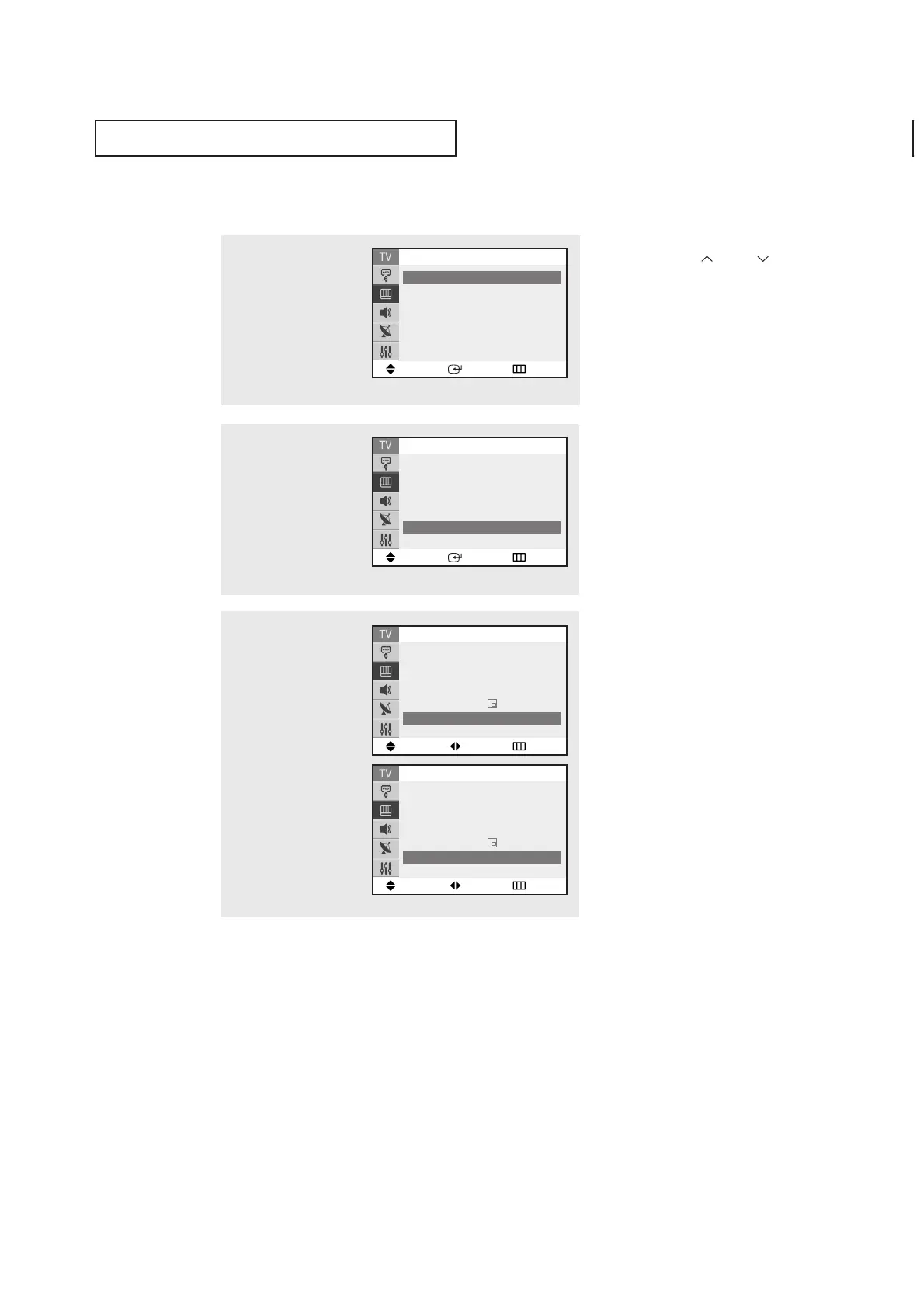
Changing the PIP Channel
1
Press the MENU button to
display the menu.
Press the ▲ or ▼ button
to select the “Picture”, then
press the ENTER button.
2
Press the ▲ or ▼ button
to select “PIP”, then press
the
ENTER button.
3
Press the ▲ or ▼ to select
the “Channel”.
Press the
œœ
or
√√
button to
change the channel that
appears in the PIP window.
Press the
EXIT button to
exit.
▼
Quick way to access the PIP channel:
Just press the CH or CH button on
the remote control.
Move Adjust Return
PIP
PIP : On
√√
Source : TV
√√
Swap
√√
Position :
√√
Channel : Air 3
Move Adjust Return
PIP
PIP : On
√√
Source : TV
√√
Swap
√√
Position :
√√
Channel : Air 5
Move Enter Return
Mode : Custom
√√
Custom
√√
Color tone : Normal
√√
Size : Normal
√√
▼
More
Picture
Move Enter Return
▲
More
Digital NR : Off
√√
DNIe Jr : On
√√
Tilt :
0
PIP
√√
Picture



 To Next Page