4.AlignmentandTroubleshooting
4.1.8.TechMode(DiagnosticMode)
Inservice(tech)mode,thetechniciancancheckthemachineandperformvarioustesttoisolatethecauseofamalfunction.
WhileinTechmode,themachinestillperformsallnormaloperations.
1)EnteringTechMode
1)Press“Menu>#>1>9>3>4”onthecontrolpanelcontinuously.
2)PressMenu.
3)Select“TechMode”.
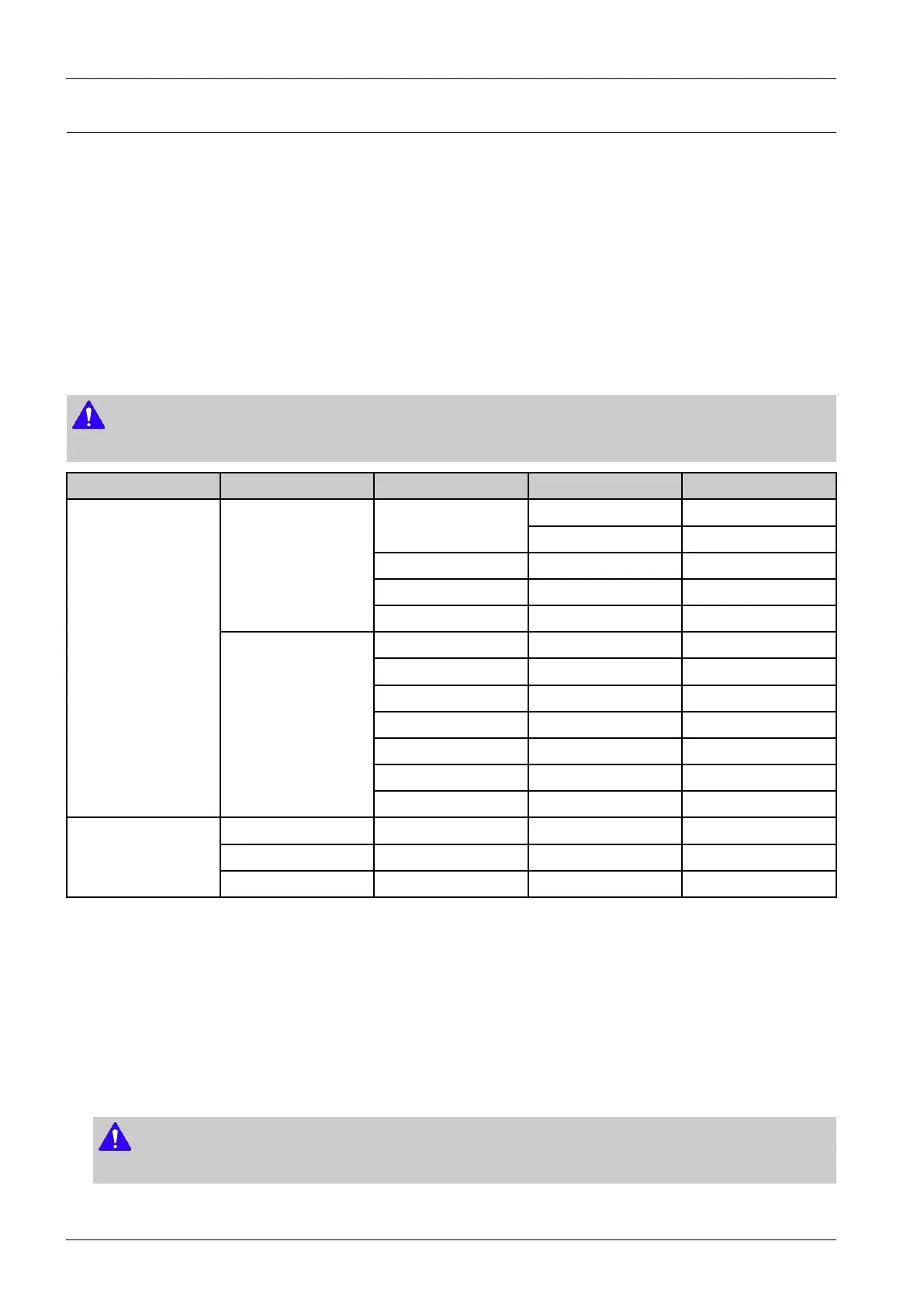
2)TechModeMenu
NOTE
Somemenuitemsmaynotappearonthedisplaydependingontheoptionsormodels.
Depth1Depth2Depth3Depth4Depth5
Fuser CounterReset
PickupRollerTray2
ClearAllMem.[Countrylist]
B2BMode0-99
DataSetup
TonerLowLevel[1~30]:10%*
SuppliesInfoPrinting…
CongurationPrinting…
UsageCounterPrinting…
JobDutyPrinting…
ErrorInfoPrinting…
AutoColorRegPrinting…
TechMode
Report
AutoToningPrinting…
NVMReadWrite
NVMInitializeInitializeNow
EDCMode
TestRoutines
3)DataSetup
•CounterReset
Thisfunctionresetsthecountvalueyouselect.
•ClearAllMemory
Thefunctionresetsthesystemtofactorydefaultsettings.Thisfunctionisusedtoresetthesystemtotheinitialvalue
whentheproductisfunctioningabnormally.Allthevaluesarereturnedtothedefaultvalues,andalltheinformation,
whichwassetbytheuser,willbeerased.
NOTE
Alwaysperformamemoryclearafterreplacingthemainboard.Otherwise,thesystemmaynotoperateproperly.
•TonerLowLevel
4-20Copyright©1995-2013SAMSUNG.Allrightsreserved.



 To Next Page
 Loading...