EasyManua.ls Logo

Samsung CM1329 - User Manual

Samsung CM1329
24 pages
Print Icon
To Next Page IconTo Next Page
Loading...
P
1
2345 6789 0
+20sec
Code No. : DE68-02349A
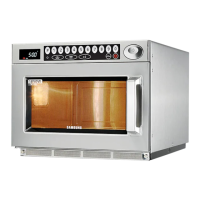
MICROWAVE OVEN
(COMMERCIAL)
Owner’s Instructions and Cooking Guide
CM1929 (1850 Watt)
CM1629 (1600 Watt)
CM1329 (1300 Watt)
Oven.......................................................................................................2
Control Panel .........................................................................................2
Using this Instruction Booklet.................................................................3
Safety Precautiones...............................................................................3
Installing Your Microwave Oven.............................................................4
Cooking / Reheating...............................................................................5
Power Levels and Time Variations.........................................................6
Stopping the Cooking.............................................................................7
Repeat Feature ......................................................................................7
Using +20sec Pad..................................................................................8
Using the Defrost Feature ......................................................................8
Memory Pads Programming ..................................................................9
How to Operate Memory Cooking........................................................11
Double Quantity Pad Programming .....................................................11
How to Operate Double Quantity Pad..................................................12
Programming Air Filter Clean Time......................................................13
Controlling Beep Tone..........................................................................13
Error Codes ..........................................................................................14
Hidden Keys.........................................................................................15
Care of Your Microwave Oven .............................................................15
Installation Instructions for Stacking.....................................................17
Replacement of Lamp ..........................................................................17
Cookware Guide...................................................................................18
Cooking Guide......................................................................................19
Cleaning Your Microwave Oven...........................................................21
Storing and Repairing Your Microwave Oven......................................22
Technical Specifications.......................................................................22
jtX`Y`X]Y`niUGGwGXGGmSGtG\SGYWW[GGXWaY_Ght

Other manuals for Samsung CM1329

Questions and Answers

  • J
    Joseph CarrollSep 2, 2025
    Why does my Samsung CM1329 Microwave Oven stop in the middle of cooking?
    • W
      Wendy AndersonSep 2, 2025
      If your Samsung Microwave Oven stops operating during cooking, it might be due to the activation of the thermal cutout (either on the Magnetron or Cavity) or because the fan motor is not rotating. Adjust the door and latch switches. Replace the fan motor if needed.
  • J
    joshua90Aug 31, 2025
    Why is my Samsung Microwave Oven making a loud buzzing noise?
    • L
      Lindsey AustinAug 31, 2025
      If your Samsung Microwave Oven is making a loud buzzing noise, it could be due to several factors. Check for loose components such as the fan and fan motor, or loose screws on the H.V. Transformer. A shorted H.V. Diode or loose/missing screws on the Cover-Back could also be the cause. Tighten the screws of the fan motor and H.V. Transformer. Replace the H.V. Diode and tighten the screws on the Cover-Back.
  • J
    Joshua RamirezAug 30, 2025
    Why is my Samsung CM1329 taking longer to cook food?
    • S
      Steven GarciaAug 30, 2025
      If your Samsung Microwave Oven is not heating food properly, and the cooking time is longer than usual, it could be due to several reasons. The power source voltage might be decreased. Check for open or loose wiring in the magnetron filament circuit. The magnetron itself might be aging, or there could be defective high voltage components such as the H.V. Transformer, H.V. Capacitor, H.V. Diode, H.V. Fuse, or the Magnetron. Consult an electrician and check the high voltage components; replace them if defective.
  • D
    Danielle AdkinsAug 28, 2025
    What to do if my Samsung CM1329 Microwave Oven shows E3 error?
    • A
      Andrew EvansAug 28, 2025
      If your Samsung Microwave Oven displays error code E3, it could be due to overheating inside the cavity because there's no load or too little load. Try plugging the power cord in again. Also, check for any blockages around the air exhaust area or ventilation openings. If the error persists, check the resistance of the Thermistor sensor and replace it if defective. The ventilation motor might be failing and causing the magnetron to overheat; replace the motor if necessary.
  • J
    Jessica HuertaAug 27, 2025
    Why Samsung Microwave Oven stirrer does not rotate?
    • D
      Dustin HenryAug 27, 2025
      If the drive motor in your Samsung Microwave Oven isn't working (the Ass’y stirrer doesn't rotate), it could be due to an open or loose wiring of the turntable motor, a defective turntable motor, or a defective ass’y stirrer. Check the wire of the drive motor. Replace the drive motor or the ass’y stirrer.
  • R
    rarcherAug 25, 2025
    Why Samsung CM1329 Microwave Oven does not accept key input?
    • W
      william19Aug 25, 2025
      If your Samsung Microwave Oven does not accept key inputs for programming (CM1929/1629/1329 models), it could be because the key input is not in sequence, there's an open or loose connection of the membrane keypad to the Ass’y PCB, the membrane panel is shorted or open, or the Ass’y PCB is defective. Refer to the operation procedure and replace the PCB main.
  • M
    Melanie WyattAug 22, 2025
    What to do if Samsung Microwave Oven timer counts down but no heat?
    • D
      Dr. Paula SimmonsAug 23, 2025
      If your Samsung Microwave Oven's timer starts counting down but there's no microwave oscillation (no heat, but the oven lamp and fan motor turn on), it could be due to an open or loose connection in the high voltage circuit, especially the magnetron filament circuit, or defective high voltage components like the H.V. Transformer, H.V. Capacitor, H.V. Diode, H.V. Fuse, or Magnetron. Adjust the door and latch switches. Check the high voltage components according to the component test procedure and replace them if defective.

Samsung CM1329 Specifications

General IconGeneral
BrandSamsung
ModelCM1329
CategoryMicrowave Oven
LanguageEnglish

Related product manuals