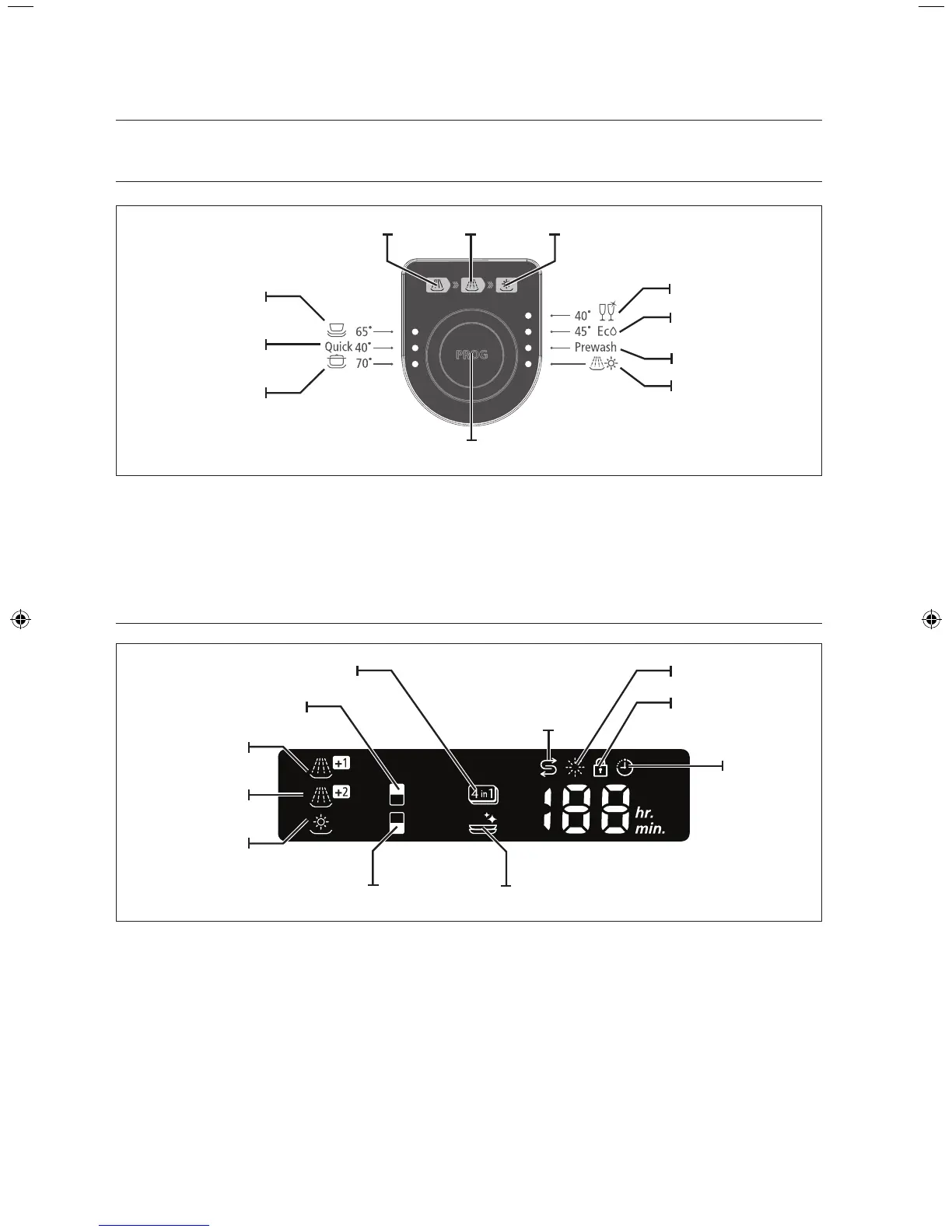
PROGRAM SELECTOR
• The indicator changes each time the button is pressed.
• Press the select button to select one of the seven available wash programs.
• By pressing the select button, the program is selected in the order of “Normal → Quick → Pots & Pans
→ Crystal → Eco → Prewash → Rinse Dry”.
DISPLAY
1. When additional rinse and drying cycles, Half Load, 4 in 1, Sterilization, Child Lock or Delay Start are
selected, the respective indicators are lit.
2. When “Rinse Refill” remains lit, there is no rinse aid in the dispenser and you should refill the rinse aid
dispenser.
3. When “Salt Refill” remains lit, there is no salt in the salt container and you should refill the salt container.
setting up your dishwasher
Half load (Upper spray arm)
4 in 1
Additional Rinse +2
Additional Rinse +1
Additional Dry
Half load (Lower spray arm)
Salt Refill
Delay Start
Rinse Refill
Sterilization
Child Lock
Normal
Quick
Program selection button
Pots & Pans
Prewash
Crystal
Rinse Dry
Eco.
DryingWashing Rinsing



 To Next Page