English
Operations
English48
Options
Using Options
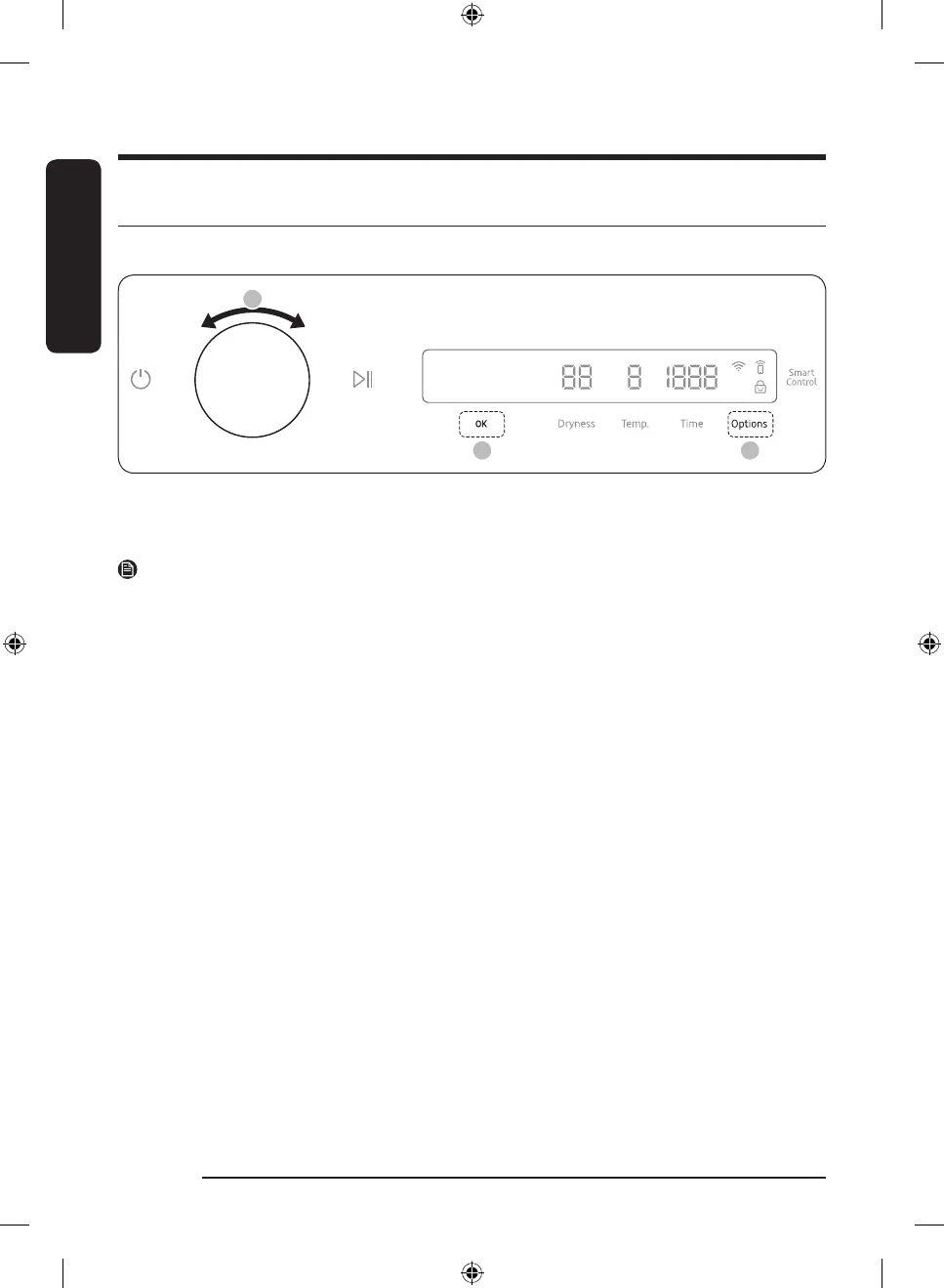
1. Tap Options.
2. Turn the Navigation dial to select the desired option.
3. Tap OK to change the selected option’s settings.
NOTE
• To return to the main screen, tap Options again or turn the Navigation dial to select Back and tap OK.
• If the selected option is not supported, the "Currently not supported" message is displayed, and the OK
button is not activated.
• When you select an option, a brief help message appears for the first ten times of use.
• If you do not manipulate the control panel for 7 seconds after entering the Options menu, the display
returns to the main screen.
Wrinkle Prevent
Reduces wrinkles by rotating the drum intermittently after completing the dry cycle. Wrinkle Prevent
provides approximately 180 minutes. The load is dry and can be removed at any time during the Wrinkle
Prevent cycle.
1. Tap Options.
2. Turn the Navigation dial to select Wrinkle Prevent, and then tap OK.
3. Tap OK to select On or Off.
DV8900HB_SimpleUX_WEB_OID57652_English.indd 48 2022-09-07 11:27:25



 To Next Page