English
English58
Maintenance
Emptying the water tank
Empty the water tank after each use to prevent leaks.
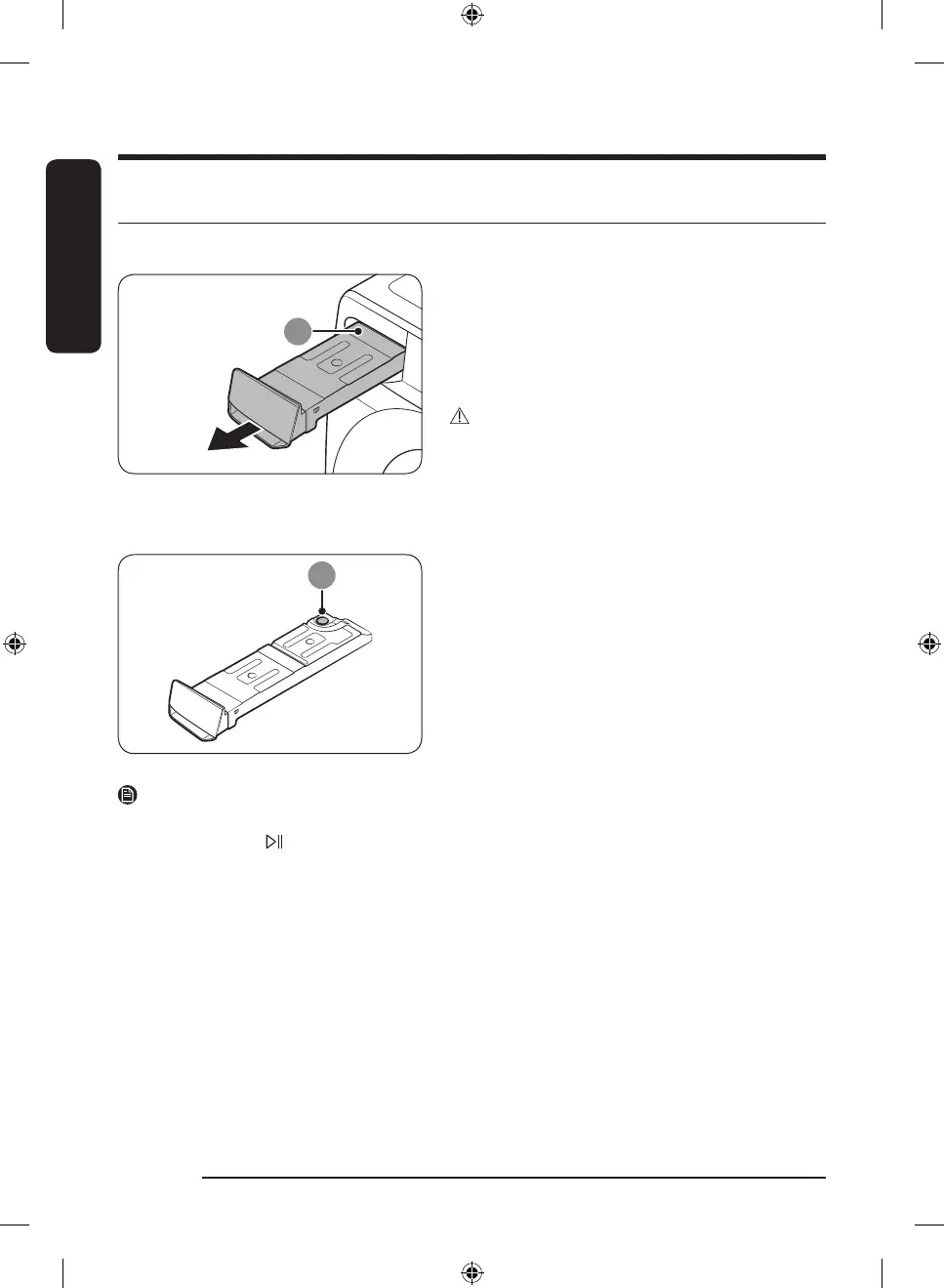
1. Remove the water tank (A) from the dryer.
- Pull the water tank handle with one hand until the
tank is halfway out.
- Once the water tank is halfway out, support the
bottom of the tank with the other hand and pull it
slowly with both hands.
CAUTION
• The water tank is heavy. Slowly remove the water
tank using both hands while keeping the tank at a
level.
• Be careful when removing the full water tank. It is
very heavy and can cause injury if you drop it.
2. Empty the water through the drain hole (B), and then
clean inside the water tank.
- Mix some neutral detergent in lukewarm water.
Fill the water tank with the mixture through the
drain hole (B) and leave it for 30 minutes. Then,
rinse the tank with clean water and completely
dry it.
3. Place the water tank back into place.
NOTE
If the dryer displays the “Empty the tank” message and stops while drying is in progress, empty the water
tank and tap and hold . The “Empty the tank” message will disappear, and the dryer will resume drying.
DV8900HB_SimpleUX_WEB_OID57652_English.indd 58 2022-09-07 11:27:27



 To Next Page