EasyManua.ls Logo

Samsung DVD-C500 - User Manual

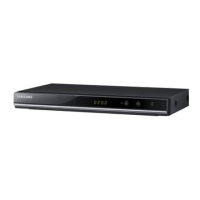
Samsung DVD-C500
16 pages
Print Icon
To Next Page IconTo Next Page
Loading...
DVD-C500
DVD-C550
ENGLISH
DVD Player
User Manual
AK68-01848A(03)
imagine the possibilities
Thank you for purchasing this Samsung product.
To receive more complete service, please register your product at
www.samsung.com/global/register

Questions and Answers

  • P
    Penny LopezJul 26, 2025
    Why is my Samsung DVD-C500 HDMI output jittering?
    • P
      Paul MartinezJul 26, 2025
      If you're experiencing a jittery screen with your Samsung DVD Player's HDMI output, especially with 720p/1080i/1080p HDMI output, it might be due to abnormal frame rate conversion (50Hz to 60Hz). Ensure your TV system settings are correctly configured. Please refer to your TV's user manual for detailed instructions.
  • S
    Scott MahoneyJul 31, 2025
    Why is there no HDMI output from my Samsung DVD-C500?
    • P
      perezrogerJul 31, 2025
      If you're not getting any HDMI output from your Samsung DVD Player, verify that the video output is set to HDMI. Check the connection between your TV and the DVD player's HDMI jack. Also, confirm that your TV supports the DVD player's output resolution (480p/576p/720p/1080i/1080p).
  • T
    Trevor DixonAug 6, 2025
    How to reset password on Samsung DVD-C500 DVD Player?
    • S
      Scott MartinAug 6, 2025
      If you've forgotten the password for your Samsung DVD Player, you can reset all settings, including the password, to factory defaults. To do this, press and hold the ?/?|| button on the front panel for more than 5 seconds when there is no disc inside the player. Note: Only use this method if absolutely necessary.
  • S
    sanderssethAug 13, 2025
    Why is 5.1 channel sound not working on my Samsung DVD-C500 DVD Player?
    • R
      Robert FrancoAug 13, 2025
      5.1 channel sound is reproduced only when specific conditions are met: the DVD player must be connected to a compatible amplifier, and the disc must be recorded with 5.1 channel sound. Check the disc for the "5.1 ch" mark. Ensure your audio system is properly connected and functioning. Verify in the SETUP Menu that the Audio Output is set to Bitstream.
  • P
    Peter HernandezAug 19, 2025
    What to do if the screen is blocked on my Samsung DVD-C500 DVD Player?
    • S
      Samuel OnealAug 19, 2025
      To resolve a blocked screen on your Samsung DVD Player, press and hold the ?/?|| button on the front panel for more than 5 seconds when there is no disc inside. This will revert all settings to factory defaults.

Summary

Getting Started and Safety

Important Safety Instructions

Essential safety guidelines for using the apparatus, including read, keep, heed, follow, water, cleaning, heat, plugs, cords, attachments, and servicing.

Precautions and Warnings

Visual warnings and essential precautions regarding electric shock, voltage, and important literature.

Handling Cautions

Advice on connecting components, moving the player, placement of objects, disc handling, and cleaning.

Product Overview and Features

Description and Controls

Tour of the Remote Control

Detailed explanation of each button on the remote control and its respective function.

Basic Functions

Playing a Disc

Step-by-step instructions for inserting and playing DVD or CD discs.

Advanced Functions

Media Playback Features (Continued)

MPEG4 Playback (DVD-C550 Only)

Playing MPEG4 video files, including DivX and Xvid formats, with specific file requirements.

Playing Media Files Using USB Host

Accessing and playing media files (pictures, movies, music) from USB storage devices.

Media Playback and Utilities

CD Ripping (DVD-C550 Only)

Copying audio files from Audio CDs to a USB device in MP3 format.

Setup Menu Navigation and Options

Setting Up Display Options

Configuring video output, aspect ratio (TV Aspect), BD Wise, and HDMI resolution settings.

Setup Menu Configuration

Setting Up Audio Options

Configuring audio output formats (Dolby Digital, MPEG2), dynamic range compression, and PCM down sampling.

Setup Menu Customization

Setting Up Security Options

Managing parental control ratings and passwords to restrict content access.

Reference and Troubleshooting

Firmware Upgrade

Instructions for downloading and installing firmware updates to keep the player current.

Troubleshooting

Guidance on resolving common issues such as blocked screens, forgotten passwords, and HDMI output problems.

Samsung DVD-C500 Specifications

General IconGeneral
Video upscaling-
Progressive scan outputYes
Audio formats supportedMP3, WMA
Image formats supportedJPG
Video formats supportedMPEG4
Disc types supportedCD, CD-R, CD-RW, DVD, DVD+R, DVD+RW
3DNo
Device typeDVD player
Form factorSet-top
Product colorBlack
Product weight2.78 lbs
Depth (imperial)8.15 \
Width (imperial)14.2 \
Height (imperial)1.5 \

Related product manuals