44 2A. Device Basics
Accessing the User Dictionary
You can create your own custom words and add them
to the built-in dictionary.
䊳 Press > and tap > Language &
keyboard > User dictionary.
To add a custom word:
1. Press > and tap > Language &
keyboard > User dictionary.
2. Press and tap Add.
3. Enter a word and tap OK.
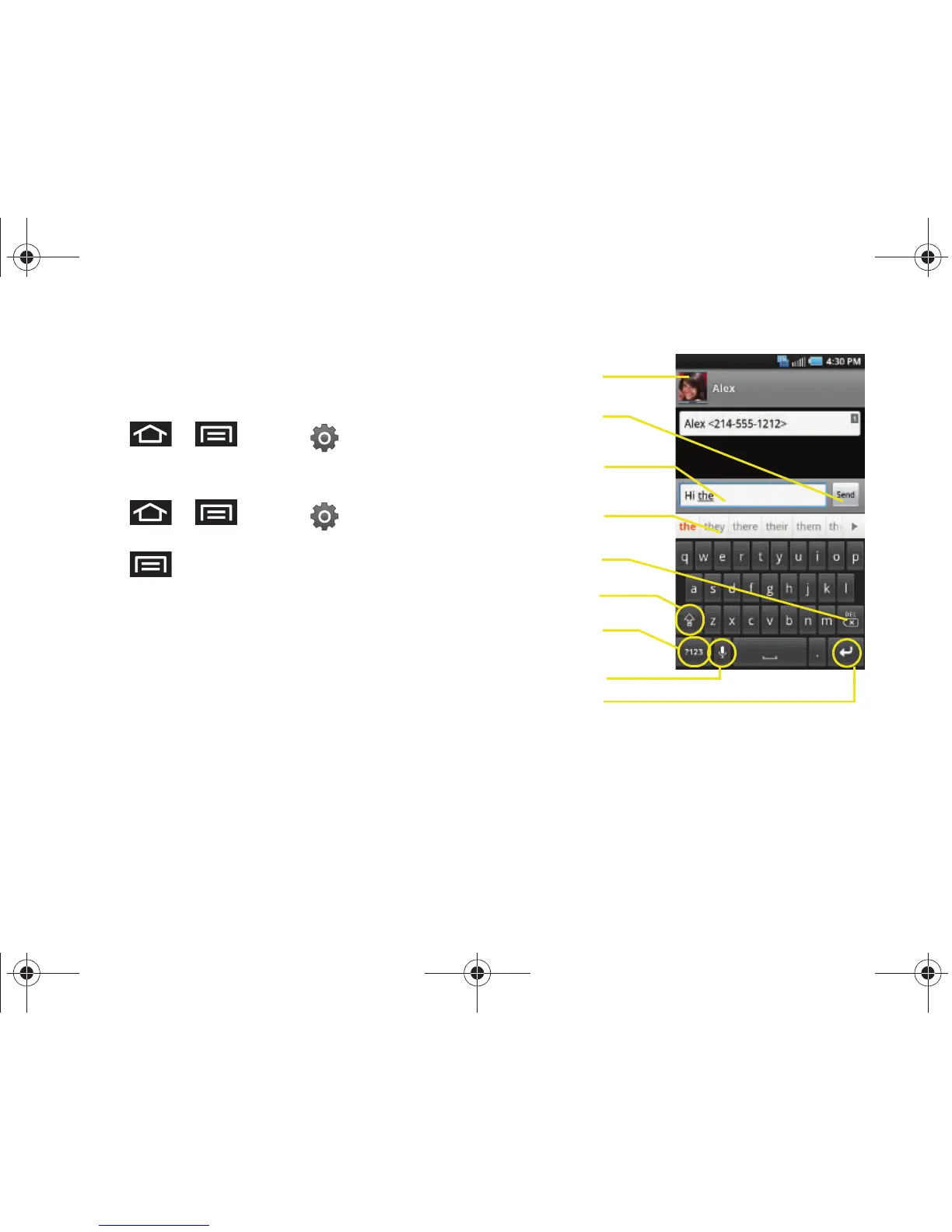
Android Keyboard Overview
䢇 Entry field: a field where text, numbers, or other
characters can be entered.
䢇 Suggested Word choices: a row of selectable word
choices based on the current set of entered text. Tap
an onscreen choice to insert the selection into your
text entry field at the current cursor position.
Tap the gray left and right arrows on this field to
reveal additional word choices.
䢇 Delete: deletes characters from the entry field.
䢇 CAPS/ALT: When in ABC mode, this key changes the
capitalization of the subsequent entered characters.
When in
?123 mode, this key can show additional
symbol characters.






 To Next Page