Shooting options
37
Using the timer
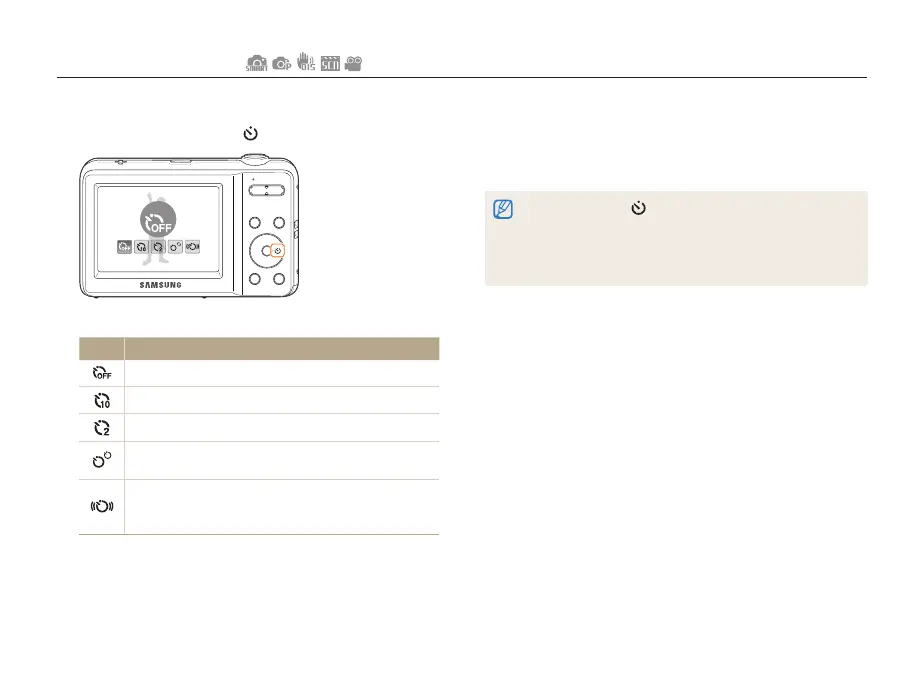
Learn how to set the timer to delay shooting.
3
Press [Shutter] to start the timer.
• The AF-assist light/timer lamp blinks. The camera
automatically takes a photo at the specified time.
• Press [Shutter] or [ ] to cancel the timer.
• Depending on the face detection option you have selected, the timer
function or some timer options may not be available.
• When you set Continuous, Motion Capture, or AEB options, you
cannot use the timer function.
1
In Shooting mode, press [ ].
Off
2
Select an option.
Option Description
Off: The timer is not active.
10 Sec: Takes a photo in 10 seconds.
2 Sec: Takes a photo in 2 seconds.
Double: Takes a photo in 10 seconds, and then takes
another 2 seconds later.
Motion Timer: Detects the movements of the subject
6 seconds after pressing the shutter and takes a photo
when the subject stops moving. (p. 38)
The options may differ depending on the shooting mode.



 To Next Page