Shooting options
51
Improving your photos
Learn how to improve your photos by applying photo styles or colors, or by making some adjustments.
Defining your own RGB tone
1
In Shooting mode, press [ ].
2
Select Shooting or Movie → Photo Style Selector →
Custom RGB.
3
Select a color (R: Red, G: Green, B: Blue).
Back Move
4
Adjust the amount of the selected color.
(-: less or +: more)
Applying photo styles
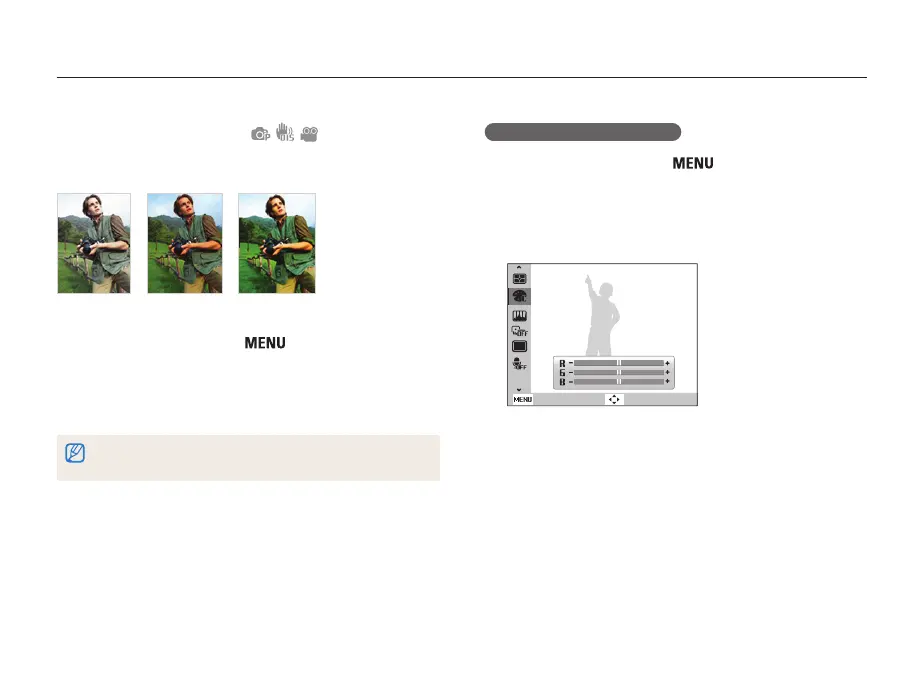
Apply a different photo style to your photos, such as Soft, Vivid,
or Forest.
Soft Vivid Forest
1
In Shooting mode, press [ ].
2
Select Shooting or Movie → Photo Style Selector →
an option.
• Select Custom RGB to define your own RGB tone.
If you use this function, you cannot set face detection and image adjustment
options.



 To Next Page