091
You cannot edit files directly on the camera. Transfer files to a folder on your computer before editing.
You cannot copy files in your computer to the camera.
Intelli-studio supports the following formats:
- Videos: AVI(MJPEG), MP4 (Video: H.264, Audio: AAC), WMV (WMV 7/8/9)
- Photos: JPG, GIF, BMP, PNG, TIFF
Depending on the video player programs, video files may not play. To play video files captured with your camera, install and use the Intelli-studio
program on your computer.
You cannot use Intelli-studio on Macintosh computers.
Transferring files to your computer (for Windows)
Using Intelli-studio
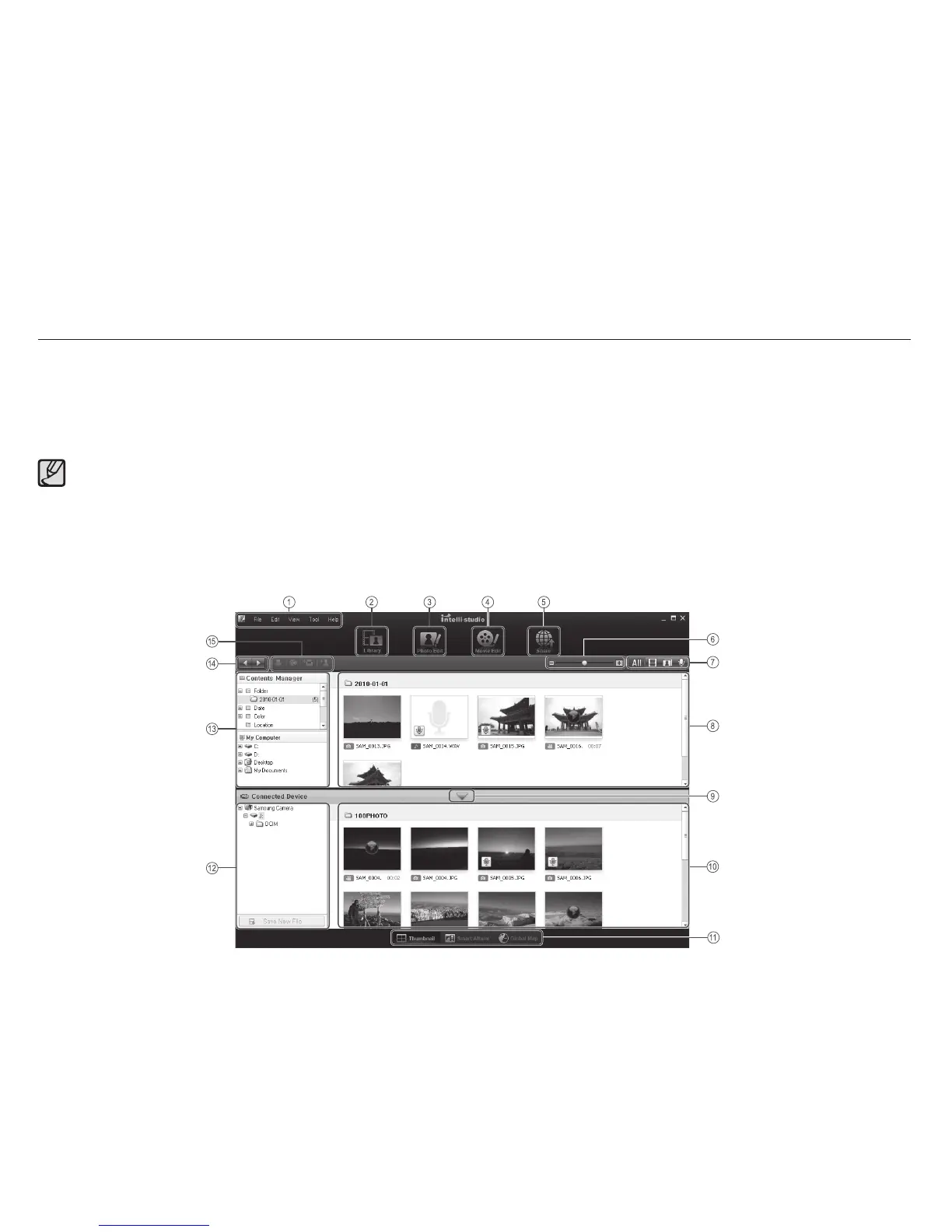
Once you have installed the Intelli-studio on your PC, the Intelli-studio starts automatically when a camera is connected with your PC. If the
Intelli-studio does not start after you have connected the camera to your PC, double-click the Intelli-studio icon on your Windows desktop.
The Intelli-studio allows you to play back and edit files. You can also upload files to websites, such as Flickr or YouTube.
For details, select [Help
Help] in the program.



 To Next Page