EasyManua.ls Logo

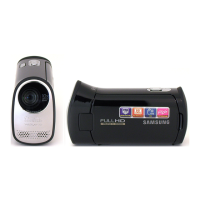
Samsung HMX-T10BP - User Manual

Samsung HMX-T10BP
123 pages
Print Icon
To Next Page IconTo Next Page
Loading...
User Manual
HMX-T10WP
HMX-T10BP
HMX-T10OP
HMX-T11WP
HMX-T11BP
HMX-T11OP
High Defi nition Digital Camcorder
www.samsung.com/register
For video recording, use a memory card that supports faster write speeds.
- Memory Card: A Class 6 SDHC card or above.

Table of Contents

Questions and Answers

  • S
    Stephen JenkinsAug 11, 2025
    What to do if my Samsung Camcorder says 'Card Full'?
    • M
      Mark CoffeyAug 11, 2025
      If your Samsung Camcorder displays 'Card Full', you should delete unnecessary files from the memory card. Alternatively, back up your files to a PC or another storage media and then delete unneeded files. You can also replace the memory card with another one that has enough free space.
  • C
    Carol JohnsonAug 16, 2025
    What to do if my Samsung Camcorder displays 'Low Battery'?
    • J
      Justin DuncanAug 17, 2025
      If your Samsung Camcorder indicates a low battery, replace it with a fully charged battery or connect the AC power adapter.
  • J
    Jason BenjaminAug 22, 2025
    What to do if my Samsung HMX-T10BP says 'Card Error'?
    • T
      Timothy VillarrealAug 22, 2025
      If your Samsung Camcorder displays a 'Card Error', replace the memory card with another card.
  • E
    Erin PhillipsAug 28, 2025
    What does it mean if my Samsung HMX-T10BP says 'Insert card'?
    • B
      Brian BoydAug 28, 2025
      If your Samsung Camcorder prompts you to 'Insert card', it means you need to insert a memory card into the device.
  • J
    Jeff RogersSep 3, 2025
    What to do if my Samsung Camcorder says 'Card Locked'?
    • D
      davidpetersSep 3, 2025
      If your Samsung Camcorder displays 'Card Locked', release the write protection tab on the memory card.

Samsung HMX-T10BP Specifications

General IconGeneral
BrandSamsung
ModelHMX-T10BP
CategoryCamcorder
LanguageEnglish

Related product manuals