EasyManua.ls Logo

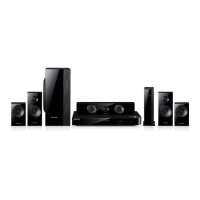
Samsung HT-F5500 - User Manual

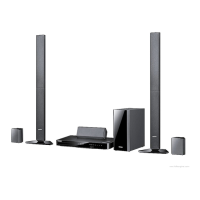
Samsung HT-F5500
59 pages
Print Icon
To Next Page IconTo Next Page
Loading...
imagine the possibilities
Thank you for purchasing this Samsung product.
To receive more complete service,
please register your product at
www.samsung.com/register
5.1CH Blu-ray™
Home Entertainment System
user manual
HT-F5500
HT-F5550
HT-F5500_50-XY_0214.indd 1HT-F5500_50-XY_0214.indd 1 2013-02-15 오후 4:57:382013-02-15 오후 4:57:38

Questions and Answers

  • M
    matthew22Sep 12, 2025
    Why can't I change the aspect ratio on my Samsung HT-F5500 Home Theater System?
    • K
      Karen GutierrezSep 12, 2025
      You can play 16:9 Blu-ray/DVD discs in 16:9 Full mode, 4:3 Letter Box mode, or 4:3 Pan-Scan mode on your Samsung Home Theater System, but 4:3 Blu-ray/DVD discs are played in 4:3 ratio only.
  • M
    Micheal SwansonAug 25, 2025
    Why is there no sound coming from my Samsung Home Theater System?
    • S
      Spencer RobbinsAug 25, 2025
      If you're not getting any sound from your Samsung Home Theater System, especially during fast playback, slow playback, or step motion playback, this is normal as the home cinema does not play sound during these modes. Also ensure that the speakers are properly connected and the speaker setup is correctly customized. Finally, check if the disc is severely damaged.
  • S
    stevenriceAug 25, 2025
    Why is Dolby Digital 5.1 CH Surround Sound not working on my Samsung HT-F5500?
    • M
      Michael SchmittAug 26, 2025
      If your Samsung Home Theater System isn't producing Dolby Digital 5.1 CH Surround Sound, verify that the disc has the "Dolby Digital 5.1 CH" mark. Also, confirm that the audio language is correctly set to Dolby Digital 5.1-CH in the information display.
  • A
    Annette HayesSep 23, 2025
    Why is there an abnormal HDMI output screen on my Samsung Home entertainment system?
    • J
      Jade SmithSep 23, 2025
      If random noise appears on the screen of your Samsung Home entertainment system, it means that the TV does not support HDCP (High-bandwidth Digital Content Protection).
  • N
    Nicholas HarrisSep 12, 2025
    Why won't my Samsung Home Theater System start playback?
    • H
      Hunter GuerraSep 12, 2025
      If playback doesn't start on your Samsung Home Theater System, it could be due to a few reasons: * A Blu-ray/DVD disc purchased from abroad may not be playable, so check the region number of the disc. * CD-ROMs and DVD-ROMs cannot be played on this product. * Ensure that the rating level is correct.
  • B
    Brandon YoungSep 16, 2025
    Why is there no HDMI output from my Samsung Home entertainment system?
    • A
      Alex BennettSep 16, 2025
      If there is no HDMI output from your Samsung Home entertainment system, check the connection between the TV and the HDMI jack of the product. Also, verify that your TV supports the 576p/480p/720p/1080i/1080p HDMI input resolution.
  • B
    Brandon BruceSep 5, 2025
    What to do if my Samsung HT-F5500 Home Theater System disc is rotating but there is no picture?
    • M
      Monique BuckleySep 5, 2025
      If the disc is rotating in your Samsung Home Theater System but no picture appears, or the picture quality is poor and shaking, first ensure that your TV is powered on. Next, verify that the video cables are correctly connected. Also, check if the disc is dirty or damaged. A poorly manufactured disc may also cause this issue.
  • P
    paulbakerSep 5, 2025
    How to eject a disc from my Samsung HT-F5500?
    • T
      Taylor ButlerSep 5, 2025
      If you can't eject the disc from your Samsung Home Theater System, check if the power cord is securely plugged into the outlet. If it is, try turning the power off and then back on.
  • W
    wbowenSep 17, 2025
    What to do if the Samsung Home entertainment system disc is rotating but there is no picture?
    • P
      Paul GonzalezSep 18, 2025
      If the disc is rotating in your Samsung Home entertainment system but no picture is produced, and the picture quality is poor or shaking, first check if the TV power is on and ensure the video cables are connected properly. The disc may be dirty or damaged, or it could be a poorly manufactured disc.
  • U
    uarmstrongAug 30, 2025
    How to troubleshoot no HDMI output on Samsung Home Theater System?
    • W
      Walter JenkinsAug 30, 2025
      If you're experiencing no HDMI output with your Samsung Home Theater System, first check the connection between the TV and the HDMI jack on the product. Then, verify that your TV supports the HDMI input resolution (576p/480p/720p/1080i/1080p).

Summary

Safety Information

General Safety Warnings

Important safety precautions, warnings, and cautions for product usage.

Getting Started

Disc and Format Compatibility

Details on playable and non-playable disc types and supported formats.

Supported Video File Formats

Specifications for supported video codecs, containers, resolution, and frame rates.

Connections

Speaker Connection and Placement

Guides on connecting and positioning the 5.1ch speaker system.

Network Router Connectivity and Notes

Instructions for wired/wireless setup and important connection notes.

Settings

Initial Setup and Settings Access

Guides through initial configuration and accessing the main settings menu.

Audio and Speaker Configuration

Guides on speaker setup, volume, audio output options, and sound settings.

Network Configuration and Smart Features

Details network settings, Wi-Fi Direct, AllShare, apps, and system settings.

Wireless Network and Wi-Fi Direct Setup

Guides on wireless network setup, including automatic, manual, and WPS methods.

Media Play

AllShare Network Functionality and Software

Using network for media and downloading software.

Network Services

Samsung Account Login and Service Access

Instructions for logging into a Samsung account and service prerequisites.

Movies, TV Shows, and App Management

Guides on accessing and using content and applications from Samsung Apps.

Appendix

Digital Output Configuration and Resolution Modes

Tables explaining digital output settings and resolution modes.

Troubleshooting Common Problems

A comprehensive guide to resolving common issues and errors.

Samsung HT-F5500 Specifications

General IconGeneral
Disc loading typeTray
Disc types supportedBD, CD, DVD
Playback disc formatsBlu-Ray audio, Blu-Ray video, CD audio, CD video, VCD
Number of optical discs1 discs
Optical disc player typeBlu-Ray player
Built-in HDDNo
HDD capacity0 GB
MP3 playbackYes
Apple docking compatibilityiPhone, iPod
Video formats supportedAVCHD, DIVX, MKV, RMVB
Audio decodersDolby Digital, Dolby Digital Plus, Dolby Pro Logic II, Dolby TrueHD, DTS, DTS 96/24, DTS Neo:6, DTS-HD
RMS rated power1000 W
Audio output channels5.1 channels
Audio formats supportedAAC, FLAC, LPCM, MP3, WAV, WMA
Supported radio bandsFM
Wireless satellite speakers-
Subwoofer typePassive subwoofer
Product colorBlack
Consumer Electronics Control (CEC)Anynet+
HDMI in1
USB version2.0
Digital audio coaxial in0
AC input voltage100-240 V
AC input frequency50 - 60 Hz
Power consumption (standby)0.5 W
Power consumption (typical)72.5 W
Weight and Dimensions IconWeight and Dimensions
Subwoofer weight3700 g
Center speaker weight900 g
Satellite speaker weight600 g
Subwoofer dimensions (WxDxH)155 x 285 x 350 mm
Front speaker dimensions (WxDxH)95 x 75 x 144 mm
Center speaker dimensions (WxDxH)227 x 75 x 95 mm
Satellite speaker dimensions (WxDxH)95 x 75 x 114 mm

Related product manuals