EasyManua.ls Logo

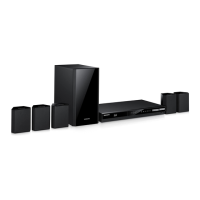
Samsung HT-F5550K - User Manual

Samsung HT-F5550K
60 pages
Print Icon
To Next Page IconTo Next Page
Loading...
imagine the possibilities
Thank you for purchasing this Samsung product.
To receive more complete service,
please register your product at
www.samsung.com/register
5.1CH Blu-ray™
Home Entertainment System
user manual
HT-F5500K
HT-F5550K
HT-F5530HK
HT-F5550HK
HT-F5500K_50K_30HK_50HK-XM_0528.indd 1HT-F5500K_50K_30HK_50HK-XM_0528.indd 1 2013-05-28 2:16:172013-05-28 오후 2:16:17

Questions and Answers

  • C
    calebharrellSep 5, 2025
    Why is there no sound when listening to TV audio through my Samsung Home entertainment system?
    • T
      Tricia HooperSep 5, 2025
      If you are listening to TV audio through your Samsung Home entertainment system and no sound is heard, it may be because pressing the OPEN/CLOSE ^ button while using the D. IN or AUX functions turns on the Blu-ray/DVD disc functions and mutes the TV audio.
  • W
    William NealAug 25, 2025
    How to fix no sound on Samsung HT-F5550K?
    • S
      Shawn HartmanAug 25, 2025
      If no sound is coming from your Samsung Home Theater System, first check if the speakers are connected properly. Also, ensure that the speaker setup is correctly customized. Note that the home cinema does not play sound during fast playback, slow playback, and step motion playback. Finally, ensure that the disc is not severely damaged.
  • K
    Kimberly MorrisAug 25, 2025
    How to troubleshoot no HDMI output on Samsung HT-F5550K Home Theater System?
    • V
      Valerie DavisAug 26, 2025
      If there is no HDMI output from your Samsung Home Theater System, verify the connection between the TV and the HDMI jack on the product. Also, check if your TV supports the HDMI input resolution (576p/480p/720p/1080i/1080p).
  • J
    James PonceSep 13, 2025
    How to fix Samsung Home entertainment system when it can't receive radio broadcasts?
    • M
      Melissa ParkerSep 13, 2025
      If you can't receive radio broadcasts on your Samsung Home entertainment system, ensure the antenna is connected properly. If the antenna's input signal is weak, install an external FM antenna in an area with good reception.
  • R
    Ronald OrtizSep 23, 2025
    Why doesn't the menu screen appear on my Samsung Home theatre system?
    • A
      abeckSep 23, 2025
      The menu screen does not appear even when the menu function is selected if you are using a disc that does not contain menus.
  • V
    Victor BurnsSep 9, 2025
    Why is my Samsung Home entertainment system remote control not working?
    • M
      Megan HodgesSep 9, 2025
      If your Samsung Home entertainment system remote control isn't working, ensure you're within the operational range and at the correct angle relative to the sensor. Check if the batteries are drained and make sure you've correctly selected the mode (TV/BD) functions of the remote control (TV or BD).
  • K
    Kathryn PierceSep 1, 2025
    What causes an abnormal HDMI output screen on Samsung HT-F5550K Home Theater System?
    • B
      brownkathleenSep 1, 2025
      If random noise appears on the screen when using HDMI output on your Samsung Home Theater System, it means that the TV does not support HDCP (High-bandwidth Digital Content Protection).
  • W
    Whitney SheltonSep 23, 2025
    Why can't I change the aspect ratio on my Samsung Home theatre system?
    • R
      Ruben NolanSep 23, 2025
      You can play 16:9 Blu-ray/DVD discs in 16:9 Full mode, 4:3 Letter Box mode, or 4:3 Pan-Scan mode, but 4:3 Blu-ray/DVD discs are played in 4:3 ratio only.
  • A
    Aaron BarberSep 18, 2025
    Why is Dolby Digital 5.1 CH Surround Sound not working on my Samsung Home theatre system?
    • K
      Kimberly TurnerSep 18, 2025
      If Dolby Digital 5.1 CH Surround Sound is not produced, verify that the disc has the "Dolby Digital 5.1 CH" mark. Also, check if the audio language is correctly set to Dolby Digital 5.1-CH in the information display.
  • E
    elliottlisaAug 28, 2025
    Why do I get an error using BD-LIVE service on Samsung HT-F5550K?
    • M
      marknelsonAug 28, 2025
      If an error occurs when using the BD-LIVE service on your Samsung Home Theater System, ensure that the memory device has at least 1GB of free space to accommodate the BD-LIVE service, which you can check in BD Data Management.

Samsung HT-F5550K Specifications

General IconGeneral
TypeHome Theater System
Number of Channels5.1
Total Power Output1000 W
Blu-ray PlayerYes
3D PlaybackYes
HDMI Inputs2
USB PlaybackYes
Wi-FiYes
DLNA SupportYes
Smart HubYes
BluetoothYes
Optical Digital Audio Input1
Wireless Rear SpeakersNo
3D Pass ThroughYes
Smart TV ConnectivityYes
Audio FormatsDolby Digital, DTS
Video FormatsMKV, AVCHD

Related product manuals