22
•
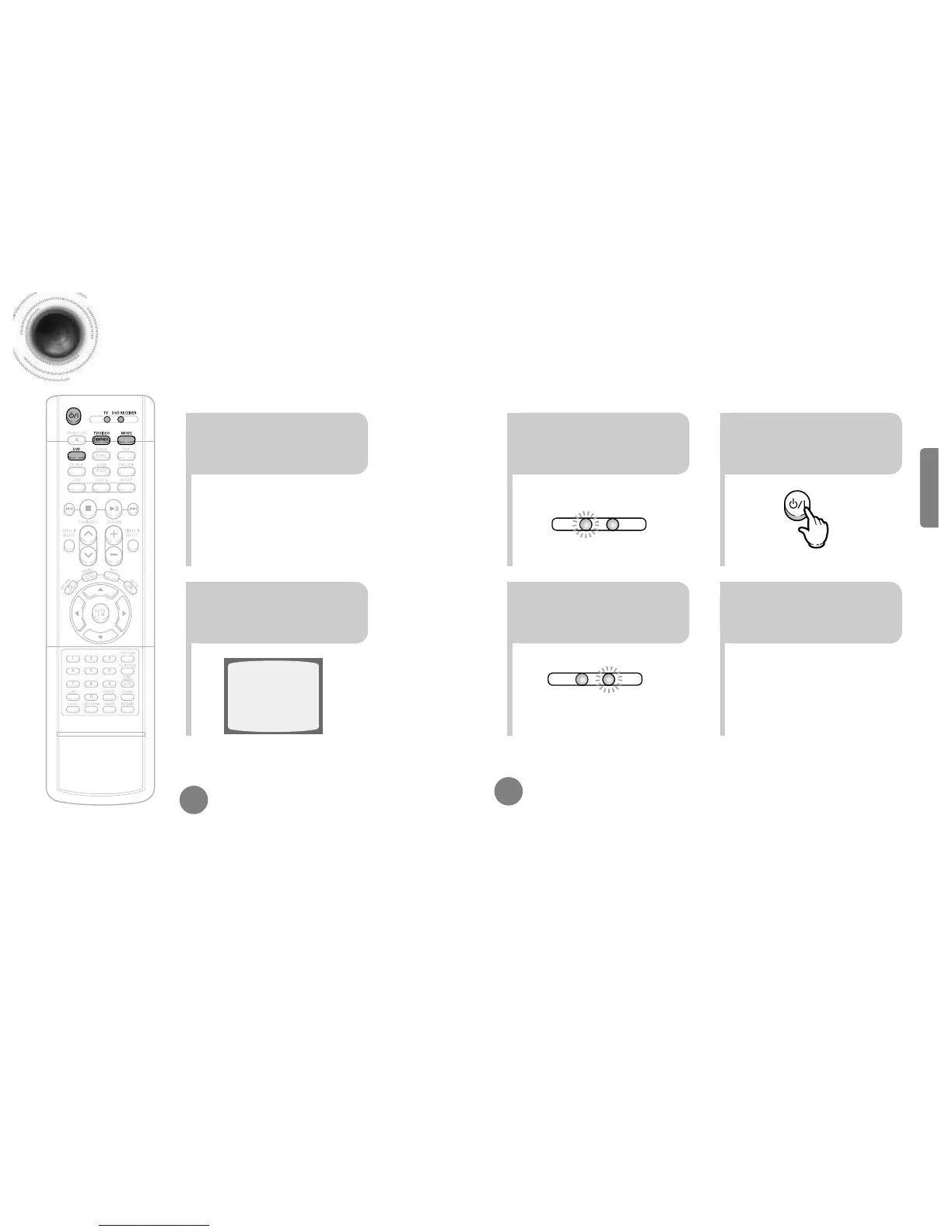
Each time the Mode button is pressed, the TV indicator (red) and the DVD RECEIVER indicator (green) will flash alternately.
•
You can operate the TV while the TV indicator is flashing and the DVD player while the DVD indicator is flashing.
•
Buttons Enabled for TV Operation: POWER, CHANNEL, VOLUME, TV/VIDEO, and Numeric (0-9) buttons.
•
By default, the remote control is set to work with Samsung TVs.
See page 63 for more information on the operation of the remote control.
Press MODE button.
To Operate the TV and DVD Player with a Single Remote Control
23
Press the MODE button so
that the TV indicator on the
remote control flashes.
Press the POWER button to
turn on the TV.
56
Press the MODE button so
that the DVD RECEIVER
indicator on the remote
control flashes.
Press DVD button to select
DVD/CD mode.
Before Using Your DVD Player
Your DVD player is capable of playing DVD, VCD, CD, MP3 and JPEG discs.Depending on the disc
you are using, these instructions may vary slightly. Read the instructions carefully before using.
21
1
Plug the power cord into the
AC power supply.
4
Press TV/VIDEO button to
select VIDEO mode.
CONNECTIONS
•
This device is designed to work with the NTSC video format.
•
For normal playback, the video format a DVD disc is recorded in
must coincide with your TV's video format.
TV Broadcast System


 To Next Page