6
Features
5
Multi-Disc Playback & AM/FM Tuner
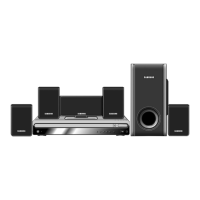
The HT-SK5 combines the convenience of multi-disc playback capability,
including DVD, VCD, CD, MP3-CD, CD-R, CD-RW, and DVD-RW, with a
sophisticated AM/FM tuner, all in a single player.
Dolby Pro Logic II
Dolby Pro Logic II is a new form of multi-channel audio
signal decoding technology that improves upon existing
Dolby Pro Logic.
Built-in 5.1-Channel Amplifier
The HT-SK5 comes with a built-in 5.1-channel amplifier, allowing
you to enjoy dynamic sound.
DTS (Digital Theater Systems)
DTS is an audio compression format developed by Digital Theater
Systems Inc. It delivers full-frequency 5.1 channel sound.
Power Saving Function
The HT-SK5 automatically shuts itself off after 20 minutes in
the stop or pause mode.
TV Screen Saver Function
The HT-SK5 automatically brightens and darkens the brightness of the
TV screen after 2 minutes in the stop or pause mode.
The HT-SK5 automatically switches itself into the power saving mode
after 20 minutes in the screen saver mode.
Customized TV Screen Display
The HT-SK5 allows you to select your favorite image during JPEG, DVD,
or VCD playback and set it as your background wallpaper.
PREPARATION
Contents
PREPARATION
Safety Warnings..................................................................................................................................................................1
Precautions.........................................................................................................................................................................2
Safety Instructions ..............................................................................................................................................................3
Features..............................................................................................................................................................................5
Notes on Discs....................................................................................................................................................................7
Description..........................................................................................................................................................................9
CONNECTIONS
Connecting the Speakers....................................................................................................................................................13
Connecting the Video to TV................................................................................................................................................15
P.SCAN(Progressive Scan) Function .................................................................................................................................16
Connecting External Components ......................................................................................................................................17
Connecting the Antennas....................................................................................................................................................19
Before Using Your DVD Player...........................................................................................................................................21
OPERATION
Disc Playback .....................................................................................................................................................................23
Selecting a Disc in the Disc changer ..................................................................................................................................24
Displaying Disc Information ................................................................................................................................................25
Checking the Remaining Time............................................................................................................................................26
Fast/Slow Playback.............................................................................................................................................................27
Skipping Scenes/Songs......................................................................................................................................................28
Repeat Playback.................................................................................................................................................................29
A-B Repeat Playback..........................................................................................................................................................30
Angle Function....................................................................................................................................................................31
Zoom Function....................................................................................................................................................................32
Selecting Audio/Subtitle Language.....................................................................................................................................33
Moving Directly to a Scene/Song........................................................................................................................................34
JPEG File Playback ............................................................................................................................................................35
Using Disc Menu.................................................................................................................................................................37
Using the Title Menu...........................................................................................................................................................38
SETUP
Setting the Language..........................................................................................................................................................39
Setting TV Screen type.......................................................................................................................................................41
Setting Parental Controls (Rating Level).............................................................................................................................43
Setting the Password..........................................................................................................................................................45
Setting the Wallpaper..........................................................................................................................................................47
Setting the Speaker Mode ..................................................................................................................................................49
Setting the Test Tone..........................................................................................................................................................50
Setting the Delay Time........................................................................................................................................................51
Setting the Audio Quality........................................................................................................................................................................53
Setting the DRC (Dynamic Range Compression)...............................................................................................................55
Sound Field (DSP)/EQ Function.........................................................................................................................................56
Dolby Pro Logic II Mode......................................................................................................................................................57
Dolby Pro Logic II Effect .....................................................................................................................................................58
RADIO OPERATION
Listening to Radio ...............................................................................................................................................................59
Presetting Stations..............................................................................................................................................................60
MISCELLANEOUS
Convenient Functions .........................................................................................................................................................61
Operating the TV with the Remote Control.........................................................................................................................63
Before Calling for Service ...................................................................................................................................................65
Cautions on Handling and Storing Discs ............................................................................................................................67
Specifications......................................................................................................................................................................68
Notes on Terminology.........................................................................................................................................................69
Warranty .............................................................................................................................................................................70


 To Next Page