43 44
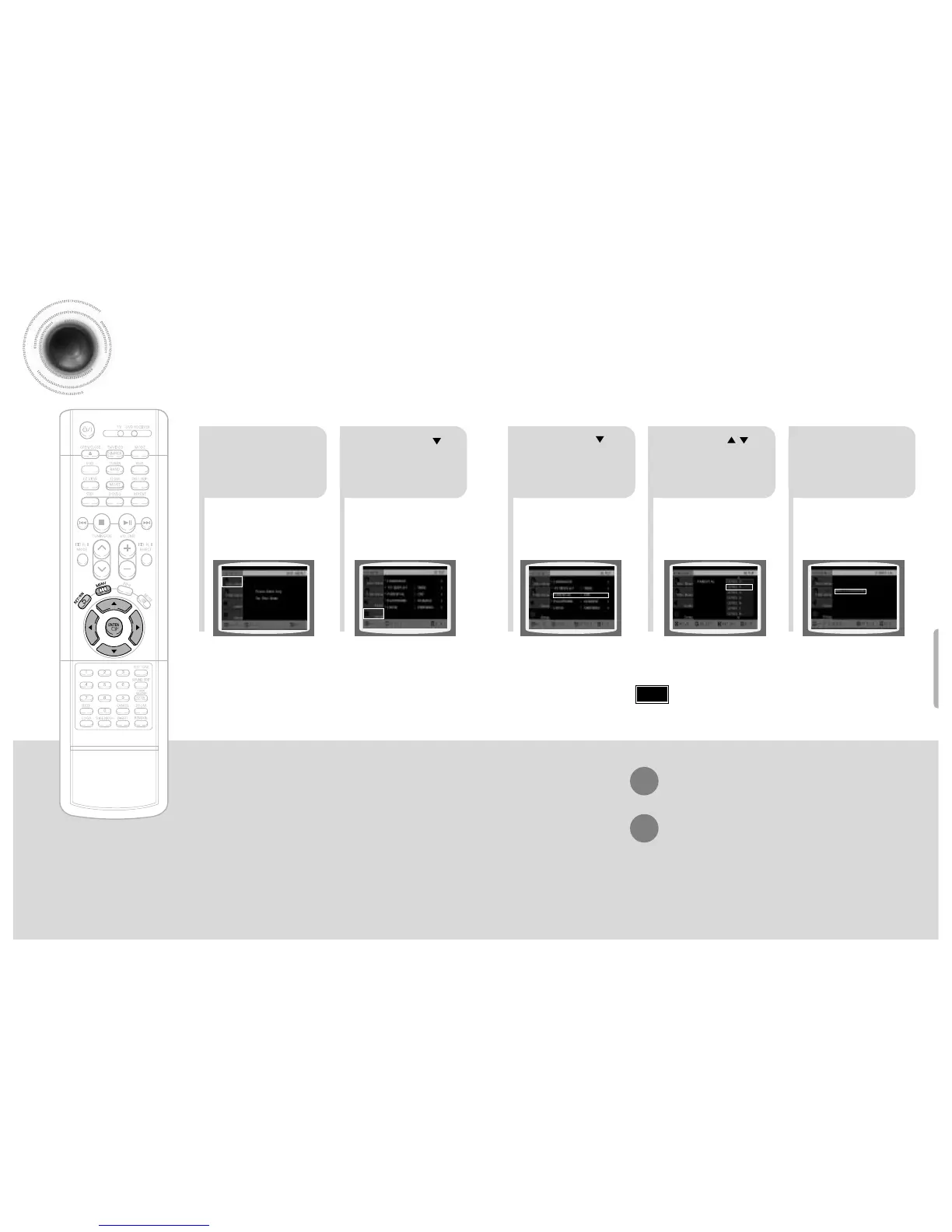
Setting Parental Controls (Rating Level)
Use this to restrict playback of adult or violent DVDs you do not want children to view.
•
This function works only if a DVD disc contains the rating level information.
Press RETURN button to return to the previous level.
Press MENU button to exit the setup screen.
21
Press MENU button.
Press Cursor
button to move to
‘Setup’ and then
press ENTER button.
4
•
The password is set to "7890" by default.
•
Once the setup is complete, you will be
taken to the previous screen.
•
If you have selected Level 6, you
cannot view DVDs with Level 7 or
higher.
•
The higher the level, the closer the
content is to violent or adult material.
3 5
Press Cursor
button to move to
‘PARENTAL’ and then
press ENTER button.
Press Cursor , button
to select the desired rating
level and then press
ENTER button.
Enter the password
and then press
ENTER button.
Note


 To Next Page