English - 5
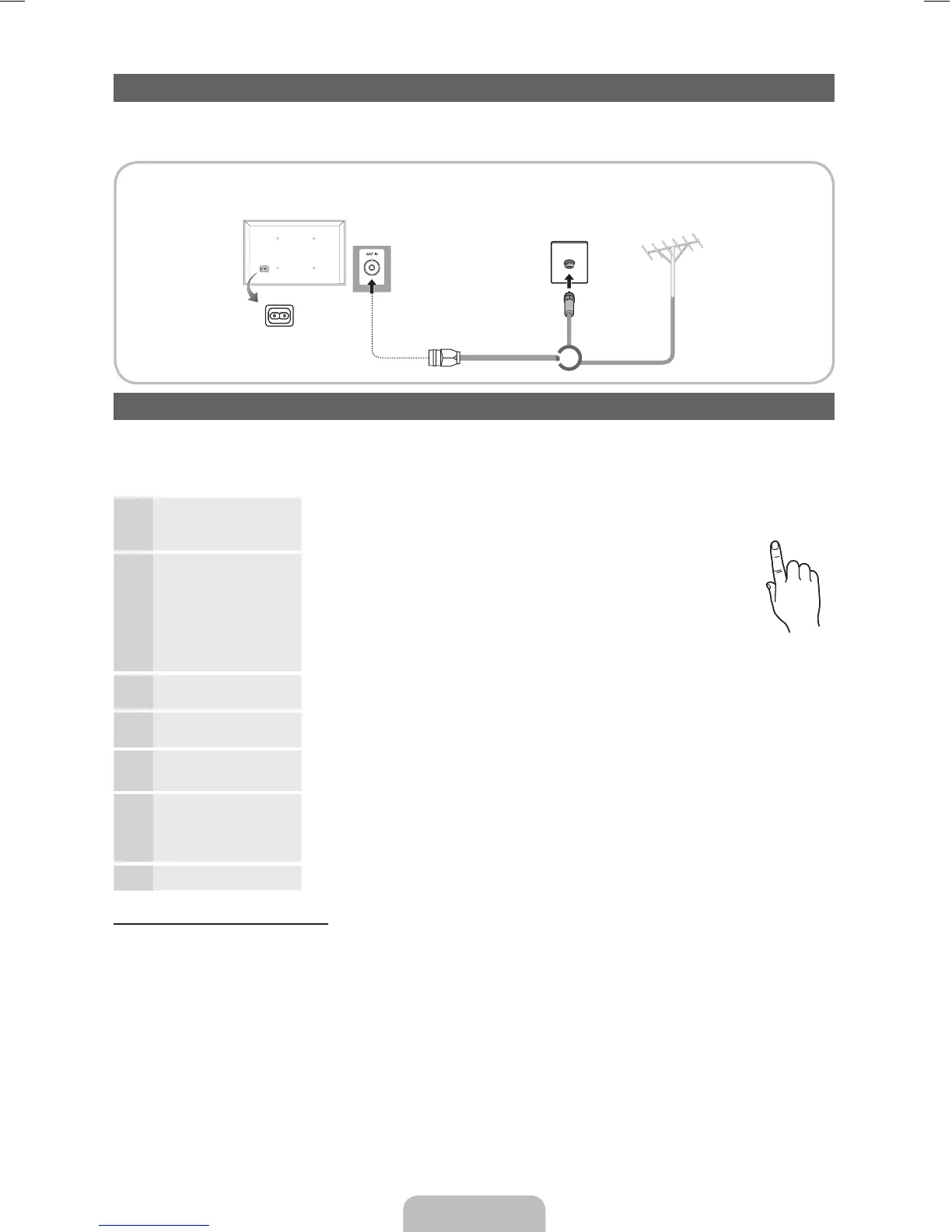
Connecting to an Antenna
When the TV is initially powered on, basic settings proceed automatically.
✎
Preset: Connecting the mains and antenna.
Plug & Play (Initial Setup)
When the TV is initially powered on, a sequence of on-screen prompts will assist in configuring basic settings. Press the
POWER
P
button. Plug & Play is available only when the Source is set to TV.
✎
To return to the previous step, press the Red button.
1
Selecting a language
Press the ▲ or ▼ button, then press the ENTER
E
button.
Select the desired OSD (On Screen Display) language.
(Not available in some locations)
P
POWER
Selecting Store Demo or
Home Use
Press the ◄ or ► button, then press the ENTER
E
button.
Select the Home Use mode. Store Demo mode is for retail environments.
To return the unit’s settings from Store Demo to Home Use (standard):
Press the volume button on the TV. When the OSD volume is displayed,
press and hold MENU for 5 sec.
Store Demo is only for shop display. If you select it, several functions are not
able to use. Please select Home Use when you watch at home.
2
Selecting a country
Press the ▲ or ▼ button, then press the ENTER
E
button.
Select the appropriate country. (Not available in some locations)
Selecting an area
Press the ▲ or ▼ button, then press the ENTER
E
button.
Select the appropriate area. (Not available in some locations)
3
Setting the Clock Mode Set the Clock Mode automatically or manually.
✎
If you select the Auto, select the time zone which you live. (Australia only)
4
Selecting a channel Select the desired broadcasting signal.
Press the ◄ or ► button, then press the ENTER
E
button.
For more information, refer to Channel → Auto Tuning.
Press the ENTER
E
button at any time to interrupt the memorisation process.
5
Enjoy your TV.
Press the ENTER
E
button.
If You Want to Reset This Feature...
Select System - Plug & Play (Initial Setup). Enter your 4 digit PIN number. The default PIN number is “0-0-0-0”. If you want to
change the PIN number, use the Change PIN function.
You should do Plug & Play (MENU → System) again at home although you did in shop.
✎
If you forget the PIN code, press the remote control buttons in the following sequence in Standby mode, which resets
the PIN to “0-0-0-0” : MUTE → 8 → 2 → 4 → POWER (on)
VHF/UHF AntennaCable
or
TV Rear Panel
✎
The position of power input port may differ depending on the model.
[LD403-503-XY]BN68-03718A-ENG.indd 5 2011-04-29 �� 8:24:56



 To Next Page