Sound Control
Changing the Sound Standard
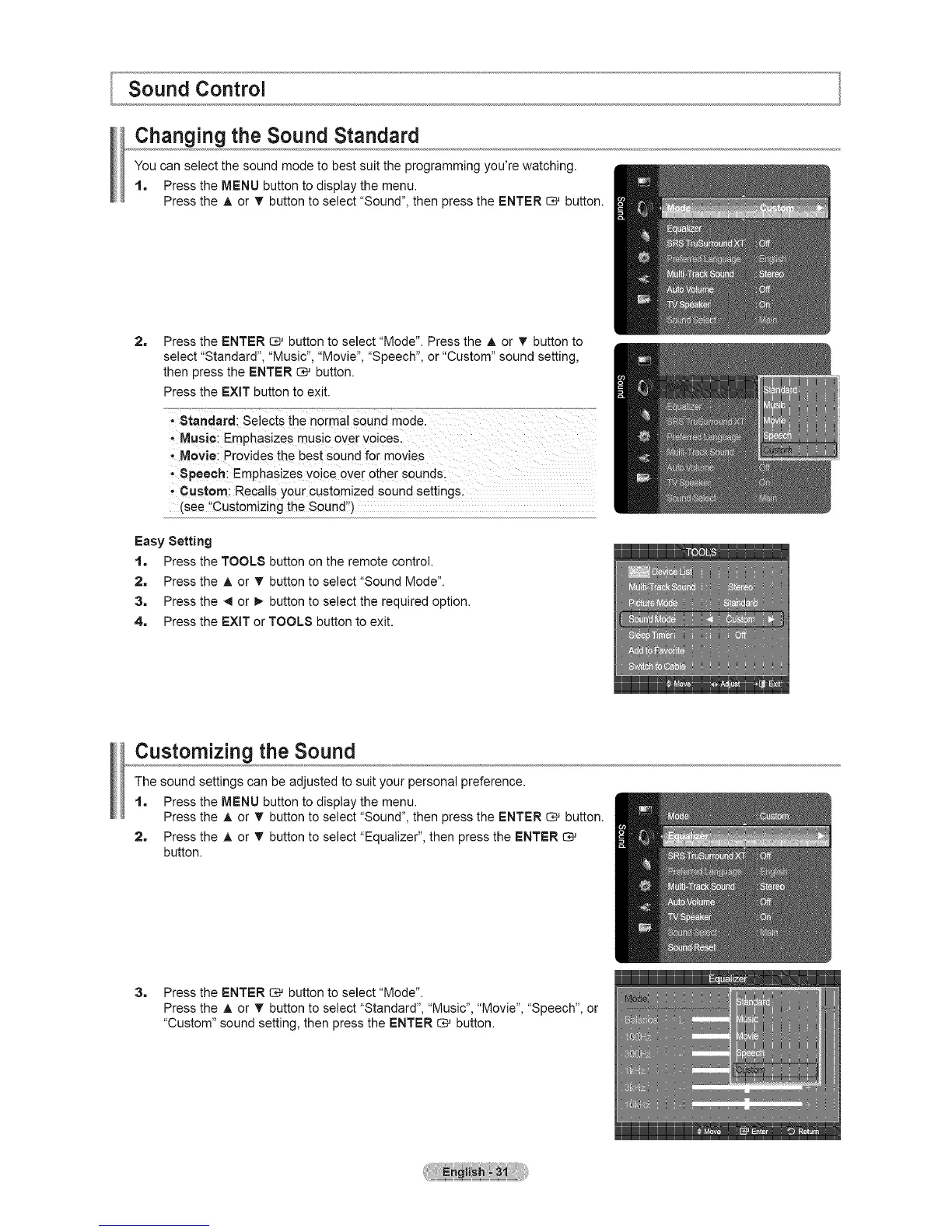
You can select the sound mode to best suit the programming you're watching.
1. Press the MENU button to display the menu.
Press the A or • button to select "Sound", then press the ENTER _ button.
2= Press the ENTER _ button to select "Mode". Press the A or V button to
select "Standard", "Music", "Movie", "Speech", or "Custom" sound setting,
then press the ENTER _ button.
Press the EXIT button to exit.
' Standard: selecti ............"
the no[real sound mode.
' Musi¢i Emphasizes music over voicesl
,,Movie: Provides the best sound for movies
speech i Emphasizes voic e over other Sounds;
, Custom: Recalls your customized sound settings:
(see ,Customizing the Soundi')
Easy Setting
1, Press the TOOLS button on the remote control.
2, Press the A or _' button to select "Sound Mode".
3, Press the _1or !_ button to select the required option.
4, Press the EXIT or TOOLS button to exit.
Customizing the Sound
The sound settings can be adjusted to suit your personal preference.
1. Press the MENU button to display the menu.
Press the A or _' button to select "Sound", then press the ENTER _ button.
2. Press the A or T button to select "Equalizer", then press the ENTER
button.
3, Press the ENTER _ button to select"Mode".
Press the A or T button to select "Standard", "Music", "Movie", "Speech", or
"Custom" sound setting, then press the ENTER _ button.






 To Next Page