Function Description
Selecting a Menu Language
1,
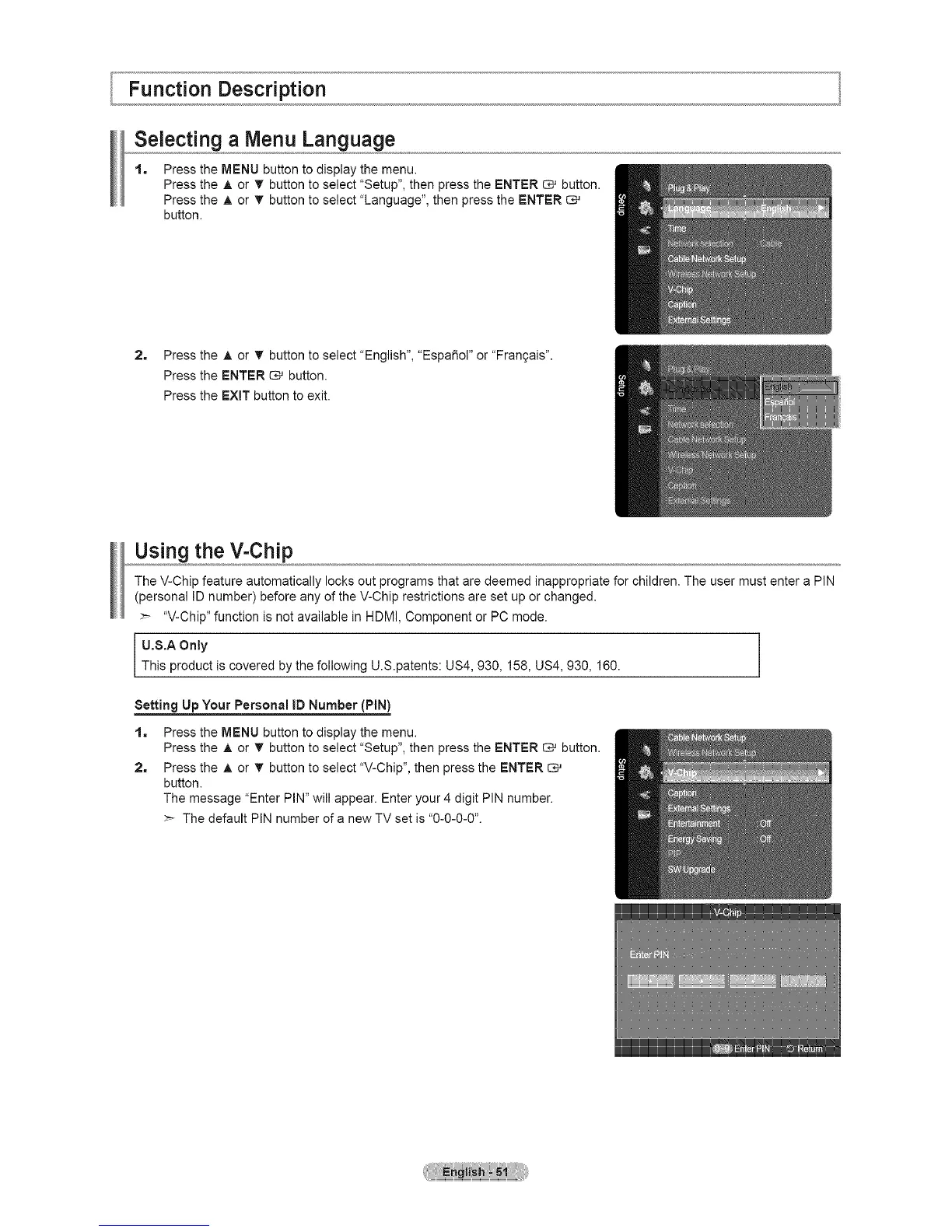
Press the MENU button to display the menu.
Press the A or _ button to select "Setup", then press the ENTER _ button.
Press the A or T button to select "Language", then press the ENTER
button.
2, Press the A or T button to select "English", "EspaSoF or "Fran9ais".
Press the ENTER _ button.
Press the EXiT button to exit.
Using the V-Chip
The V-Chip feature automatically locks out programs that are deemed inappropriate for children. The user must enter a PIN
(personal ID number) before any of the V-Chip restrictions are set up or changed.
"V-Chip" function is not available in HDMI, Component or PC mode.
U.$.A Only
This product is covered by the following U.S.patents: US4, 930, 158, US4, 930, 160.
Setting Up Your Personal ID Number (PIN)
1=
2,
Press the MENU button to display the menu.
Press the A or T button to select "Setup", then press the ENTER _ button.
Press the A or T button to select "V-Chip", then press the ENTER
button.
The message "Enter PIN" will appear. Enter your 4 digit PIN number.
>- The default PIN number of a new TV set is "0-0-0-0".





 To Next Page