Setting the On/Off Timer
1=
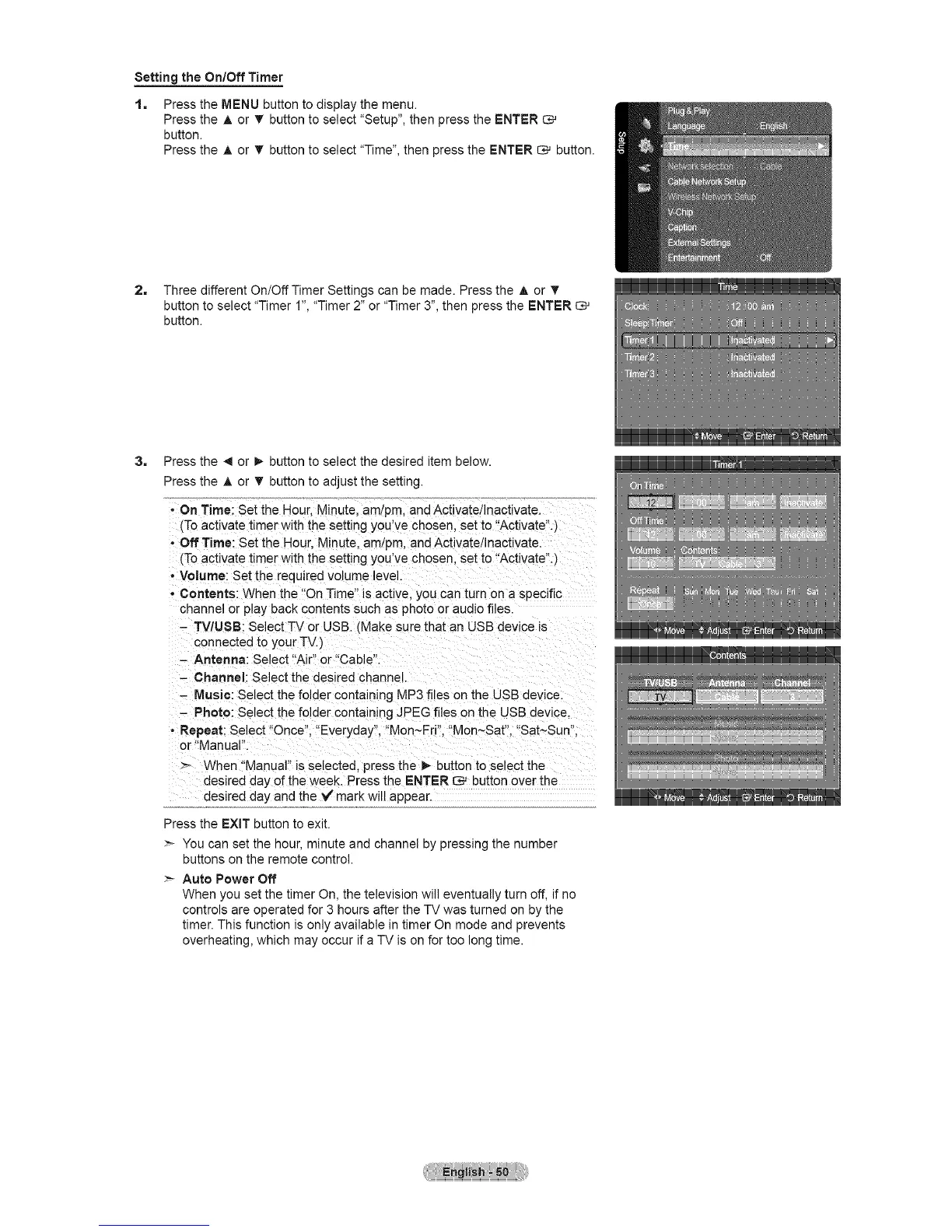
Press the MENU button to display the menu.
Press the A or • button to select "Setup", then press the ENTER
button.
Press the A or T button to select "Time", then press the ENTER _ button.
2, Three different On/Off Timer Settings can be made. Press the A or V
button to select "Timer 1", "Timer 2" or "Timer 3", then press the ENTER
button.
3= Press the _ or !_ button to select the desired item below.
Press the A or T button to adjust the setting.
- On Time: Set the Hour, Minute. am!pro, and Activate/Inactivate.
(To activate timer with the setting you've chosen, set to "Activate".)
- Off Time: Set the Hour. Minute. am/pro, and Activate Inactivate.
(To activate timer with the setting you've chosen, set to "Activate".)
- Volume: Set the required volume level.
* Contents: When the "On Time" is active, you can turn on a specific
channel or play back contents such as photo or audio files.
- TV/USB: Select TV or USB. _Makesure that an USB device is
connected to your TV.)
- Antenna: Select "Air' or "Cable".
- Channel: Select the desired channe.
- Music: Select the folder containing M =3 files on the USB device.
- Photo: Select the folder containing JPEG files on the USB device.
- Repeat: Select "Once". "Everyday". "Mon~Fri". "Mon~Sat". "Sat~Sun".
or "Manual".
>- When "Manual" is selected, press the I_ button to select the
desired day of the week. Press the ENTER _ button over the
desired day and the V mark will appear.
Press the EXiT button to exit.
>- You can set the hour, minute and channel by pressing the number
buttons on the remote control.
Auto Power Off
When you set the timer On, the television will eventually turn off, if no
controls are operated for 3 hours after the TV was turned on by the
timer. This function is only available in timer On mode and prevents
overheating, which may occur if a TV is on for too long time.





 To Next Page