O ItemSelectioninformation
ShowsthenumberofmusicfliesthatareselectedbypressingtheYellowbutton.
O Helpitems
- Red(Device) button: Selects a connected device.
, Green(Favorites Setting) button: Changes the favorites setting for the selected music. Press this button
repeatedly until the desired value appears. (Refer to page 771
- Yellow(Select) button: Selects music files from the music list. Selected music files are marked with a symbol V on
the left.
_11_ (Jump) button: Jumps to the previous sorting group/Jumps to the next sorting group.
• TOOLS(Option) button: Displays the "Play Current Group", "Delete", "Change Group lnfo" (in "Mood" group),
'information" or "Safe Remove" menus.
Sorting Music List
You can sort music files in the Music List by a particular standard.
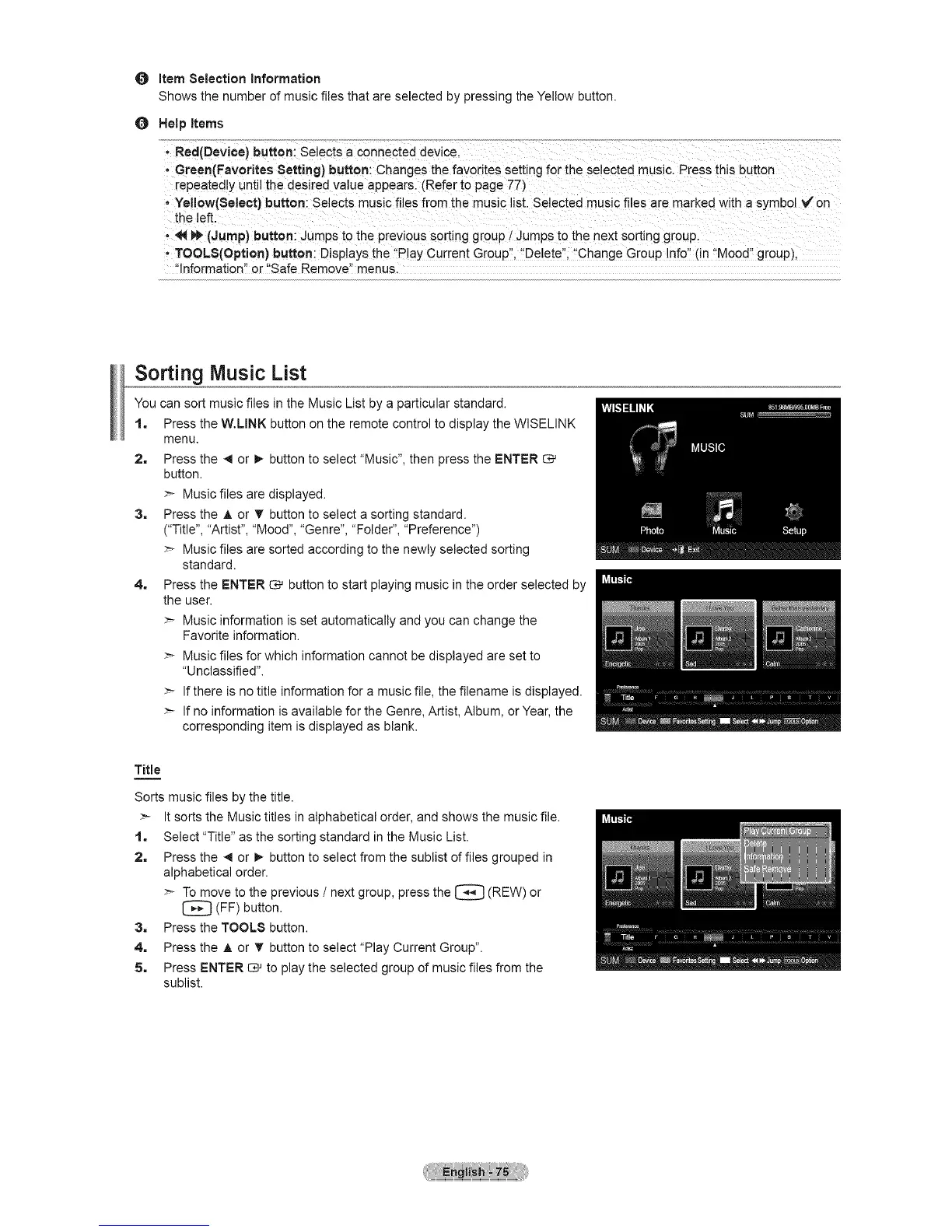
1, Press the W.LINK button on the remote control to display the WISELINK
menu.
2. Press the 41or !_ button to select "Music", then press the ENTER
button.
>- Music files are displayed.
3. Press the A or _' button to select a sorting standard.
("Title", "Artist", "Mood", "Genre", "Folder", "Preference")
>- Music files are sorted according to the newly selected sorting
standard.
4. Press the ENTER _ button to start playing music in the order selected by
the user.
>- Music information is set automatically and you can change the
Favorite information.
>- Music files for which information cannot be displayed are set to
"Unclassified".
>- If there is no title information for a music file, the filename is displayed.
>- If no information is available for the Genre, Artist, Album, or Year, the
corresponding item is displayed as blank.
Title
Sorts music files by the title.
>- It sorts the Music titles in alphabetical order, and shows the music file.
1, Select "Title" as the sorting standard in the Music List.
2, Press the _1or !_ button to select from the sublist of files grouped in
alphabetical order.
>- To move to the previous / next group, press the (REW)
or
[_ (FF) button.
3, Press the TOOLS button.
4. Press the A or T button to select "Play Current Group".
5. Press ENTER 13_to play the selected group of music files from the
sublist.






 To Next Page