LAN Connection for Static iP Environment
The procedures to set up the network using a static IPaddress are described below. You have to manually enter the IP
address, subnet mask, gateway, and DNS that are provided by your Internet Service Provider (ISP).
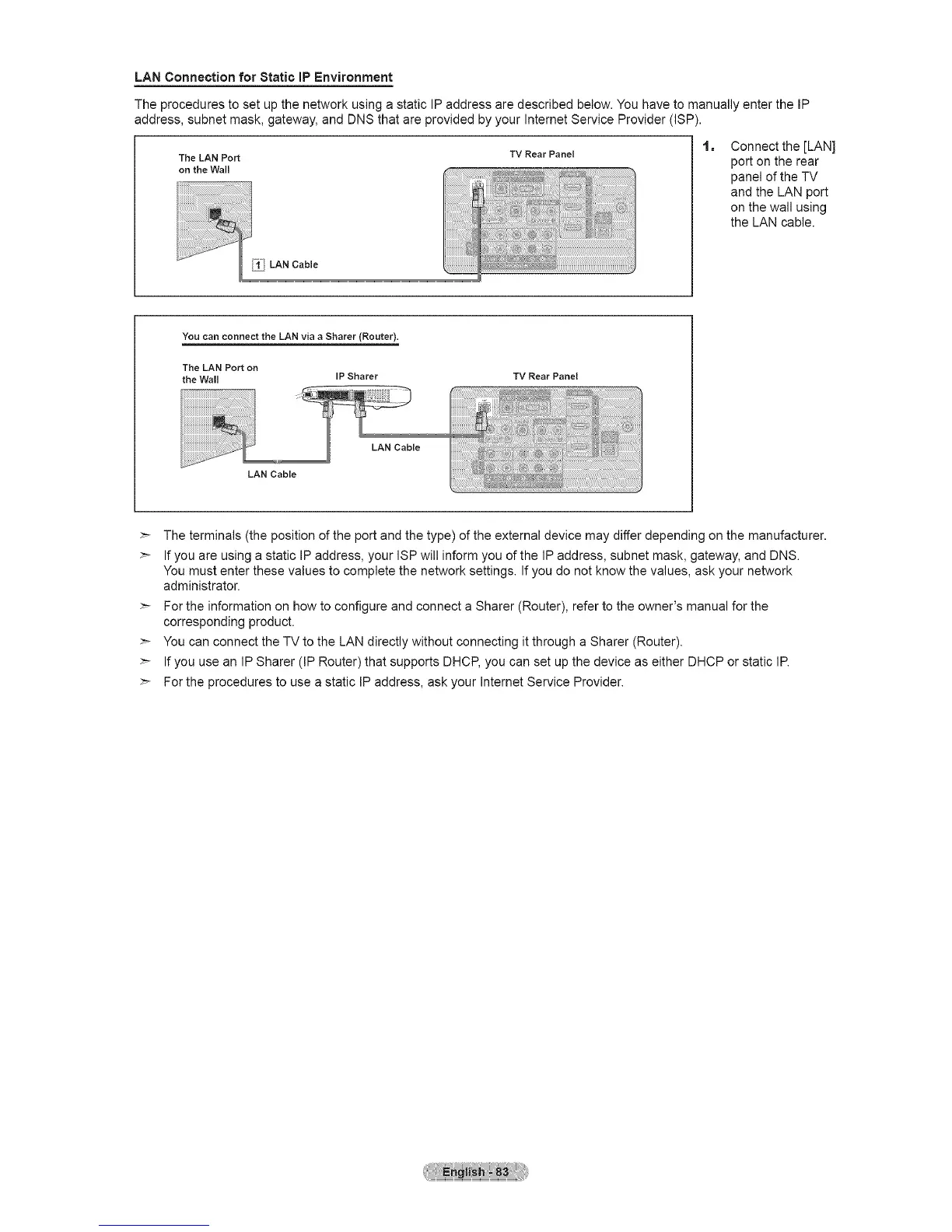
The LAN Port
on the Wall
__iii LAN Cable
TV Rear Panel
1=
Connect the [LAN]
port on the rear
panel of the TV
and the LAN port
on the wall using
the LAN cable.
You can connect the LAN via a Sharer (Router).
The LAN Port on
the Wall IP Sharer
TV Rear Panel
LAN Cable
LAN Cable
>- The terminals (the position of the port and the type) of the external device may differ depending on the manufacturer.
>- If you are using a static IP address, your ISP will inform you of the IP address, subnet mask, gateway, and DNS.
You must enter these values to complete the network settings. If you do not know the values, ask your network
administrator.
>- For the information on how to configure and connect a Sharer (Router), refer to the owner's manual for the
corresponding product.
>- You can connect the TV to the LAN directly without connecting it through a Sharer (Router).
>- If you use an IP Sharer (IP Router) that supports DHCP, you can set up the device as either DHCP or static IR
>- For the procedures to use a static IP address, ask your Internet Service Provider.





 To Next Page