ENG
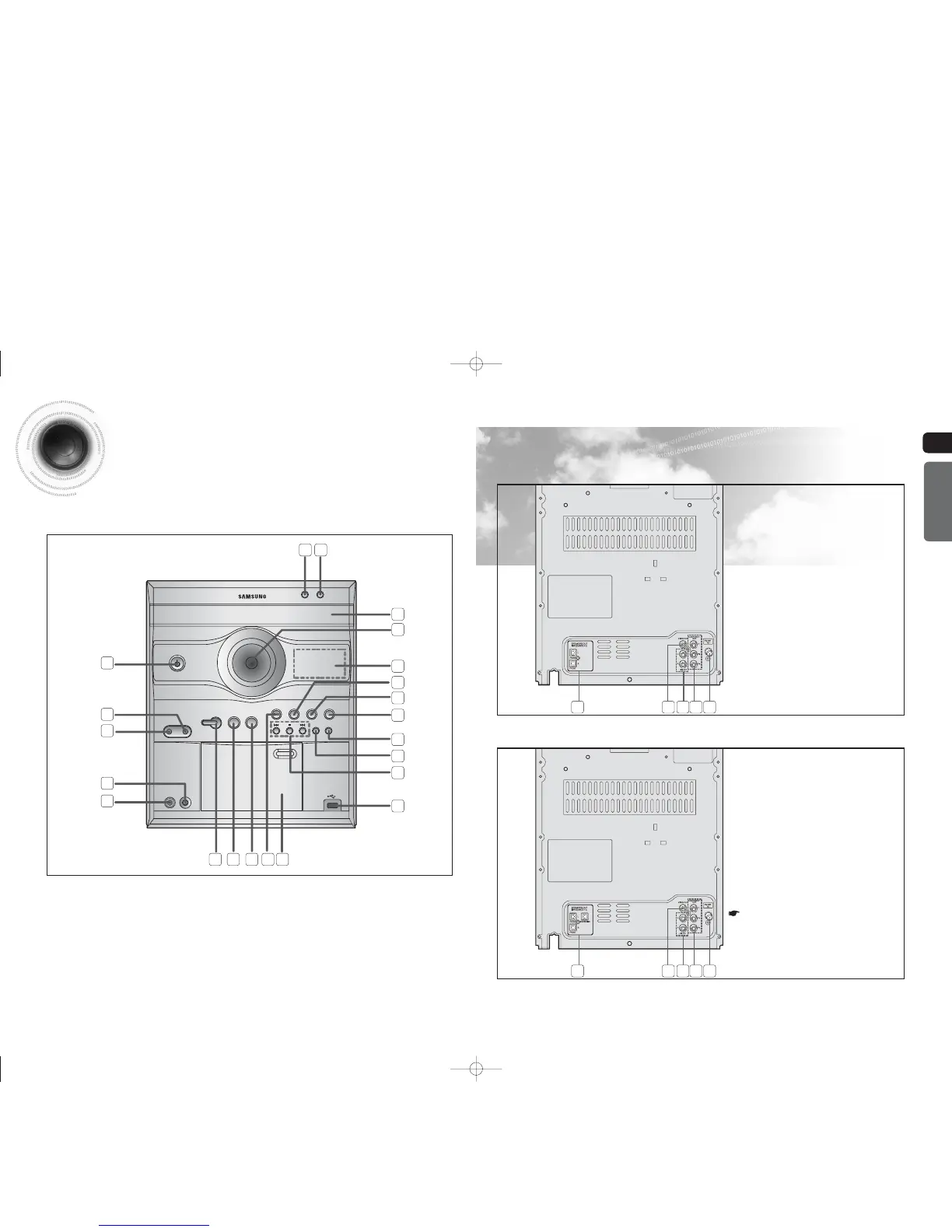
—Rear Panel—
5
Description
—Front Panel—
PREPARATION
6
DISC CHANGE
OPEN/CLOSE
PHONES
MIC MIC VOL
MIN. .MAX
PORTABLE
AUDIO IN
PAR T Y
P. SOUND P. BASS
MP3-CD/DVD TUNER TAPE
CD
RIPPING
CD SYNC/
REC/PAUSE
AUX/USB
1. STANDBY/ON
2. PORTABLE AUDIO IN
3. HEADPHONE JACK
4. MIC VOLUME
5. MIC
6. PARTY
7. POWER SOUND
8. POWER BASS
9. MP3-CD/DVD FUNCTION
10. CASSETTE DECK DOOR
11. USB JACK
12. SEARCH FUNCTION BUTTONS, TUNING MODE
OR STOP BUTTON
13. CD RIPPING
14. CD SYNC/REC/PAUSE
15. AUX/USB FUNCTION
16. TAPE FUNCTION
17. TUNER FUNCTION
18. WINDOW DISPLAY
19. VOLUME
20. COMPACT DISC COMPARTMENT
21. OPEN/CLOSE
22. DISC CHANGE
1
2
3
4
5
6 7 8 9
1.
Speaker Connector Terminals
2.
Video Output Connector
Connect the TV's video input jacks (VIDEO
IN) to the VIDEO OUT connector.
3.
LINE OUT connector
4.
Component Output Connectors
Connect a TV with component video input
jacks to these jacks.
5.
FM Antenna Connector
1.
Speaker Connector Terminals
2.
Video Output Connector
Connect the TV's video input jacks (VIDEO
IN) to the VIDEO OUT connector.
3.
LINE OUT connector
4.
Component Output Connectors
Connect a TV with component video input
jacks to these jacks.
5.
FM Antenna Connector
1
1
2
2
4
4
3
3
5
5
10
11
12
13
14
15
16
17
18
20
19
2122
All those pictures of Rear panel are
based on MODEL:MAX-DG54
MAX-DG53
MAX-DG54
1-34p-MAX-DG53-DG54-NO ENG.indd 8-91-34p-MAX-DG53-DG54-NO ENG.indd 8-9 2009-3-24 11:03:122009-3-24 11:03:12


 To Next Page