ENG
13
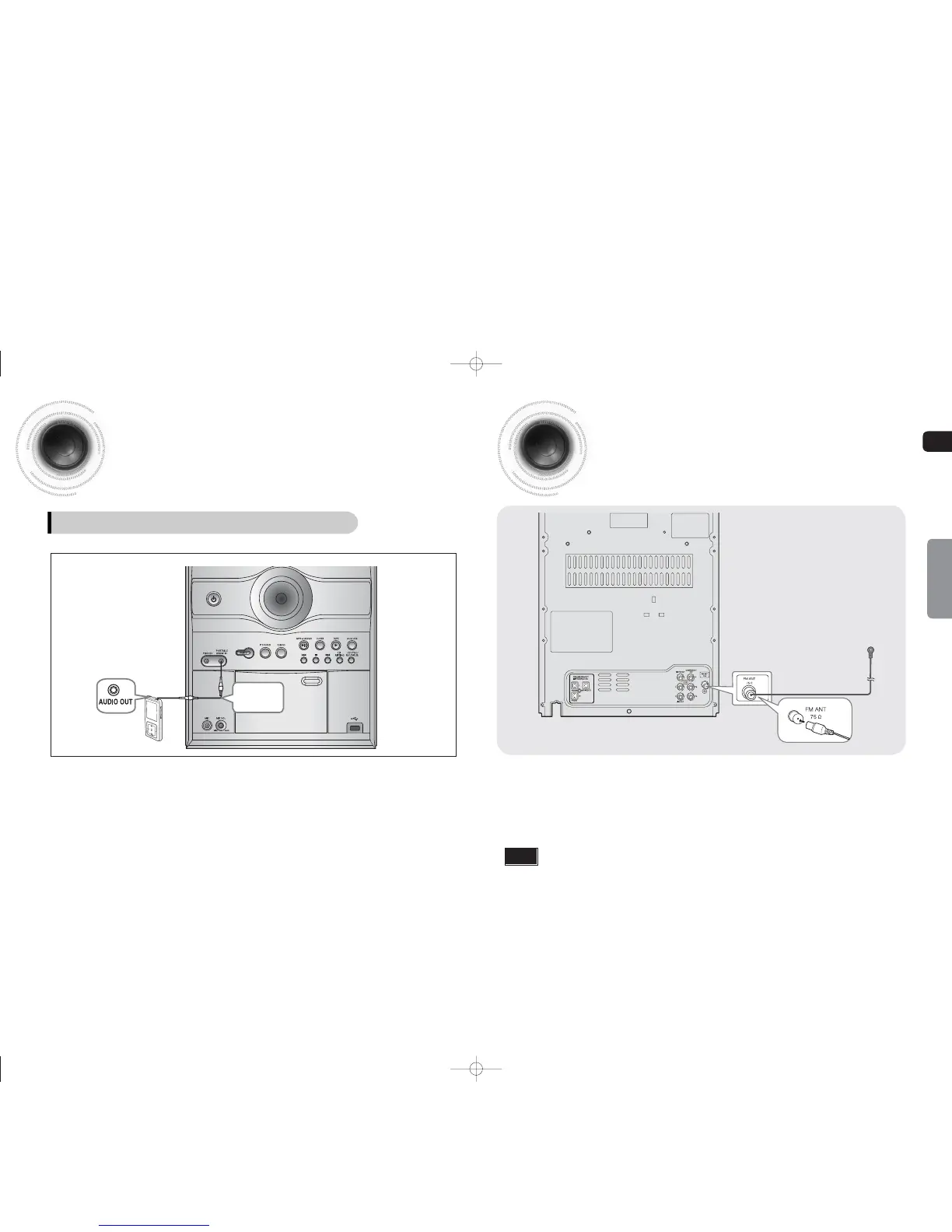
Connecting the FM Antennas
FM Antenna (supplied)
14
Connecting External Components
CONNECTIONS
1
Connect the FM antenna supplied to the FM 75Ω COAXIAL Jack.
2
Slowly move the antenna wire around until you find a location where reception is good, then fasten it
to a wall or other rigid surface.
• This unit does not receive AM broadcasts.
Note
AUX : Connecting an External Component/MP3 player
AUX : Front Panel
Audio Cable
(not supplied)
Components such as an MP3 Player
1
Connect PORTABLE AUDIO IN (Audio) on the MINI COMPACT front panel to the Audio Out of the
external component/MP3 player.
2
Press the AUX/USB button to select <AUX> input.
The mode switches as follows :
AUX
USB.
1-34p-MAX-DG53-DG54-NO ENG.indd 16-171-34p-MAX-DG53-DG54-NO ENG.indd 16-17 2009-3-24 11:03:242009-3-24 11:03:24


 To Next Page