ENG
15
16
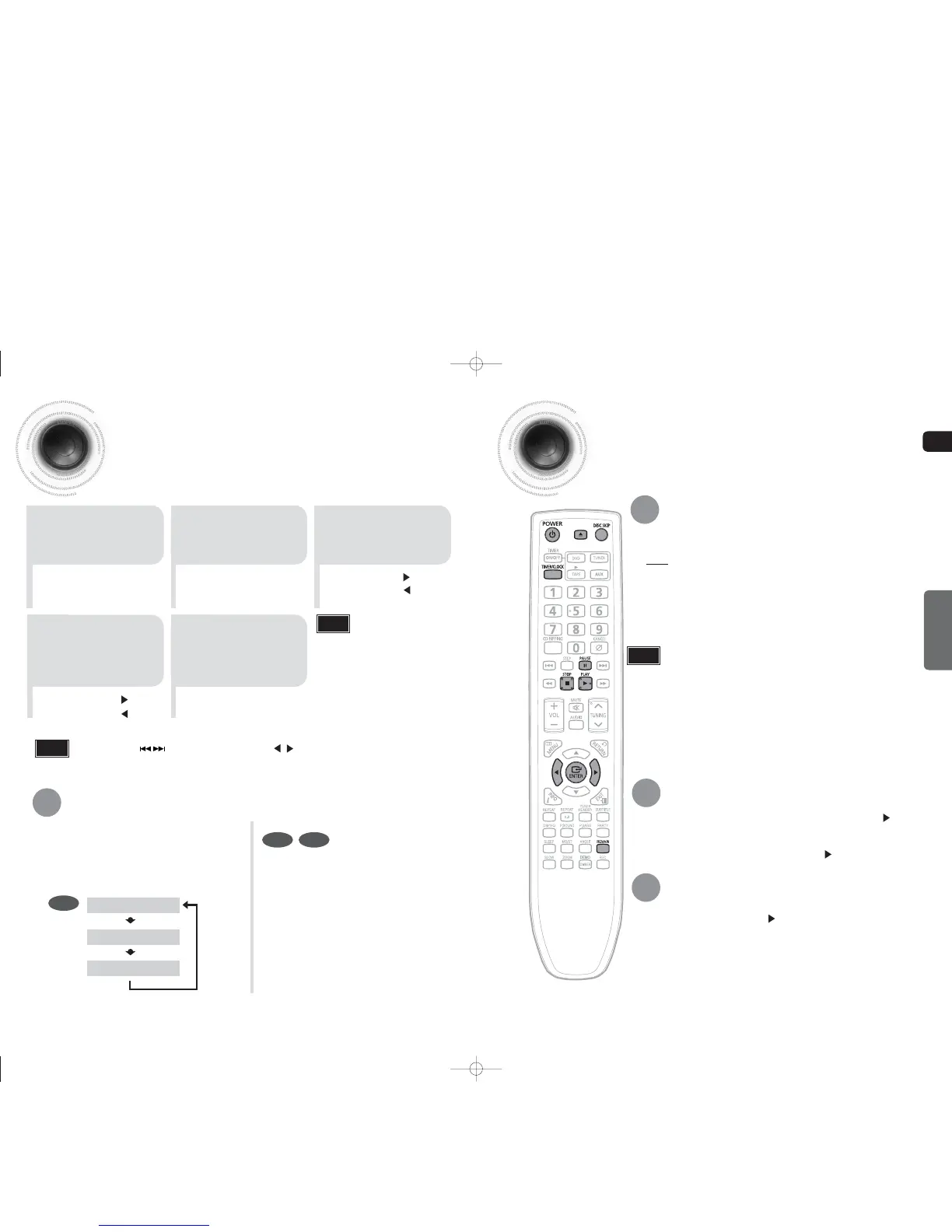
Disc PlaybackSetting the Clock
For each step, you have a few seconds to set the required options.
If you exceed this time, you must start again.
•
You can display the time, even
when you are using another
function, by pressing
TIMER/CLOCK once.
•
"CLOCK" is displayed.
2
Press TIMER/CLOCK
twice.
1
Switch the system on
by pressing POWER
button.
•
"TIMER" appears in the display.
•
The current time is now set.
5
When the correct
time is displayed,
press ENTER.
•
Increase the minutes :
•
Decrease the minutes :
4
When the correct
hour is displayed,
press ENTER.
The minutes flash.
•
Increase the hours :
•
Decrease the hours :
3
Press ENTER.
The hour flashes.
Note
Checking the Remaining Time
Each time the REMAIN button is pressed ,
the time is displayed as below:
Press the REMAIN button.
•
For checking the remaining time of a title or chapter
being played.
DVD
CD MP3
OPERATION
To select a specific disc, press the DISC CHANGE button on the front panel or DISC SKIP
on the remote control, until the required disc indicator flashes.
Result: All the discs will be played in turn, starting with the one selected.
Selecting a CD in the Disc changer
•
If the disc selected is not loaded, the next disc is played automatically.
•
You can also use on the panel front instead of buttons in step 3,4.
Note
•
To resume playback, press PLAY( ) button again.
To temporarily pause playback, press PAUSE button
during playback.
•
If pressed once, the stop position will be stored in memory. If PLAY ( ) button
is pressed, playback resumes from the stop position. (This function works only with
DVDs.)
•
If pressed twice, “STOP” is displayed, and if PLAY ( ) button is pressed,
playback starts from the beginning.
To stop playback, press STOP button during playback.
TITLE REMAIN TIME
CHAPTER REMAIN TIME
ELAPSED TIME
Press the REMAIN button.
If you press the REMAIN button, the
remaining time is displayed.
To cancel this function, press the
REMAIN button again.
•
For mixed discs, the play order is as below:MP3/WMA
DIVX
JPEG.
•
Depending on the content of the disc, the initial screen may appear different.
•
Depending on the recording mode, some MP3-CDs cannot be played.
•
For CD discs, you can press the numeric buttons to select the track, when you
press the numeric buttons after 3 seconds, the p
layback starts automatically.
•
Table of contents of a MP3-CD varies depending on the MP3 track format recorded
on the disc.
•
DTS Audio is not supported.
•
DVD Audio Disc is not supported.
Note
1-34p-MAX-DG53-DG54-NO ENG.indd 18-191-34p-MAX-DG53-DG54-NO ENG.indd 18-19 2009-3-24 11:03:262009-3-24 11:03:26


 To Next Page