ENG
32
OPERATION
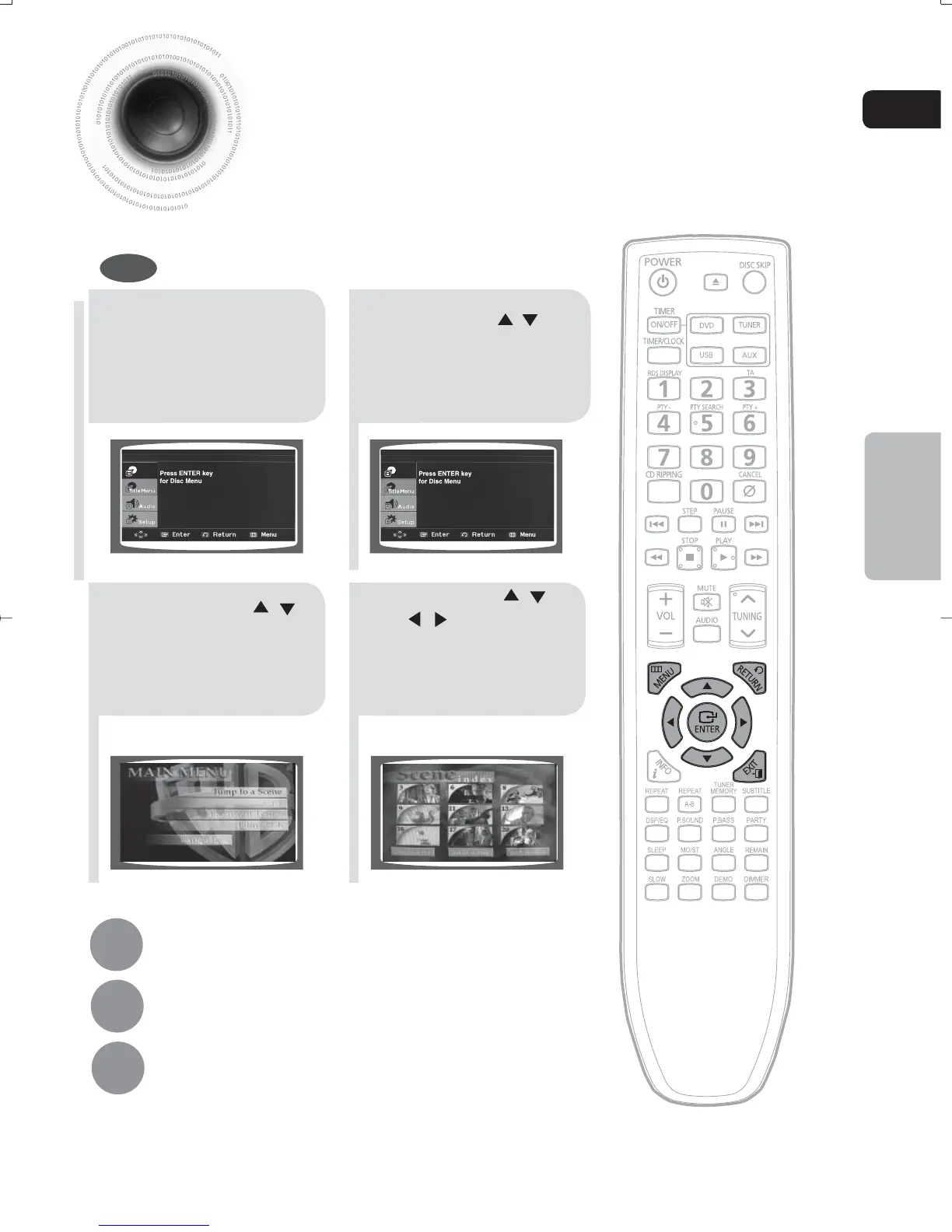
Using Disc Menu
You can use the menus for the audio language, subtitle language, profile, etc.
DVD menu contents differ from disc to disc.
DVD
21
In stop mode, press
MENU button.
Press Cursor , buttons
to move to ‘DISC MENU’
and then press ENTER
button .
43
Press Cursor ,
buttons to select the
desired item and then
press ENTER button.
Press Cursor ,
, buttons to select
the desired item and
then press ENTER
button.
Disc Menu
Disc Menu
Press MENU button to exit the setup screen.
Press RETURN button to return to the previous level.
Press EXIT button to exit the setup screen.
1-34p-MAX-DG56-RDS ENG.indd 351-34p-MAX-DG56-RDS ENG.indd 35 2009-7-17 18:21:252009-7-17 18:21:25



 To Next Page