39
Setting the DRC (Dynamic Range Compression)
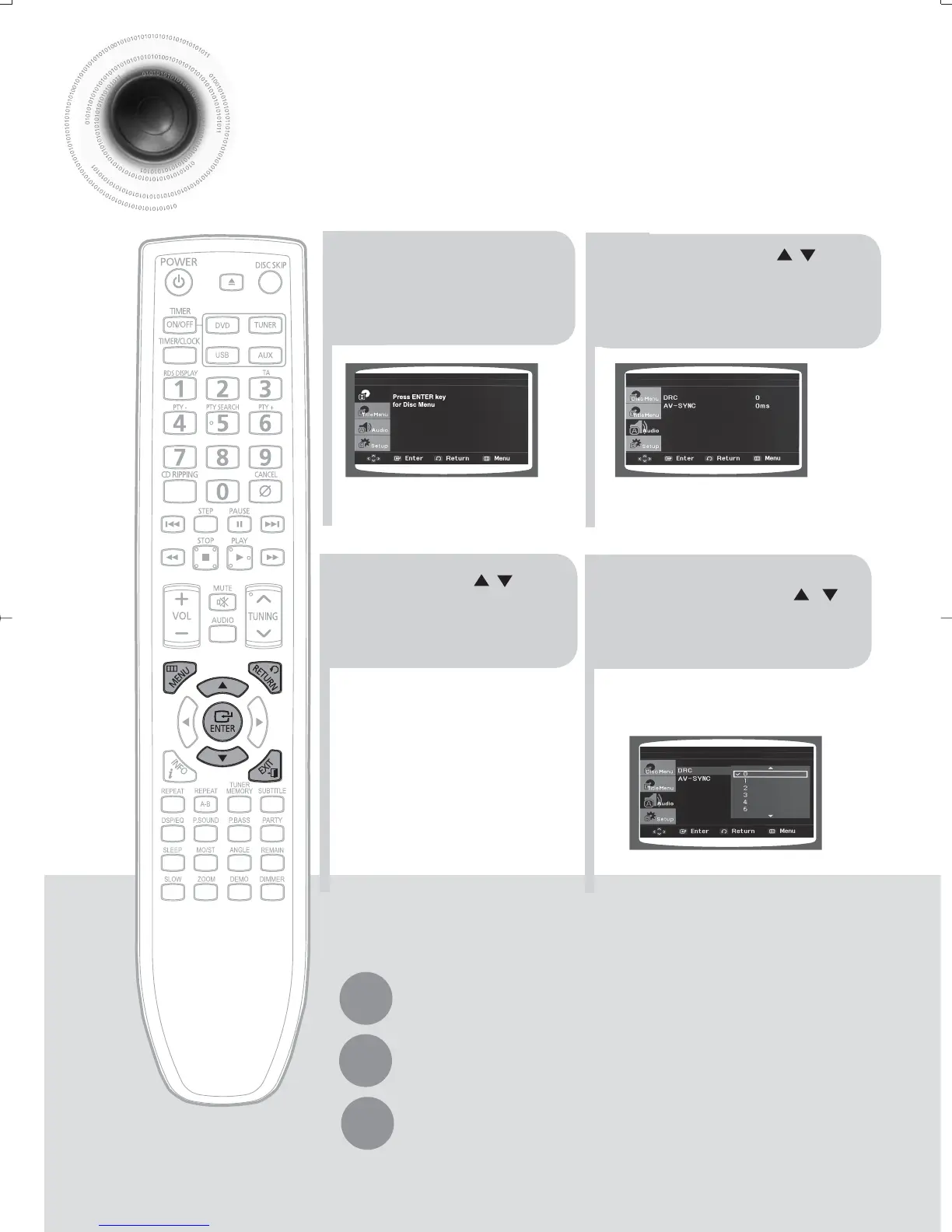
You can use this function to enjoy Dolby Digital sound when watching movies at
low volume at night.
1
2
In stop mode, press
MENU button.
Press Cursor ,
button to move to
‘Audio’ and then press
ENTER button.
3
4
Press Cursor , to
adjust the ‘DRC’.
Press RETURN button to return to the previous level.
Press MENU button to exit the setup screen.
Press EXIT button to exit the setup screen.
Press Cursor , button
to select the 'DRC' and
then press ENTER button.
•
You can set the DRC between 0 and 8.
Set it to the optimal status.
Disc Menu
35-58p-MAX-DG56-RDS ENG.indd 3835-58p-MAX-DG56-RDS ENG.indd 38 2009-7-17 18:28:372009-7-17 18:28:37



 To Next Page