ENG
Press RETURN button to return to the previous level.
Press MENU button to exit the setup screen.
40
SETUP
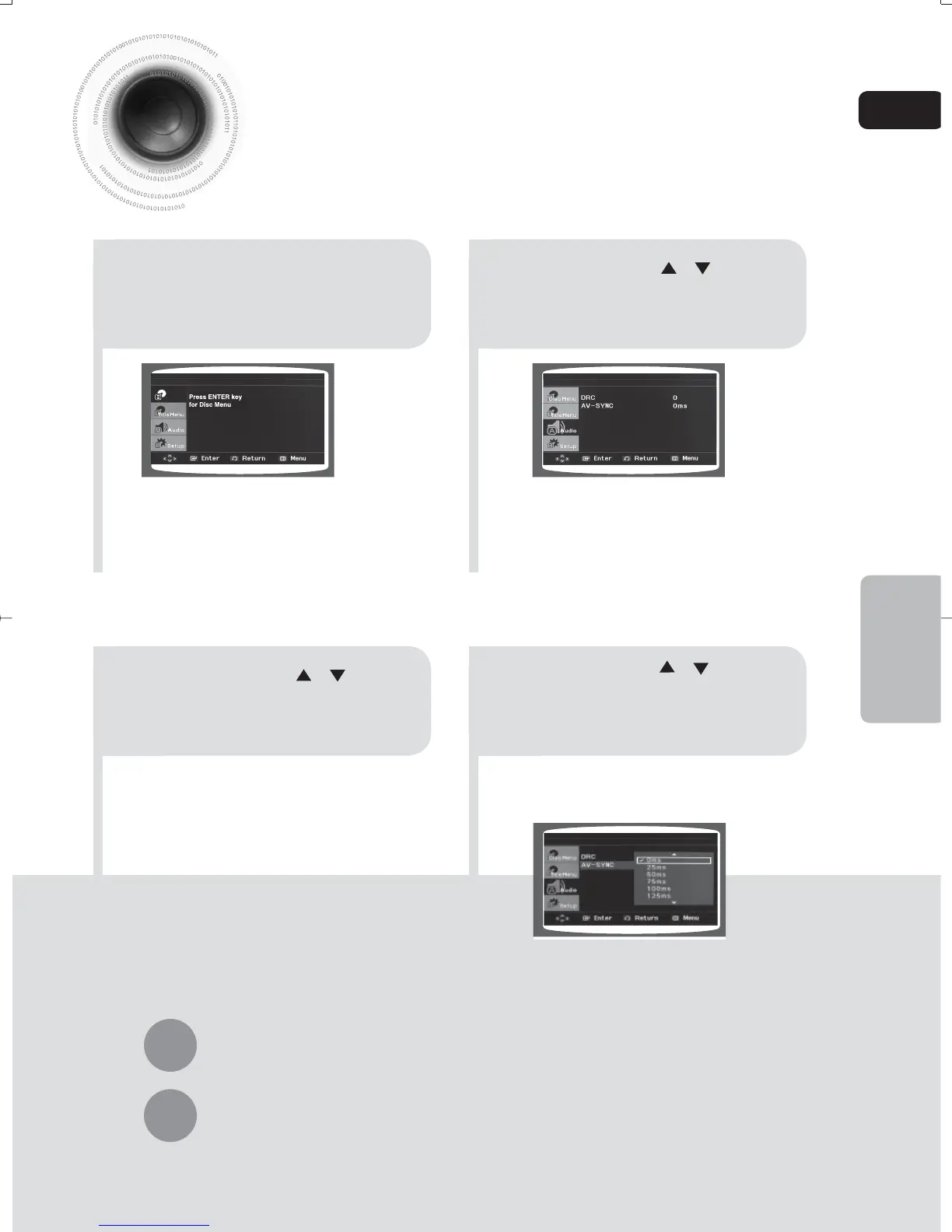
AV SYNC Setup
21
3
Press Cursor , buttons
to move to ‘Audio’ and then
press ENTER button.
4
•
You can set the audio delay time between 0 ms
and 300 ms. Set it to the optimal status.
Press Cursor , buttons
to select the Delay Time of
AV-SYNC and then press
the ENTER button.
Video may look slower than the audio if it is connected with digital TV.
In this case, adjust the delay time of audio to optimal status to fit the video.
Press Cursor , buttons
to move to ‘AV-SYNC’ and
then press ENTER button.
In stop mode, press
MENU button.
Disc Menu
35-58p-MAX-DG56-RDS ENG.indd 3935-58p-MAX-DG56-RDS ENG.indd 39 2009-7-17 18:28:402009-7-17 18:28:40



 To Next Page