EasyManua.ls Logo

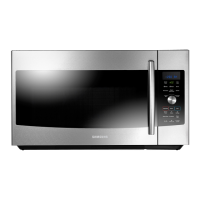
Samsung MC17F808KDT - User Manual

Samsung MC17F808KDT
80 pages
Print Icon
To Next Page IconTo Next Page
Loading...
DE68-04224C-00
QUESTIONS OR COMMENTS
COUNTRY CALL OR VISIT US ONLINE AT
U.S.A
Consumer Electronics
1-800-SAMSUNG (726-7864) www.samsung.com/us/support
CANADA 1-800-SAMSUNG (726-7864)
www.samsung.com/ca/support (English)
www.samsung.com/ca_fr/support (French)
Please be advised that the Samsung warranty does NOT cover service calls to explain product
operation, correct improper installation, or perform normal cleaning or maintenance.
Scan the QR code* or visit
www.samsung.com/spsn
to view our helpful
How-to Videos and Live Shows
* Requires reader to be installed on your
smartphone
MC17J8000CS_AA _DE68-04224C-00_EN.indd 80 2015-06-16 �� 9:52:01

Table of Contents

Other manuals for Samsung MC17F808KDT

Questions and Answers

  • K
    Kenneth MendezSep 9, 2025
    What to do if the Samsung Microwave Oven display and/or the oven is not working?
    • J
      Jennifer JacksonSep 9, 2025
      If the display and/or oven of your Samsung Microwave Oven is not working, ensure the plug is properly connected to a grounded outlet and that the wall switch (if applicable) is turned on. Unplug the oven, wait ten seconds, and plug it back in. Reset the circuit breaker or replace any blown fuses. Test the outlet with another appliance. If it still doesn't work, contact a qualified electrician. You can also try plugging the oven into a different outlet.
  • R
    Robert PhamAug 23, 2025
    Why are the buttons on my Samsung Microwave Oven not working?
    • L
      Luis HarrisAug 23, 2025
      If the buttons on your Samsung Microwave Oven are not working properly, check for any foreign matter caught between the buttons and remove it. For touch models, wipe away any moisture on the exterior. Also, verify whether the Child Lock feature is activated and, if so, deactivate it.
  • P
    potterethanAug 25, 2025
    How to fix -SE- error on Samsung MC17F808KDT?
    • M
      Michael DoyleAug 25, 2025
      If your Samsung Microwave Oven displays the error code -SE-, try turning the set off and then restarting it.
  • F
    flowersstephanieAug 26, 2025
    What to do if my Samsung Microwave Oven display is working, but the power won’t come on?
    • H
      Holly BurtonAug 27, 2025
      If the display of your Samsung Microwave Oven is working, but the power isn't coming on, ensure the door is closed securely. Check for any packaging material or obstructions in the door seal and inspect the door for damage. Touch Cancel twice and re-enter all the cooking instructions.
  • D
    Douglas RobinsonAug 27, 2025
    How to fix a Samsung MC17F808KDT Microwave Oven when the time is not displayed?
    • C
      Christopher HartmanAug 27, 2025
      If the time isn't displayed on your Samsung Microwave Oven, ensure that the oven is receiving power by checking the power cord, outlet, fuses, and circuit breakers. Also, check if the Eco (power-saving) function is enabled and turn it off.
  • J
    James FordAug 29, 2025
    What to do if my Samsung Microwave Oven turns off during operation?
    • N
      nnavarroAug 29, 2025
      If your Samsung Microwave Oven turns off during operation, consider the following: * If the oven has been cooking for an extended period, allow it to cool down. * Check if the cooling fan is running; listen for its sound. * Ensure there's food inside the oven during operation. * Verify that there is enough ventilation space around the oven, referring to the installation guide for proper clearance from walls and cabinets. * Unplug other appliances from the same outlet to ensure sufficient power supply to the microwave.
  • D
    djacksonSep 18, 2025
    Why is the cook top lamp too dim on my Samsung Microwave Oven?
    • V
      Victoria BrownSep 18, 2025
      If the cook top lamp on your Samsung Microwave Oven is too dim, set the lamp brightness level to high.
  • V
    Vernon JeffersonSep 19, 2025
    Why does my Samsung MC17F808KDT Microwave Oven turntable rotates improperly?
    • E
      Erica ChavezSep 22, 2025
      If the turntable of your Samsung Microwave Oven rotates improperly, it may be due to excessive food weight or size. Ensure you have not placed too much food on the turntable.
  • T
    Taylor VasquezSep 7, 2025
    What to do if my Samsung MC17F808KDT has sparks or arcing?
    • R
      rodriguezkimberlySep 8, 2025
      If your Samsung Microwave Oven is sparking or arcing, remove any metallic utensils, cookware, or metal ties from the oven. If you are using foil, make sure to use only narrow strips and allow at least one inch between the foil and the interior oven walls.
  • S
    sophiabennettSep 4, 2025
    What to do if my Samsung Microwave Oven displays error E-24 or E-25?
    • T
      Timothy NicholsSep 4, 2025
      If your Samsung Microwave Oven displays error codes E-24 or E-25, it indicates overheating during cooking, specifically reaching 500F. The suggested solution is to replace either the Sensor or the Control Circuit Board.

Summary

Important Safety Instructions

Precautions for Microwave Energy Exposure

Precautions to prevent harmful exposure to microwave energy from oven operation.

Safety Symbols and Precautions

Explanation of safety symbols and their meanings for user safety.

Grounding Instructions

Instructions for proper grounding of the microwave oven to prevent electric shock.

Extension Cord Usage

Guidelines for using extension cords safely with the microwave oven.

Setting Up Your New Microwave Oven

Checking the Parts

List of included parts to verify upon unpacking the microwave oven.

Oven Setup and Shelf Installation

Step-by-step guide for the initial setup and assembly of the microwave oven.

Control Panel Overview

Identification and explanation of all buttons and indicators on the microwave control panel.

Setting the Time

Guide on setting the clock and customizing oven preferences.

Using Your Microwave Oven

Basic Controls and Timer Functions

Controls like Stop/Clear, Child Lock, Kitchen Timer, and +30 sec.

Advanced Features and Modes

Using More/Less, Eco, Steam Clean, Warm Hold, Defrost.

Preset Cooking Menus

How to use various preset cooking menus for different foods.

Microwave Settings and Advanced Cooking

Setting power levels, cooking stages, browning, convection, speed roast.

Cookware and Cooking Guide

Cookware Recommendations

Guidance on choosing and using microwave-safe cookware and utensils.

Cooking Techniques and Guides

Techniques for stirring, arrangement, shielding, and guides for cooking eggs and vegetables.

Cleaning and Maintenance

Exterior and Interior Cleaning

Methods for cleaning the oven's exterior, interior, and control panel.

Door Seals, Lights, and Filters

Replacing lights and cleaning/replacing filters for oven maintenance.

Troubleshooting

Check Points for Common Problems

Table addressing common issues, causes, and actions to resolve them.

Information Codes

Explanation of error codes displayed on the oven and troubleshooting steps.

Appendix

Product Specifications

Detailed technical specifications, dimensions, and weight of the microwave oven.

Warranty Information

Limited Warranty to Original Purchaser

Overview of the manufacturer's warranty coverage, terms, and conditions.

Samsung MC17F808KDT Specifications

General IconGeneral
BrandSamsung
ModelMC17F808KDT
CategoryMicrowave Oven
LanguageEnglish

Related product manuals