Switch Setting and Testing Operation (Cont.)
Step 4 Testing operation (Indoor unit)
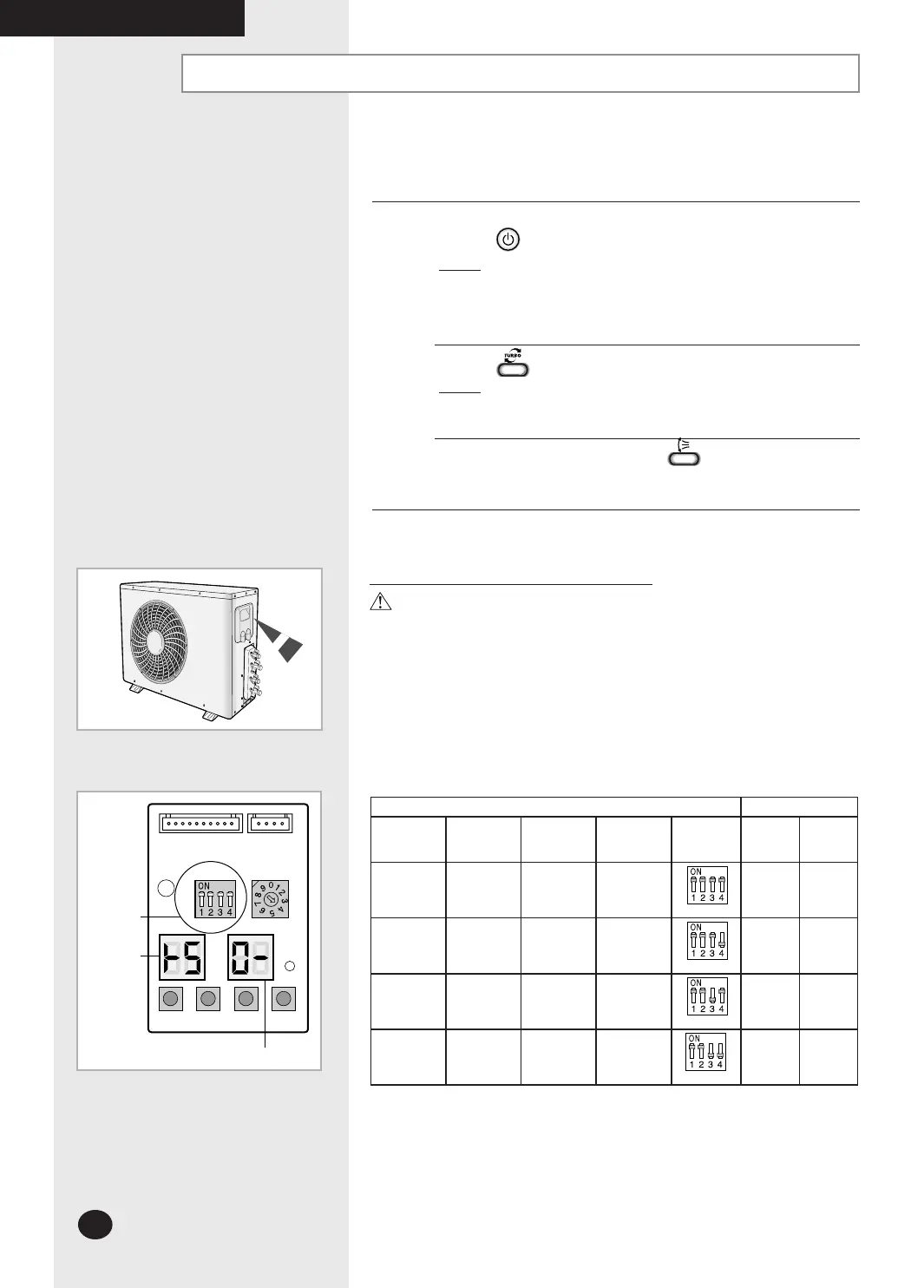
Press the button.
Result: The indicator lights on the indoor unit flash at
half-second intervals.
While the indoor unit opens, the indoor unit fan runs
to start.
Press the button.
Result: The outdoor unit operates in cooling or heating
mode as following the room temperature.
Air flow direction Press the button and check that
the air flow blades work properly.
It could take maximum 60 minutes to operate for the protection of the compressor
if the outdoor temperature is below -5°C.
Ampere Limit Setting & Changing Procedure
WARNING
Do not adjust the “Ampere Limit Switch”, because it needs to meet HDB
requirement or Local authorities.
“Ampere Limit Switch” is initially set to the default value (table below).
“Ampere Limit Switch” is on the PCB of outdoor unit.
Contact the authorized service technician or dealer for setting and changing
the “Ampere Limit Switch”.
Before changing the “Ampere Limit Switch”, turn off the main power of the
system.
Before changing the “Ampere Limit Switch”, turn off the main power of the
system.
K 1 K 2 K 3
DIS01
SW0
2 SW01
K 4
DIS02
The designs and shape are subject to
change according to the model.
Outdoor PCB Display
Ampere Switch Selection
MH040FXEA2A
MH052FXEA2A
MH18VV1X
MH19VV1X
MH060FXEA3A
MH070FXEA4A
MH080FXEA4A
Switch 3 4
9.0A
(Default)
13.5A
(Default)
14.5A
(Default)
16.6A
(Default)
ON ON
8.5A
11.0A 13.0A 14.0A
ON OFF
8.0A 9.0A 10.0A 11.0A
OFF ON
7.0A 8.0A 8.0A 10.0A
OFF OFF
Switch
Indoor unit
address
View data display
COMPLETING THE INSTALLATION
26926A_IM_E.indd 28 2007-2-9 16:13:02



 To Next Page