Switch Setting and Testing Operation (Cont.)
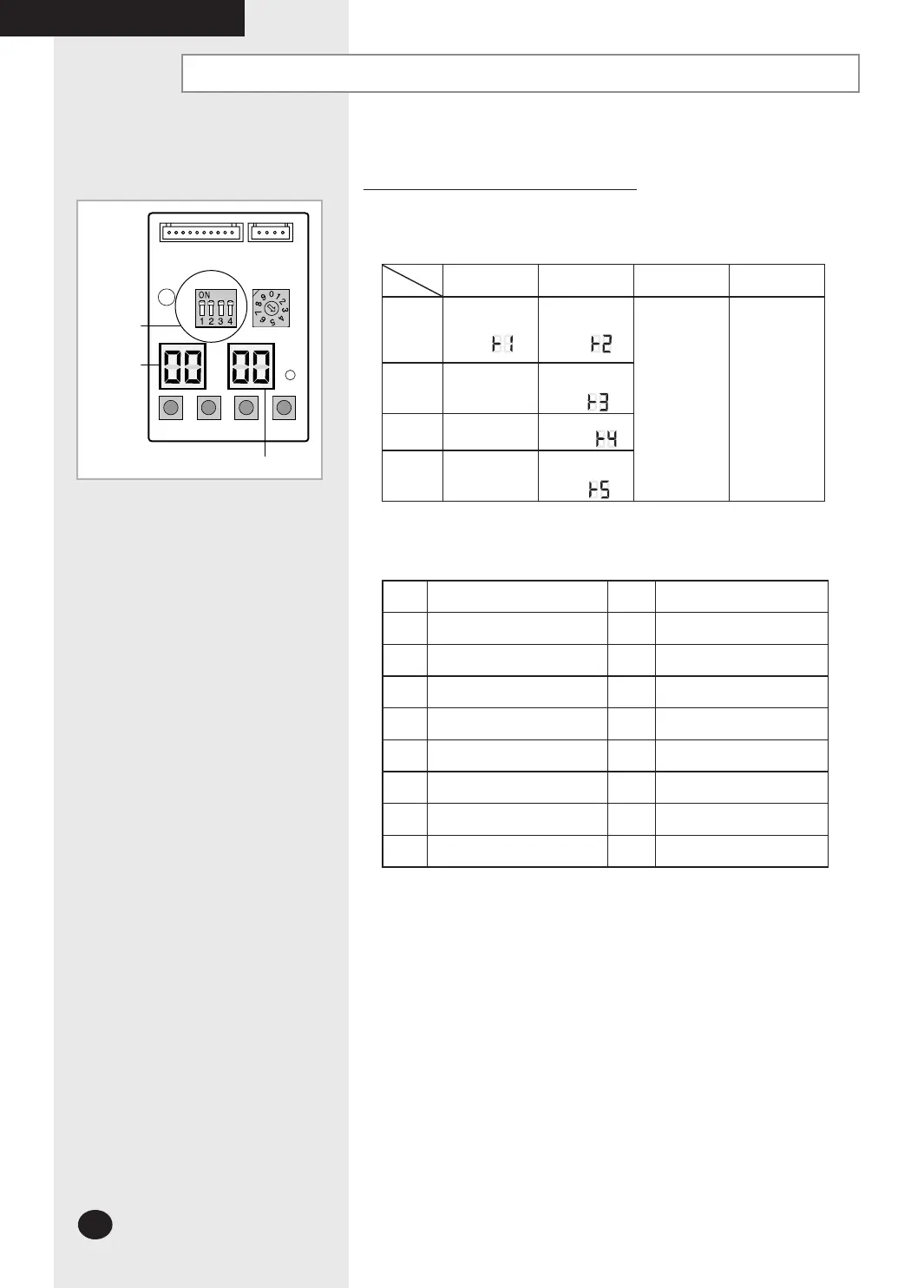
K 1 K 2 K 3
DIS01
SW0
2 SW01
K 4
DIS02
Settings of PCB Display of the Outdoor unit
Key Options of PCB Display
- K1 : Test button - K2 : Function button
- K3 : Reset button - K4 : View mode change button
Key
Push
K1 K2 K3 K4
1
Heat mode
Try-run
(Display:
)
Refrigerant
Charging
(Display:
)
Reset
View mode
change
2
-
Cool mode
Try-run
(Display:
)
3
-
Pump down
(Display:
)
4
-
Checking of
pipe connection
(Display:
)
Outdoor PCB Display
Switch
Indoor unit
address
View data display
K4 View mode Display changes
Push
Display Explanation
Push
Display Explanation
0 Present Compressor Frequency 8 Discharge temperature
1 Target Compressor Frequency 9 OLP temperature
2 Order Compressor Frequency 10 Condenser temperature
3 EEV0 current step 11 Outdoor temperature
4 EEV1 current step 12 First current
5 EEV2 current step 13 Target Discharge temperature
6 EEV3 current step3 14 Total capacity of the indoor units
7
Fan RPM
(H: high, L: low, Blank: off)
15 Safety control
The EEV 2 and EEV 3 of MH040FXEA2A/MH052FXEA2A/MH18VV1X/
MH19VV1X model are always displayed as blank.
The EEV 3 of MH060FXEA3A model is always displayed as.
COMPLETING THE INSTALLATION
26926A_IM_E.indd 30 2007-2-9 16:13:05



 To Next Page